Linked checking account problems

es114
es114 Quicken Windows Subscription Member ✭✭✭

New transactions all showing as cash advance as the payee when not cash advances. Also showing the category as a credit card that has been closed for 2 years. The memo field shows as a transfer from another of my fidelity accounts that has nothing to do with checking. This after several days of downloading correctly. This is so frustrating.


Comments

  • Quicken Kristina
    Quicken Kristina Quicken Windows Subscription Moderator mod

    Hello @es114,

    Thank you for reaching out. To help troubleshoot, please provide more information. When did you first notice this issue? Which financial institution is this happening with? Was there anything that happened just before the problem started, such as a program/computer update or unexpected computer/program shut down?

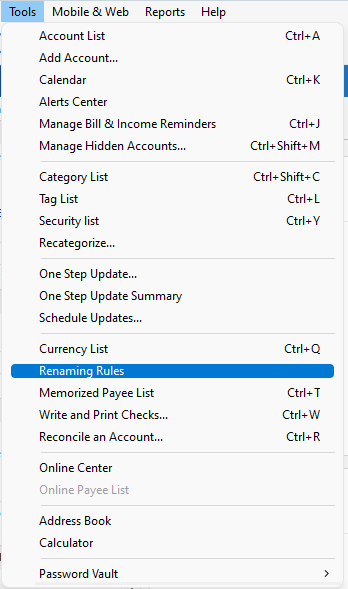
    The incorrect information showing up automatically makes me suspect a renaming rule may be causing the issue. Please navigate to Tools>Renaming Rules and check to see if there are any overly general or incorrect renaming rules.

    renaming rules location.png

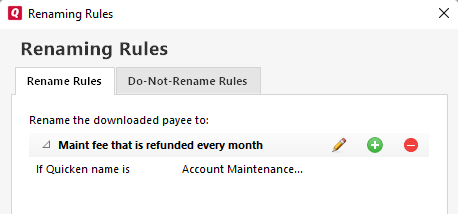
    If there are, you can click the - sign to delete the problem rules, or click the pencil icon to edit them.

    Renaming rules screen.png

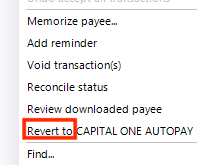
    You should be able to correct the problem transactions by right clicking on them and selecting the revert option.

    Revert to QWin.png

    I look forward to your response!

    Quicken Kristina

    Make sure to sign up for the email digest to see a round up of your top posts.

  • Quicken Kristina
    Quicken Kristina Quicken Windows Subscription Moderator mod

    Hello @es114,

    I haven't seen a response from you. Do you still require assistance?

    Thank you!

    Quicken Kristina

    Make sure to sign up for the email digest to see a round up of your top posts.

  • es114
    es114 Quicken Windows Subscription Member ✭✭✭

    canceling renaming rules helped so all good there. But still have problem with Fidelity cash management account. The linked account was showing perfectly while the investment side was $0 until this weekend when a dividend reinvestment appeared there. Although the money market shows SPAAX the actual money market is FZDXX. None of the four options listed to change FZDXX work. They all over state the dollars. So I am left with adding both the investment side and the checking side to get an accurate balance.

  • UKR
    UKR Quicken Windows Subscription SuperUser ✭✭✭✭✭

    Although the money market shows SPAAX the actual money market is FZDXX. None of the four options listed to change FZDXX work.

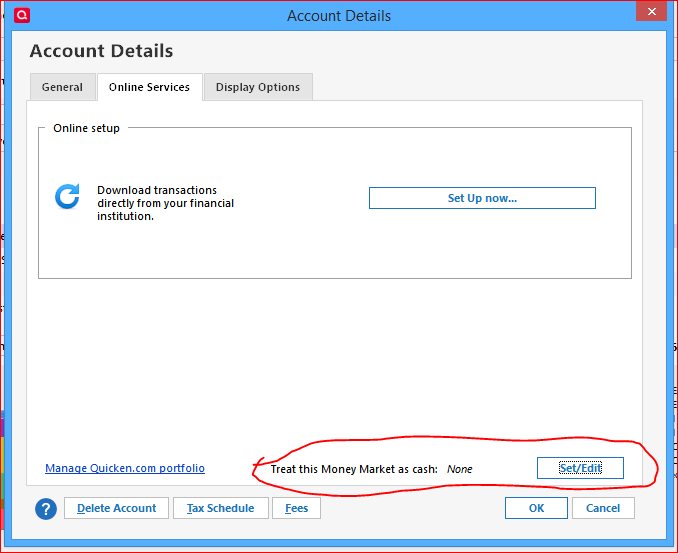
    All I know about this stuff is that there is a relatively new setting which allows you to assign a money market fund to your brokerage account. You can find this setting in Edit Account Details / Online Services tab:

    image.png
  • es114
    es114 Quicken Windows Subscription Member ✭✭✭

    that option doesn’t work. If I set the account to FZDXX, the four options all overstate the balance. If I leave as SPAXX, I no longer have a zero balance in the investment account, but if I add the investment account and the linked checking account, I have an accurate total.

  • es114
    es114 Quicken Windows Subscription Member ✭✭✭

    shouldn’t the two new transactions on the investment side be divx instead of reinvdiv and div? If I change them, the investment side drops back to zero and the checking side becomes an accurate figure. So is quicken mis-labeling the transaction?