Barclaycard: One Card Holder Account with Two Account Numbers - Transactions Download for Only One
Windows 11 Pro 25H2
Quicken Classic Premier R65.17
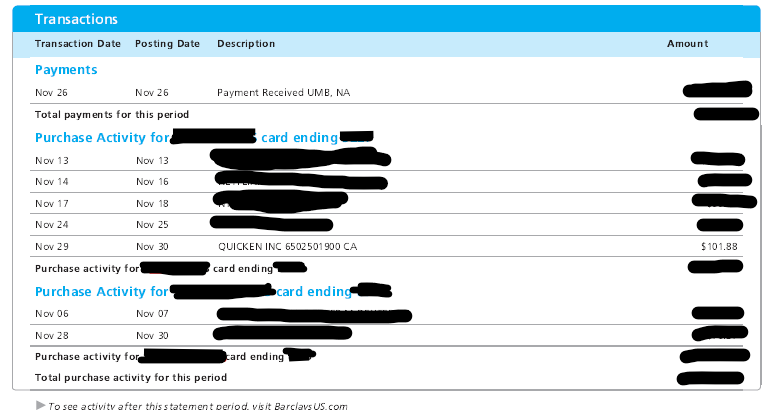
We have one Barclays credit card account with two cards. Barclays' practice is to issue a separate card number for each physical card, while still combining all transactions from both "accounts" on a single account statement.
I hadn't realized this presented a Quicken download issue before, as my wife hadn't been using her card, instead reserving it as a backup.
When she did use it last month, I only now found out that the transactions from her account number do not download to Quicken.
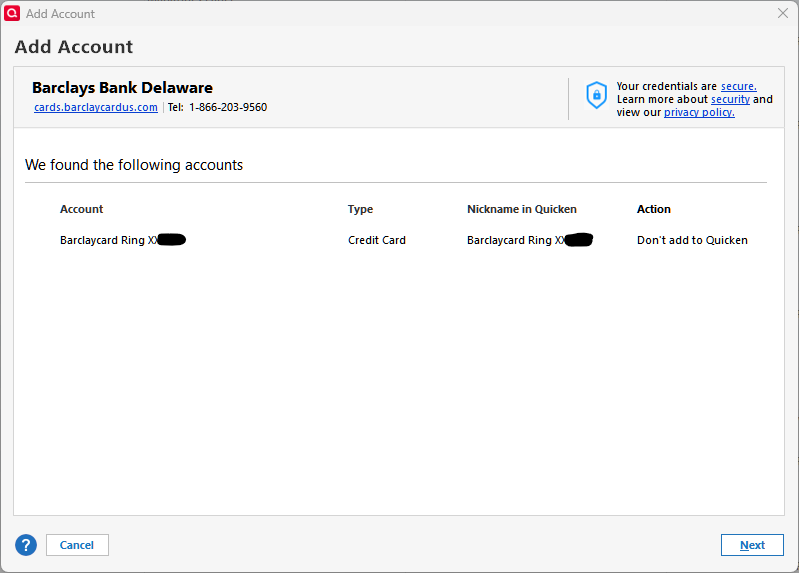
When I tried to add the separate account number to Quicken, the Barclays interface only provided the primary account number for my card, which is the one I already had linked in Quicken.
I could find no apparent way to set up the secondary account number for download into Quicken.
It certainly would be nice if this could be resolved with Barclays. Ideally the transactions from both cards should download to the primary cardholder account. I doubt that I am the only Quicken user facing this issue. Yet I searched here and could find no other reference to it .
Comments
-
I also have a single BarclaysUS card account with 2 cards, each with it's separate card number.
And I have no problem downloading from both cards into the one account in Q … so I'm a bit mystified.
When you log into their website, do you see the transactions for both cards?
When I do TOOLS, Account List and click EDIT adjacent to the account, it shows the last 4 digits of MY card, since I'm the primary card holder. When you do the same, does it show the last 4 of the primary cardholder on your account … or the other card?
Q user since February, 1990. DOS Version 4
Now running Quicken Windows Subscription, Business & Personal
Retired "Certified Information Systems Auditor" & Bank Audit VP0 -
Thanks for your response.
Yes, the charges for both cards show up on the website and also the monthly statement.
Yes, the Account List account detail in Quicken shows the last four digits of my card, the primary one. The transactions for that card are the only ones that download.
So, since this is working for you, but not for me, I am also mystified. I thought perhaps I needed set up a separate login credentials for the secondary card, but I can't see any way to that on the Barclays web site, and it's sounds like you have not done that either, and are simply using the primary account in Quicken as I am.
0 -
I just took a look at my records for the account, in Q, and the last time that my wife used her card was 11/15. I'm usually the one who pays for everything, so it's not unusual for there to be little to no activity on her card.
SO, do you have any idea when this issue started? OR, stated differently, when was the last time that a transaction on her card downloaded? How often do you download this account into Q? Are you using "Scheduled Updates" (set to automatically trigger at a certain time of day), or are you initiating the downloads manually (either for the particular account or via One Step Update)?
I also note that you recently renewed your Q subscription. Assuming that you've applied that renewal, is there any indication that the issue existed prior to the renewal?
(And, yes, I'm kinda grasping at straws here)
Q user since February, 1990. DOS Version 4
Now running Quicken Windows Subscription, Business & Personal
Retired "Certified Information Systems Auditor" & Bank Audit VP0 -
This is the first time I can recall that my wife has used this card.If this had happened previously, I would have noted it when reconciling, which is how I noticed it this time. So I would have to say there is no evidence that it worked earlier… or that it did not work earlier. So no way of saying whether it worked differently pre-renewal.I download this account typically at least once per week. Have been doing so for over 10 years. Always manually triggered, never scheduled. This particular time it was a OSU.
Thanks for your interest and thoughts. What's most puzzling, is why it works for you and not for me, also that there does not appear to be anyone else who has reported the issue on the forum.
[Edit] Looking back in Quicken at all the transactions for the card, it does appear that my wife used it a handful of times back in 2015-2017. I doubt there was any issue with her transactions downloading at that time, or I am sure I would have noted it when reconciling.[/Edit]
0 -
At this point, the only thing that I can suggest is that you contact Barclay's support (although I wouldn't hold out much hope for that route, they'll just blame it on Q) and that you contact Q Support via the link at the top of this page.
I have, at sometime in the past, responded to other posts about this 1-account, 2-cards scenario … but I don't recall seeing your particular issue before.
Q user since February, 1990. DOS Version 4
Now running Quicken Windows Subscription, Business & Personal
Retired "Certified Information Systems Auditor" & Bank Audit VP0
Categories
- All Categories
- 60 Product Ideas
- 36 Announcements
- 216 Alerts, Online Banking & Known Product Issues
- 21 Product Alerts
- 704 Welcome to the Community!
- 671 Before you Buy
- 1.2K Product Ideas
- 53.9K Quicken Classic for Windows
- 16.4K Quicken Classic for Mac
- 1K Quicken Mobile
- 812 Quicken on the Web
- 115 Quicken LifeHub