Just purchased middle of October - no problem for 2 months - now I cannot seem to bring up Reconcile to do my checking account. Signed up for Quicken Subscription.
Hello @jennyblue,
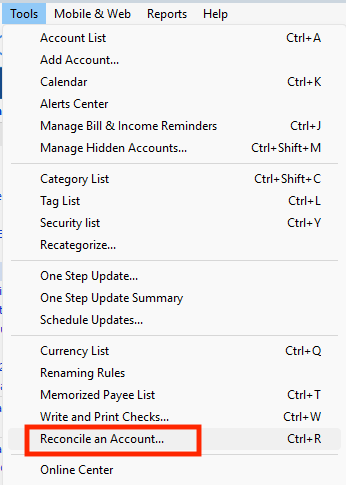
Thank you for reaching out! You can reconcile an account clicking on the account you want to reconcile, then navigating to Tools>Reconcile an Account….
You can also use the keyboard shortcut Ctrl+R.
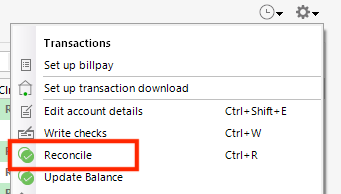
When viewing an account in Quicken, you can click on the gear icon to the upper right of the register and select Reconcile from that menu.
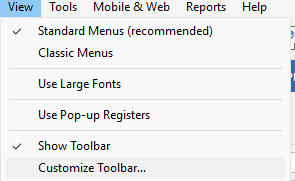
You can also customize your toolbar in Quicken, so that you have a shortcut button. To do that, navigate to View>Customize Toolbar….
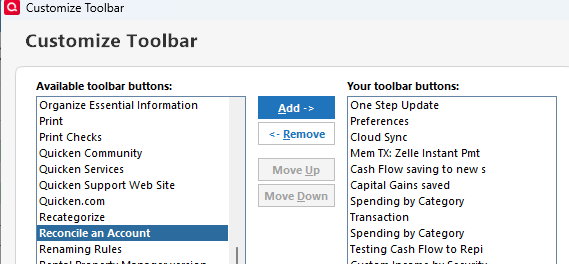
In the screen that comes up, scroll down to Reconcile an Account. Click on that to select it, then click the Add button.
Doing that will add a reconcile button to the toolbar in your Quicken.
I hope this helps!
If I may add to @Quicken Kristina 's excellent explanation … You can optionally define the Quicken Toolbar to "show icons and text". While customizing the Toolbar, click the radio button at "show icons and text". This makes the Toolbar icons much easier to use than icons alone.
I haven't seen a response from you. Do you still require assistance?
Thank you!