The Capital Gains Estimator is accessed from an Investing account's portfolio page's "Investing Tools" button - top right. Initially, it will show current price quotations for all holdings / basis lots.
But, you can manually enter a price for a security that will over-ride that quote.
Quicken Mac makes that manual price appear in italics … which is way too subtle for me, as I noted in this thread:
What's worse, in my view, is that even after closing the Capital Gains Estimator (CGE) or quitting Quicken, that manual price remains… and is never updated to the current price if the user forgets about it.
Here is my proposal for an improvement:
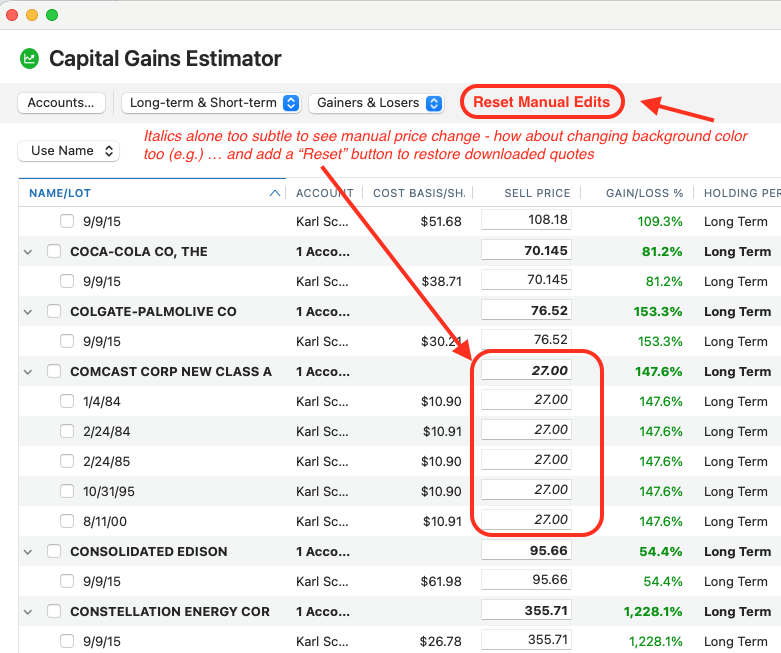
- Instead of just italics for a manual price entry… how about a background color change to it really stands out? I'd suggest yellow as it should be a caution that the price calculations will not be using current market prices.
- Add a button to "Reset Manual Edits" - to clear all manual price entries and return the CGE to its normal state of most-recent-price quotes. Currently, you must delete (blank out) the price field … and you must do that for every security that has been over-ridden… which could be many. If you just want to restore one security to its quotation, just blank it out. But we need a means to restore the entire CGE to using current quotation values.


