Why won't some bills stay removed?

I have no online billers.
I have a manual list of my monthly bills.
Every time I update (daily), three specific bills (duplicates of my manual entries, only on wildly incorrect days, and one that is no longer a valid reminder) reappear.
I continue to manually remove them every day, only for them to reappear.
I have (repeatedly) reviewed and repaired, with no further message than "Validation complete. Local bills are in sync with the server." (Because I have no online bills, I suspect)
Can anyone suggest something else? A setting on the server I'm not seeing? A local config file that I can manually edit? This is maddening enough that I am seriously considering exploring other software.
Answers
-
In the Bills, Income & Transfers view, please select the gear icon and click on "Manage Online Billers".
Does the resulting popup view show these bills because they once were online bills or were attempting to be defined as such?
Try deleting them from this view.0 -
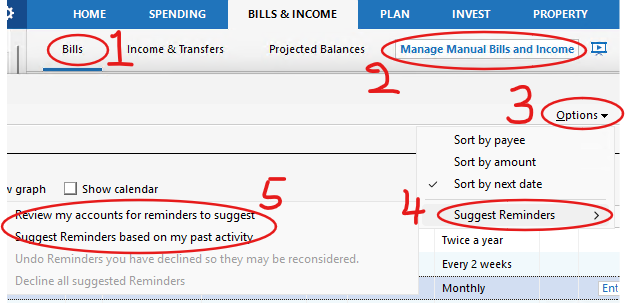
And another one to try:
- Bill & Income > Bills
- select Manage Manual Bills and Income
- Under the Options dropdown
- select the Suggested Reminders dropdown
- Uncheck any of the selections
- Q Win Deluxe user since 2010, US Subscription
- I don't use Cloud Sync, Mobile & Web, Bill Pay0


Categories
- All Categories
- 18 Product Ideas
- 34 Announcements
- 247 Alerts, Online Banking & Known Product Issues
- 19 Product Alerts
- 518 Welcome to the Community!
- 682 Before you Buy
- 1.5K Product Ideas
- 55.7K Quicken Classic for Windows
- 16.8K Quicken Classic for Mac
- 1K Quicken Mobile
- 834 Quicken on the Web
- 128 Quicken LifeHub