Where do I find the Undeposited Funds Account?

AdvBC
AdvBC Quicken Windows Subscription Member

This Quicken help page clearly says that the undeposited funds account is automatically created. https://info.quicken.com/mac/using-the-undeposited-funds-account

It also says that in that account you can select multiple entries to use as a combined deposit into something like a checking account. However, I cannot find this account anywhere. I cannot seem to create an account with that feature. I have Googled this for over an hour and searched the community to no avail. I have generated multiple invoices which is supposed to trigger the creation of the Undep. Funds acct. according to the link above. Undeposited Funds account is not an option when receiving payments and choosing where to send them. I am at a loss.


Best Answer

  • UKR
    UKR Quicken Windows Subscription SuperUser ✭✭✭✭✭
    Answer ✓

    I'm a little confused … Are you a Quicken for Windows user?
    You are looking at a Help page applicable to Quicken for Mac users only.

    Q Windows does not have this Mac-specific feature. You need to do this instead:

    Using an Intermediate deposit account (a.k.a. "Undeposited Funds"):
    When you receive multiple payments by check per day but only make one summary deposit to your bank ...

    • Create a manual (offline) checking account, named something like "Undeposited Funds" with an Opening Balance of $0.00, Opening Date 1/1 this year
    • When processing the received checks (i.e., when filling out the New Customer Payment form in Customer Invoices), deposit each check to "Undeposited Funds" instead of your regular bank checking account.
    • At the end of the day, tally up all checks on your bank deposit slip.
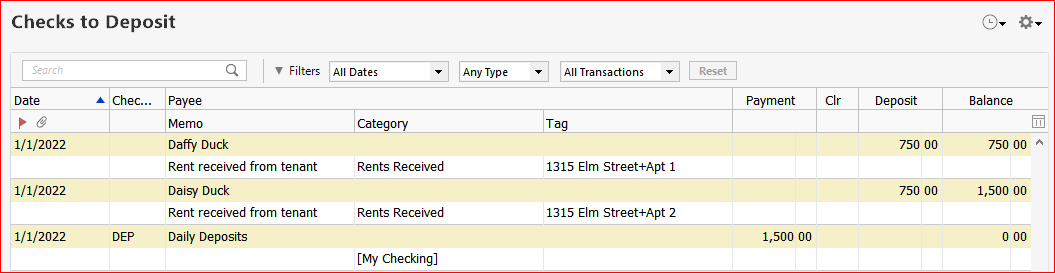
      In Quicken, in the "Undeposited Funds" account make a transfer transaction "Daily Deposits" in the amount of your deposit slip. Put the amount into the Payment column. As category choose your checking account, surrounded by [square brackets], e.g. [ABC Bank Checking]. Verify that this reduces the balance in the "Undeposited Fundst" account back to zero (or you have made a mistake somewhere along the way).
      cap65 checks to deposit acct.PNG
      This image is an example I made up for Rent Receipts. Your view of the Undeposited Funds register will be similar.

    If you need a printed report, in lieu of a deposit slip, create a register report (CTRL-P from the above register), filtered to show only today's transactions.

Answers

  • UKR
    UKR Quicken Windows Subscription SuperUser ✭✭✭✭✭
    Answer ✓

    I'm a little confused … Are you a Quicken for Windows user?
    You are looking at a Help page applicable to Quicken for Mac users only.

    Q Windows does not have this Mac-specific feature. You need to do this instead:

    Using an Intermediate deposit account (a.k.a. "Undeposited Funds"):
    When you receive multiple payments by check per day but only make one summary deposit to your bank ...

    • Create a manual (offline) checking account, named something like "Undeposited Funds" with an Opening Balance of $0.00, Opening Date 1/1 this year
    • When processing the received checks (i.e., when filling out the New Customer Payment form in Customer Invoices), deposit each check to "Undeposited Funds" instead of your regular bank checking account.
    • At the end of the day, tally up all checks on your bank deposit slip.
      In Quicken, in the "Undeposited Funds" account make a transfer transaction "Daily Deposits" in the amount of your deposit slip. Put the amount into the Payment column. As category choose your checking account, surrounded by [square brackets], e.g. [ABC Bank Checking]. Verify that this reduces the balance in the "Undeposited Fundst" account back to zero (or you have made a mistake somewhere along the way).
      cap65 checks to deposit acct.PNG
      This image is an example I made up for Rent Receipts. Your view of the Undeposited Funds register will be similar.

    If you need a printed report, in lieu of a deposit slip, create a register report (CTRL-P from the above register), filtered to show only today's transactions.

  • AdvBC
    AdvBC Quicken Windows Subscription Member

    You are correct. I am a Windows user. I made the mistake of assuming that Quicken for Windows would have that feature also. It would be nice to be able to check the entries that I want to combine for a deposit into checking without having to total them up manually. I am a Quickbooks user that is trying to convert. Thank you for your time and help. At least I now know.