Optum HSA Tease?
Starting a couple of weeks ago, when importing a QFX From Optum Bank HSA, quicken says they now support direct download/EWC (they removed it a couple years ago) and asks if I'd like to convert. The process seems to go smoothly, even texts me the 2FA code and accepts the response, but then takes me back to the setup screen saying Optum wants me to log in and accept some message. There is no message when I log in or any alert in my account.
Is this just quicken incorrectly interpreting that since other Optum account types support EWC that the HSA does also? Back when they did support it, it used a totally different FI name (Optum Bank HSA I believe), where QFX just has it as Optum Bank.
Anyone else getting prompted for this?
Comments
-
Yes, saw this too. Now seems to have gone away.
0 -
Hello @Drinkingbird & @Pedro,
Thank you for sharing your experience. To help troubleshoot, I checked our internal tools. I can see @Drinkingbird was getting a CC-508 error (action required on financial institution website). The additional information said that you don't have access to Optum bank. That may indicate that HSA accounts are not supported on that connection. If you do want to try troubleshooting the error, you can follow these steps from our article on CC-508 errors:
First, refresh your online account information in Quicken
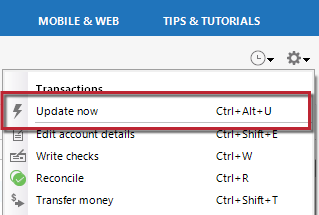
- From your account register, select the Actions gear icon at the upper right of your register (Ctrl + Shift + N).
- Then, select Update now.
- Follow the on-screen instructions to complete the update.
- Repeat these steps for each financial institution experiencing this error.
Then, visit your bank's website
- Sign in to your financial institution's website.
- Navigate to the page you download your account information.
- When you encounter the new web page that requires your response, fill out the requested information and dismiss the screen. This could be a dialog requesting you accept terms of service or a special offer.
Important: If you have the option to not display the page or ask you again, select that option. If you do not, the error may continue to occur.
If the issue persists
- Close Quicken.
- Click the Start button and select Control Panel.
- Windows 10: the Control Panel is located in the Windows System folder in the Start menu.
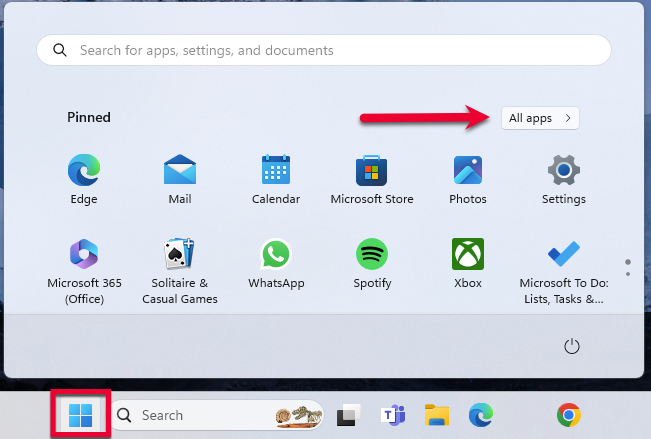
- Windows 11: Go to the Start menu and select All apps.
Then, go to Windows Tools and select Control Panel.
- Select Network and Internet > Internet Options.
- Under Browsing history, click Delete.
- Make sure there is a check next to Temporary Internet Files. The other checkmarks are optional.
- Click Delete.
- Then click OK when done.
- Log in to your financial institution's website and accept Cookies and any security measures, as requested by the site.
- Open Quicken and try your update again.
Note: If the Security level is set too high, it may prevent your system from storing the cookies and security necessary to continue functioning with your financial institution. Medium security level should be sufficient to store the cookies and security. You can re-elevate the security level after a successful connection with your financial institution. If the financial institution uses expiring (session) cookies or expiring security, you may have to repeat these steps each time the cookies/security expire.
I hope this helps!
Quicken Kristina
Make sure to sign up for the email digest to see a round up of your top posts.
0 -
I suspect it was a glitch and that HSA accounts still are not supported (they removed support a couple years ago). However now when I try to download a QFX file quicken just gives an error that it is unreadable. I'll wait until there is a new transaction and see what happens.
0 -
Correct, now when trying to download transactions in the QFX file format, you end up with a 1 kb, near-empty file containing this message: "Error fetching data". Has been happening for a few weeks now in Quicken Classic. @Quicken Kristina FYI
0 -
I think Optum may be to blame for that one. I reported it to them earlier this week, they said they'll have the team look into it, which means they probably won't.
This was after they sent me the pre-canned response of not supporting downloads within quicken anymore. Yeah, I know that, welcome to 2 years ago. I literally had to send them a screenshot of the "download to quicken" button so they finally got what I was talking about.I don't know if the two things are related or not, if it is a sign that they may be preparing to support direct downloads or not, or if it was two unrelated glitches. Who knows.
1 -
Optum has confirmed they're aware of the issue (after MANY attempts to get them to understand the issue) and are targeting a fix on January 9th.
0
Categories
- All Categories
- 41 Product Ideas
- 36 Announcements
- 224 Alerts, Online Banking & Known Product Issues
- 21 Product Alerts
- 497 Welcome to the Community!
- 676 Before you Buy
- 1.3K Product Ideas
- 54.3K Quicken Classic for Windows
- 16.5K Quicken Classic for Mac
- 1K Quicken Mobile
- 814 Quicken on the Web
- 115 Quicken LifeHub