Deleted Savings Goal value showing in Account Bar
I have been using Savings Goals for several years but have recently moved the CASH used in Savings Goals to a longer term investment so Savings Goals no longer work. Before I deleted the Savings Goal I (1) withdrew savings goal money and put back in the savings account (2) turned off any reminders for future contributions. Outside of Quicken the cash was transferred out of the Savings Account so I then CLOSED the related Savings Account. Everything looked fine and I have been carrying on for over a month.
However, I happened to click off the "Show Savings Goals Transactions in register and reports" and I am seeing a value in the Account Bar under "More Accounts" equal to the last value in the now Closed Account - but when I look at the specific Closed Account the value is zero matching the account registry.
None of this appears to affect my TOTAL BALANCE but it does change the Banking summary at the top of the Account Bar.
Can anyone recommend a work around to fix this? I have weeks and weeks of transactions I would hate to have to go through again.
Thanks in advance for any suggestions.
Comments
-
Hello @jk9401,
Thank you for letting us know you're seeing this issue. To help troubleshoot, please provide more information. When did you first notice this issue? When you closed out the Savings Goal, did you delete it completely or keep it as a $0 asset? Have you restarted Quicken since this issue started?
I look forward to your response!
Quicken Kristina
Make sure to sign up for the email digest to see a round up of your top posts.
0 -
I first noticed the problem this week because I typically leave the "show savings buckets" checked. The Savings Goals were deleted over two months ago and I followed the process of withdrawing the funds out of the savings bucket back into the bank account before I deleted the account - I did not keep the asset at $0. I restored multiple versions of backup to see if I could get a version before this error was introduced - but when I realized how far back I would have to go I decided to post this request for help first. I have run validations and restarted Quicken multiple times.
Thanks
[Edited - Readability]
0 -
Thank you for your reply,
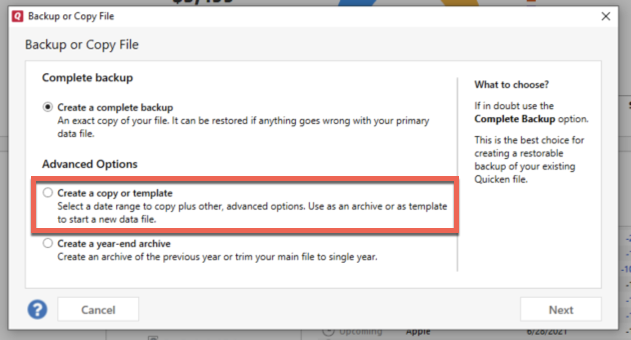
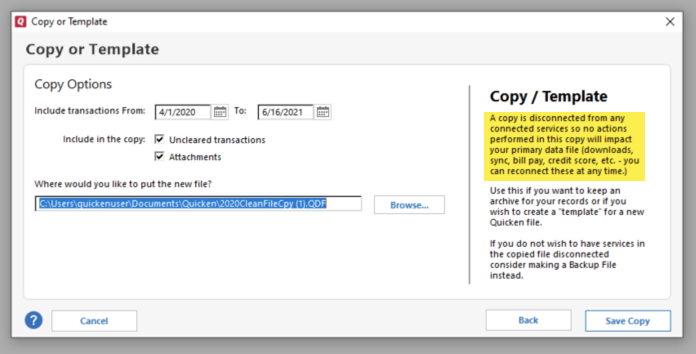
I'm not able to replicate the issue in my Quicken, which leads me to suspect the issue is file-specific. Since you said you've already validated multiple times and restoring a backup isn't a viable option, the next step is to try creating a copy of your data file. This will rebuild all of the internal lists and database tables. If successful, you would then move forward with the copied file. To create a copy, please navigate to File > Copy or Backup File... > Create a copy or template (see examples below) which will also allow you to select a date range to move forward with.
If you wish to move forward with your entire data file, please check the full date range of your entire data file before copying so you can enter the correct date range if you do not wish to "shrink" your file by eliminating certain dates. Note - The only reason to "shrink" your file is if you believe older data in the file is causing the problem.
It's important to know that all online services will be disconnected in the copied file, and you will need to sign back in with your Quicken ID and reconnect all of your online accounts, online billers, Quicken Bill Manager services, etc if you plan to use that copied file going forward. The reason for this is that the new copy also creates a new and separate dataset ID.
Please check to make sure the issue is resolved before you reconnect accounts/online services. If the issue is resolved, then I recommend using the copied file as your main file going forward.
If the issue is not resolved in the copied file either, then feel free to switch back to your original file. For information on switching between Quicken files, please click here.
Please let me know how it goes!
Quicken Kristina
Make sure to sign up for the email digest to see a round up of your top posts.
0
Categories
- All Categories
- 60 Product Ideas
- 36 Announcements
- 219 Alerts, Online Banking & Known Product Issues
- 21 Product Alerts
- 704 Welcome to the Community!
- 671 Before you Buy
- 1.2K Product Ideas
- 53.9K Quicken Classic for Windows
- 16.4K Quicken Classic for Mac
- 1K Quicken Mobile
- 812 Quicken on the Web
- 115 Quicken LifeHub