Quicken Classic connection for IRAs imported as investment accounts

Savk
Savk Quicken Windows Subscription Member

When I connect my Quicken Classic account to LifeHub, it imports my account as an "Investment Account." These cannot be changed to "Retirement Account" after connecting to Quicken.

In Quicken Classic, these accounts are flagged as "Account Type" of either "Roth IRA," "Traditional IRA" or "401k, Roth 401k, or 403(b)."

How can I get these accounts correctly reclassified as "Retirement Accounts" so I can select the correct type of account they belong to (e.g. IRA, 401k, Roth IRA, SEP, Simple, etc.)? Since they all come over as "Investment Account," I can only set the account type to "Brokerage" or "529" in LifeHub.


Comments

  • Quicken Kristina
    Quicken Kristina Quicken Windows Subscription Moderator mod
    edited December 13

    Hello @Savk,

    Thank you for taking the time to visit the Community to report this issue, though we apologize that you are experiencing this.

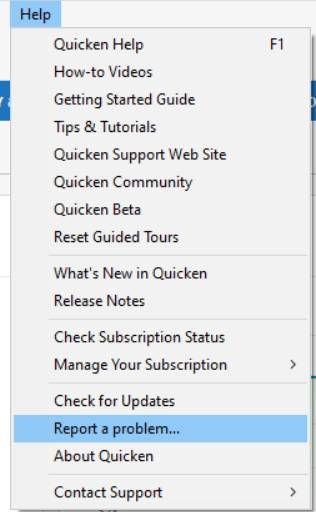
    I replicated this issue in my own Quicken LifeHub, and forwarded it to the proper channels to be further investigated. In the meantime, we request that you please navigate to Help > Report a problem and submit a problem report with log files attached and (if you are willing) a sanitized copy of your data file in order to contribute to the investigation.

    Report a Problem QWin.png

    While you will not receive a response through this submission, these reports will help our teams in further investigating the issue. The more problem reports we receive, the better.

    We apologize for any inconvenience!

    Thank you.  

    (CBT-960) 

    Quicken Kristina

    Make sure to sign up for the email digest to see a round up of your top posts.