This discussion was created from comments split from:
CC-501 error with Bank of Hawaii
.
Still unable to download BOH transactions directly into Quicken. I tried downloading direct from the BOH site into a QFX file - Quicken will not import it. I received a message that it is unable to establish an internet connection and then "unable to verify the financial institution" Any idea when this will be resolved?
Any word @Quicken Kristina when this might be resolved?
Hello @DebinHI,
Thank you for letting us know you're encountering this problem. Since the error you are seeing is different from the CC-501 error others were encountering, I split your posts into a new discussion.
The screenshot you attached makes me suspect you are updating your account using QFX/Web Connect (download a file from the financial institution and import into Quicken). Is that correct? If it is, that error is typically caused by an incorrect bank identification number in the file you're trying to import.
If you haven't already done so, try downloading a new QFX file from the financial institution website. If you get the same error with multiple files, then I recommend reaching out to the financial institution for assistance, since they are the ones generating the file.
I hope this helps!
Aloha @Quicken Kristina, thank you for your response. The reason I was trying to download and import from BOH is because the one step update/express web connect is not working! It's been dysfunctional since November.
Also, I tried downloading the QFX file more than once with the same results. I have already called the bank and they say it is a Quicken issue and that there has been no communication about it from Quicken.
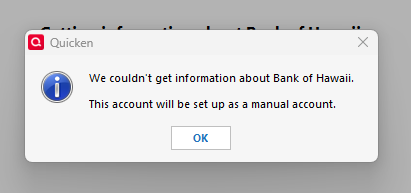
This happened earlier in the year when BOH changed their mobile banking platform and dragged on for about 2 months. We are nearing the end of the year and I need financial information for tax purposes. Please advise. The screenshot below is the message I get when I try to connect. Thanks so much for your help!
When opening one of these QFX files with Notepad, what bank ID number is shown in the file's header records? E.g.,
<FID>?????

</FI>

<INTU.BID>?????
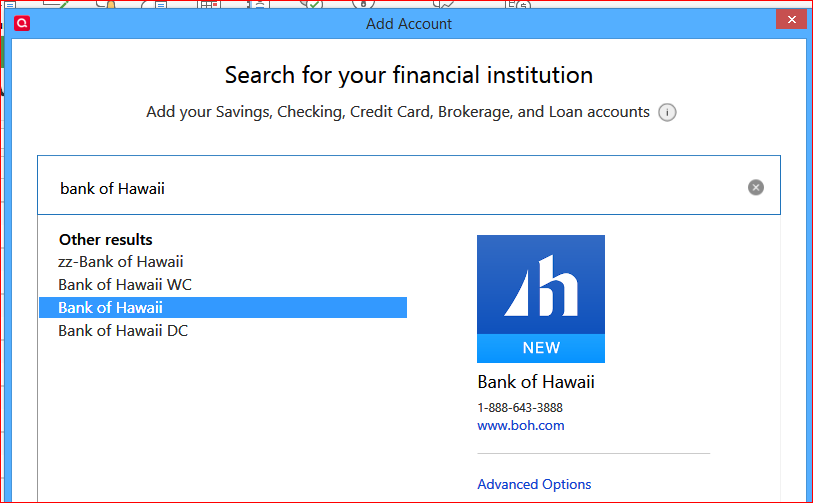
What financial Institution Name is showing when you attempt a One Step Update? There's an obsolete, soon to be removed zz-Bank of Hawaii and apparently newer ones (see image)
AFAIK, you should be using one of the newer names to activate your accounts with and download transactions from. The WC suffix stands for Web Connect, DC stands for Direct Connect. I have no idea why there are three selections and which one the bank would recommend you use. I'd try the one without any suffix first.
@UKR the bank name when opening the QFX file with notepad is Bank of Hawaii BOH. When I attempt one step update, I have selected Bank of Hawaii. I am aware that the "zz" one is outdated, but I tried them all anyway. None of them worked. I've tried multiple times with each option. In the past, when it was working, the Bank of Hawaii option was the one that worked. Open to suggestion. Thanks for your help!
@Quicken Kristina I'm not sure if you saw my previous message? Sorry I couldn't get your name to highlight in the last post. I have tried to reconnect my accounts to one step update, using all the different Bank of Hawaii options - none of them work. I keep getting the same message, screenshot above (We couldn't get information about Bank of Hawaii…etc.). What do you recommend at this point? Thank you for your help.
Thank you for your reply,
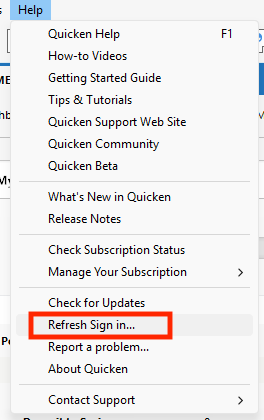
I'm not able to replicate the error message you're encountering. To troubleshoot this error, please start by refreshing your sign in with Quicken. To do that, navigate to Help>Refresh Sign in… and follow the prompts.
After you finish refreshing your sign in, test to see if the issue is resolved.
Please let me know how it goes!
@Quicken Kristina I tried refreshing the sign in - then tried all the bank of hawaii options including the standard one that used to work, DC, WC, & zz. Twice. Quit Quicken and reopened, refreshed, etc. I keep getting the same message.
Aloha @Quicken Kristina - please see my latest message and advise. I really need my financial data! Thanks so much.
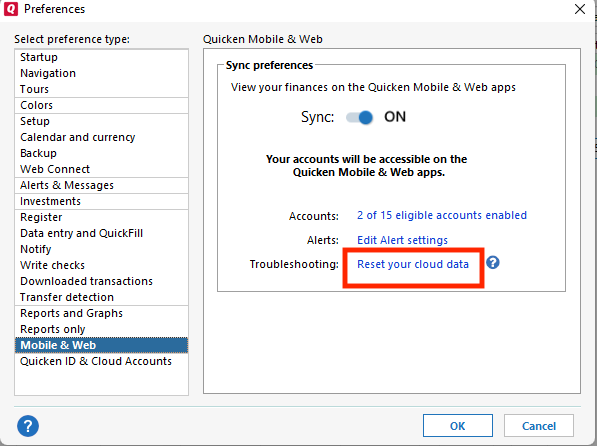
The next step, in case the problem is being caused by outdated information in the Quicken Cloud, is to reset the cloud. To do that, navigate to Edit>Preferences>Mobile & Web. Click the blue "Reset your cloud data" link.
Note: If you do not see the blue "Reset your cloud data" link, that means you have Sync turned off. To reset the cloud, turn Sync on, click OK, then navigate back to Edit>Preferences>Mobile & Web and click the blue "Reset your cloud data" link. Once the cloud reset completes, you can turn Sync back off.
Once the cloud reset completes, test to see if the issue is resolved.
@Quicken Kristina I do not store my financial information in the cloud. Does that make a difference regarding your suggestion?
No, even if you do not sync your file with the Quicken Cloud, the program does still use the cloud to facilitate some functionality.
Thank you!
@Quicken Kristina resetting the cloud did not work! I am getting desperate. What now?? About 4-5 months over the course of last year, Quicken not working properly.
QFX files are generated by the financial institution, so for the issue with QFX files, you would want to reach out to Bank of Hawaii directly.
You may be able to manually edit the QFX files to get them to import, if the problem is an incorrect Bank ID (BID) or a missing BID. As @UKR asked, what BID are you seeing in the header of the QFX file? Is it showing 70122, or a different number?
What specific issue do you encounter when trying to connect your Bank of Hawaii accounts for download via One Step Update? Do you see any error messages/codes?
I cannot get my Bank of Hawaii transactions to download to Quicken. I get the following message even though I have a valid login and can sign on myself. I also tried to download a Quicken file from BOH website and that does not work either. This really needs to be corrected, many of us depend on Quicken for tax purposes.
I have been dealing with the same issue since October 2025! @Burnszee thank you for posting. @Quicken Kristina it would be really helpful if you would respond. You left me hanging on another post!
Thank you for your replies @DebinHI & @Burnszee,
@DebinHI
I did reply to you on the 9th.
Did the error you're getting when attempting to connect your accounts in Quicken change from the screenshot you provided earlier to the error that @Burnszee is seeing?
For further assistance with that error, I recommend that you and @Burnszee contact Quicken Support directly for assistance getting your Bank of Hawaii accounts connected in Quicken. The Quicken Support phone number can be found through this link here. Phone support is available from 5:00 am PT to 5:00 pm PT, Monday through Friday.
I apologize that I could not be of more assistance!
@Quicken Kristina thank you for your help. After several calls with Tech Support, the issue has been resolved! As it turned out, a Microsoft patch was required to fix this, found at https://www.microsoft.com/en-us/download/details.aspx?id=30135. This tracks to when I first encountered download issue in July following a windows update. As it also turned out, it was not just Bank of Hawaii and Citibank I was unable to connect to, Quicken was not connecting to ANY bank when I tried to add an account.
Thank you for the follow-up,
I'm glad to hear that the issue is resolved! Thank you for sharing the resolution!
If you need further assistance, please feel free to reach out!
The link to the Microsoft patch that you provided does not go anywhere. It returns a 404, page not found, error. Do you have an updated URL or the KBxxxxxx number of the patch?