This discussion was created from comments split from:
Fidelity Investments - linked checking account not updating [Edited]
.
I am having the same problem…My Fidelity Checking Account is showing up as an "Investment Account"….I write checks from this "Cash Managment Account" (it shows up as a "Cash Management Account" where it should be in Dollars & Cents….and not in "Shares". The register downloads (syncs with Fidelity) showing "Share Balance", "Investment price" and "Cash Balance"—-it SHOULD show up like a regular Checking Account would Look.
Hello @Twigofthetree,
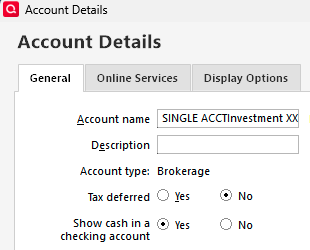
Thank you for reaching out! To clarify, do you have your CMA account set up in Quicken with a linked checking account? If you're not certain, you can check by navigating to Tools>Add Account and clicking the Edit button next to the investment account. On the General tab, there is a "Show cash in a checking account" option. If Yes is selected, then you have the linked checking account turned on.
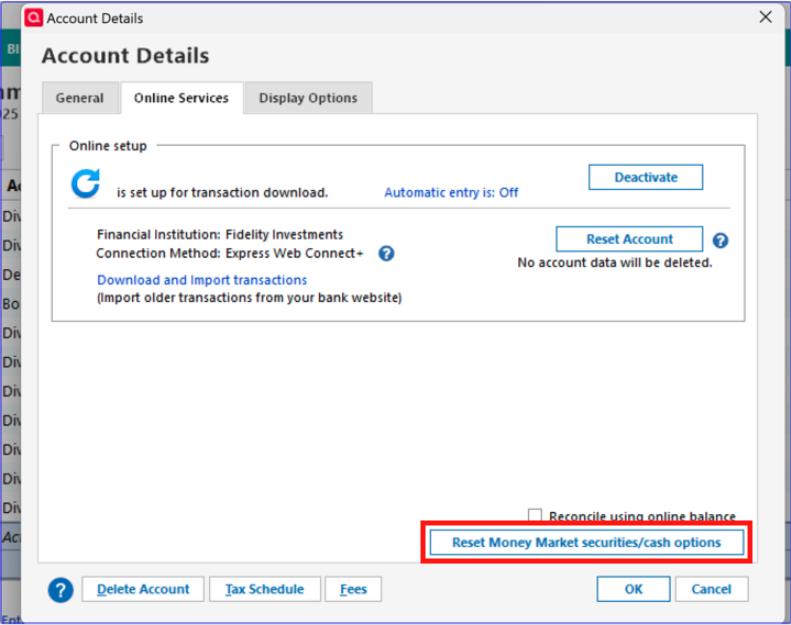
You mentioned that it is showing shares instead of cash. Which fund is being represented as shares? Have you tried resetting the cash representation? If you haven't, then navigate to Tools>Account List and click the Edit button next to the problem account. On the Online Services tab, click on the Reset Money Market securities/cash options button.
I look forward to your reply!
I haven't seen a response from you. Do you still require assistance?
Thank you!