401(k) buy transaction doesn't reduce cash balance on Quicken Classic for Mac Premier

I have been using Quicken for Windows for over 25 years, and I am exploring to transition to use Quicken for Mac. I have just installed Quicken for Mac Premier on Macbook Air running on Mac OS 26.2. I have accepted all the downloaded transactions and validated the Quicken file on Windows. I then copied the file to Mac and started Quicken to open this Quicken file. Quicken then did the migration. I have encountered a couple of issues:
During the migration, it prompted me that
- There are unaccepted transactions, but actually, I did accept all the transactions in Windows.
- One of the investing account showes in correct cash balance, and I found out there are numerous transactions created during the migration. I can go through the entire account to remove each of them; it is time-consuming, but doable.
- There is a fidelity 401k account that has in correct cash balance. When I looked closer, the reason is that "401(k) buy transaction doesn't reduce cash balance". I have tried to manually create a BUY transaction, and it still doesn't reduce the cash balance at all. It looks like this account is CORRUPTED and CANNOT be FIXED.
Can someone offer help on the above issues, especially #3 above, which is my GO/NO-GO decision? Thanks.
[Edited-Readability]
Comments
-
Helloo @Lampatrick,
Thank you for sharing your experience and reporting the issues you ran into along the way.
The first thing I would suggest is redoing the conversion to see if you get better results. Here is a Support Article that goes over the entire conversion process.
Here are some important bits of information before you start the conversion process:
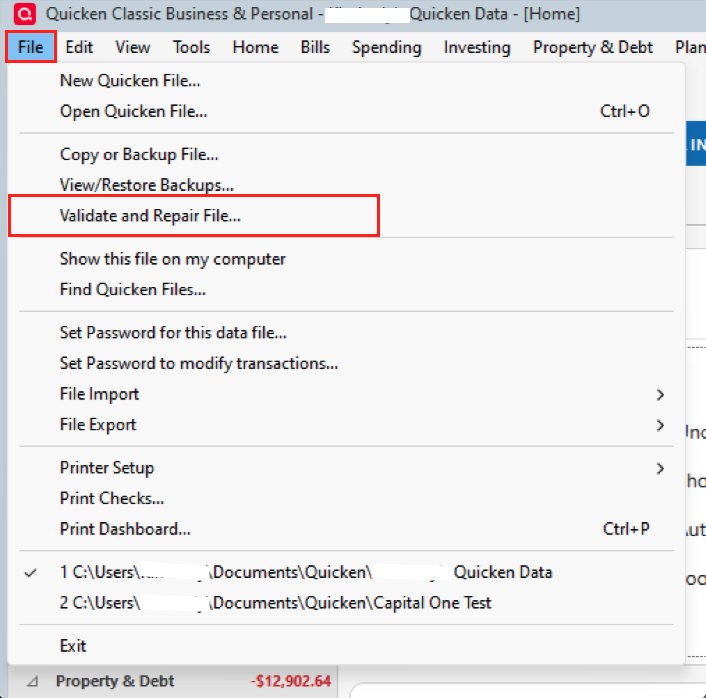
- You'll want to Validate your file in Quicken for Windows first. You can do this by following these steps:
- Click on File on the top menu bar, then select Validate and Repair File....
- Put a check next to Validate file.
- Click OK.
- Click on File on the top menu bar, then select Validate and Repair File....
- Always check the account balances before and after the conversion. If your data doesn't match, be sure to see which account is in error and what transactions are not showing. Then, manually add the transactions that are missing.
- Invoices created in Quicken for Windows Business & Personal will not carry over to any version of Quicken for Mac.
- Attachments in a Quicken for Windows data file will not carry over when converting to Quicken for Mac. For a full list of items that will not carry over, click here.
- If you need instructions on moving your Quicken data files from one computer to another, click here.
Follow the instructions in the article on converting, and let me know how it goes.
Thank you!
Quicken Alyssa
Make sure to sign up for the email digest to see a round up of your top posts.
0 - You'll want to Validate your file in Quicken for Windows first. You can do this by following these steps:
-
@Quicken Alyssa I have followed your instruction above, and I still encountered the following:
- Three of the investing accounts showe in correct cash balance, and I found out there are numerous transactions created during the migration or missing transactions. I can go through the entire account to remove each of them; it is time-consuming, but doable.
- There is a fidelity 401k account that has in correct cash balance. When I looked closer, the reason is that "401(k) buy transaction doesn't reduce cash balance". I have tried to manually create a BUY transaction, and it still doesn't reduce the cash balance at all. It looks like this account is CORRUPTED and CANNOT be FIXED.
Thanks.
0 -
@Quicken Alyssa do you have any update on this? Thank you.
0 -
Thank you for following up, and I apologize for the delayed response!
Unfortunately, conversions don't always go perfectly, especially with files that are very old or could have some existing damage or corruption within them.
One more thing I am thinking might work to get you better results is copying your data file before converting it. We have a Support Article for advanced data file troubleshooting that you could run through Windows, and then attempt the conversion again.
Copy and Validate instructions
Always make a backup before performing complex procedures. This ensures that you have a "fallback" file you can use to get back to where you were when you started.
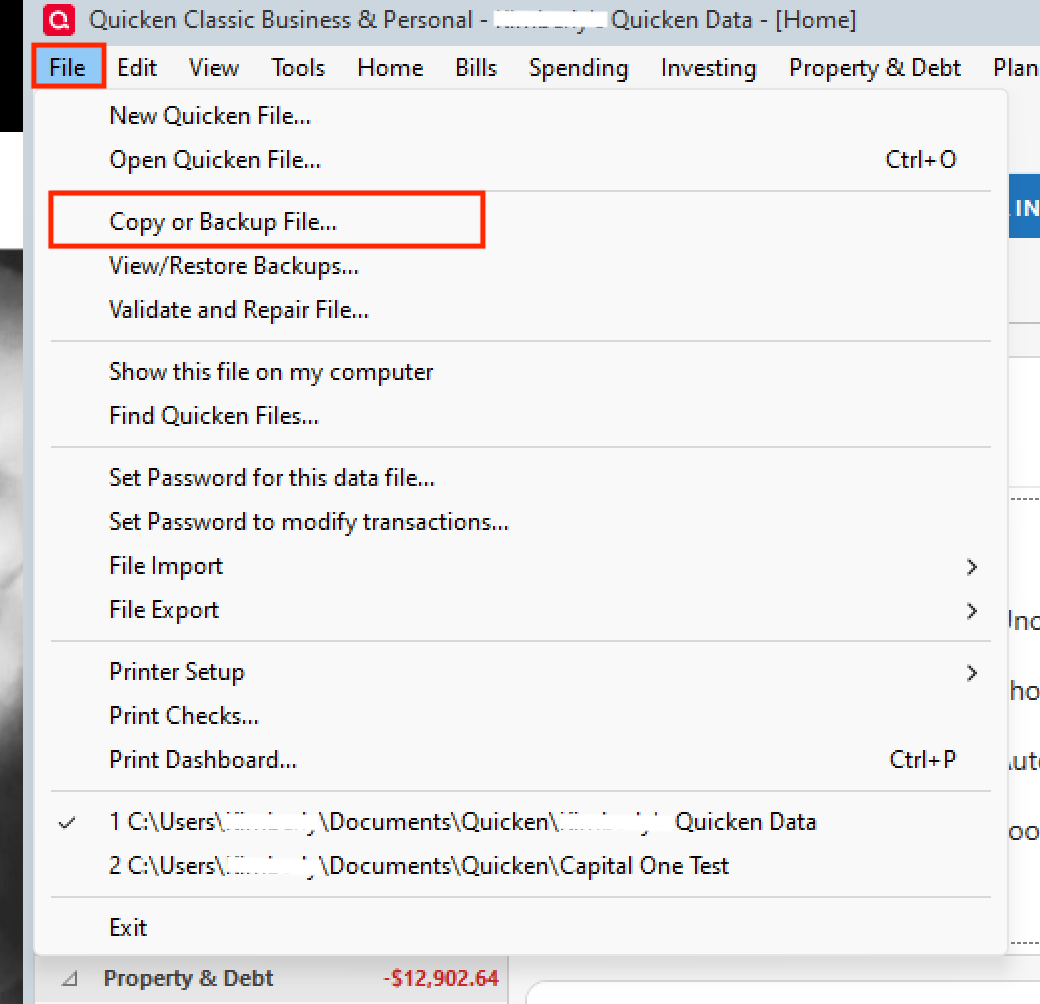
- Go to File > Copy or Backup File and select Create a copy or template (do not choose Year End Copy for this procedure).
- Please note that a file copy is disconnected from online services, such as transaction download. Online services would need to be reconnected if you wish to use them in the file copy.
- Leave all the settings, including file name and checkboxes, at their default (change nothing on this screen). Simply click Save Copy.
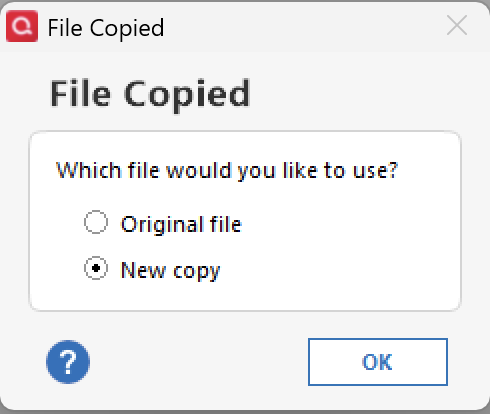
- After the Copy is complete, choose to Open New Copy.
- In the New Copy, go to File > Validate and Repair File and select the Validate file option. This is to ensure there are no lingering issues with the data in this file.
- If your issue was with Investment account(s) slowness or other data issues with an investment account, be sure to also select Rebuild Lots during this procedure.
- After the Validation process is finished, you will see the Data_Log appear in a Notepad window. This file is a summary of the Validation results.
- Review the Data_Log.txt for messages pertaining to the quality of your data and resolve any that are advised with instructions you should follow. This may require that you delete, edit, or reenter transactions manually.
Example of Data Integrity Issues in Data Log
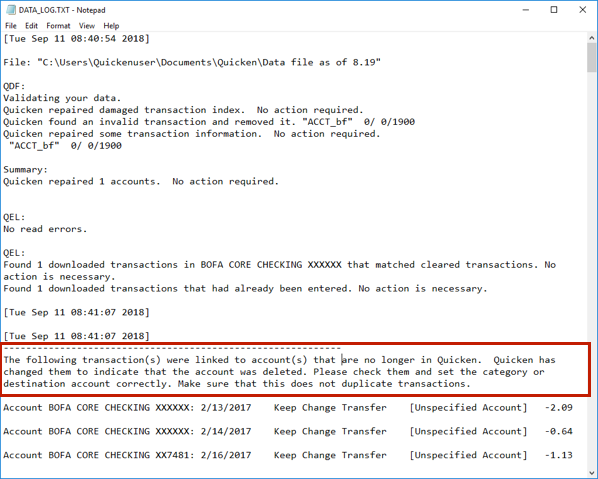
In the example above, further instructions are given advising to review and set the categories correctly.
- If you receive the message "Damaged data block" in the Data_Log after the Validation completes, the file is not repairable. We recommend restoring a backup from prior to the date listed on this message.
Once you have done both the Copy and Validation, try the conversion again. If the steps did not resolve the issue, I would suggest starting a brand new file on your Mac or calling Quicken Support to see if they can walk you through any more options that I have not thought of.
Let me know how it goes!
Quicken Alyssa
Make sure to sign up for the email digest to see a round up of your top posts.
0 - Go to File > Copy or Backup File and select Create a copy or template (do not choose Year End Copy for this procedure).
-
@Quicken Alyssa I have tried your instructions above, and unfortunately, the same problems still exist.
0 -
@Quicken Alyssa I have finally converted the Windows file to Mac (after a lot of manual effort to recreate the problematic account and some numbers). And now I got the Quicken for Windows and Quicken for Mac showing the same accounts and numbers. However, I ran into another issue with Fidelity accounts on Quicken for Mac.
I have several Fidelity accounts. Most of the Fidelity accounts have money market fund as SPAXX, and 2 of Fidelity accounts have FDRXX as money market fund instead. After the recent fixes of the Fidelity download issues, on my Quicken for Windows, it downloaded both the SPAXX and FDRXX as CASH (instead of security) when I did the update.
However, on the Quicken for Mac, it downloaded the SPAXX as CASH (as expected), but it downloaded the FDRXX as security instead.
On windows version, there is a setting to treat money market as CASH. However, I don't see this setting in the mac version.
Can you please offer some help? I would like Quicken to download the FDRXX as CASH as well, just like the SPAXX.
(I thought this particular Fidelity issue has been fixed recently for both Windows and Mac versions).
Thank you.
0 -
@Quicken Alyssa Do you have any comment regarding the above issue? I also found another issue with the Quicken for Mac regarding the Amortization Schedule for a Mortgage. It is off by one month. It looks like this issue has been reported by other Quicken for Mac user back in 2022 and 2023 (however, the amortization schedule from Quicken for Windows is correct).
0 -
Thank you for following up!
Unfortunately, unlike Quicken Windows, Quicken Mac does not currently have a way to manually set cash representation.
As for the separate issue regarding amortization. If you don't mind, can you please create a new thread for this to help keep the Community organized?
Thanks again!
Quicken Alyssa
Make sure to sign up for the email digest to see a round up of your top posts.
0
