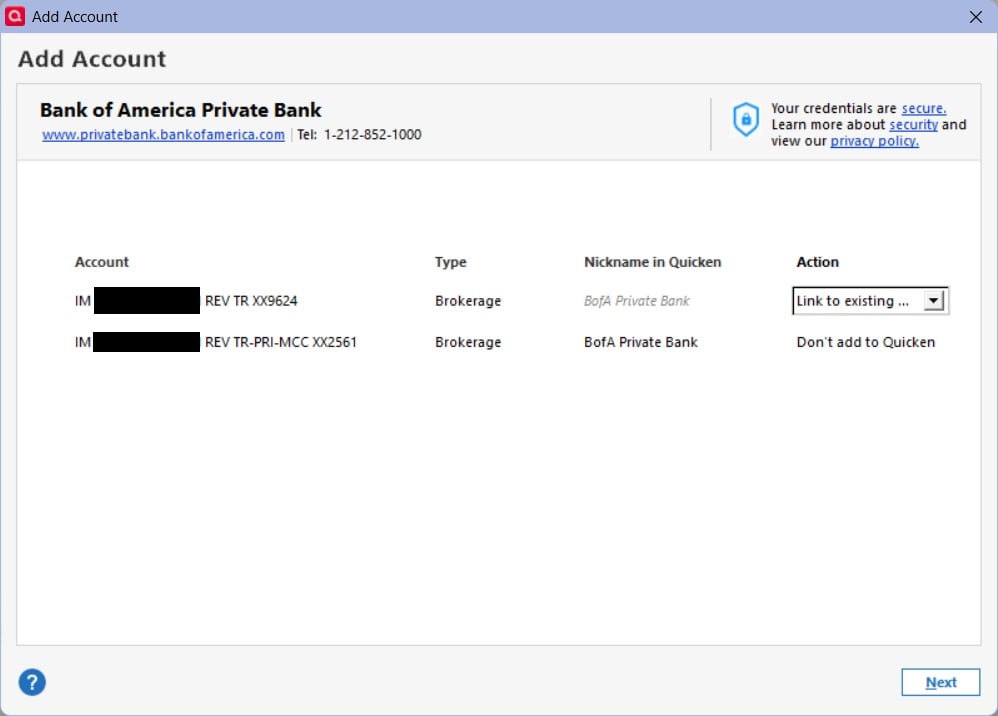
failure on adding second account with Bank of America Private Bank

PrivateBankQuickenproblem.jpg

I have 2 accounts at Bank of America Private Bank. One (9624) is more than 20 years old, and I do not want to lose the transaction in Quicken. Thus I am unwilling to delete that account. The other (2561) is only a year old. Private Bank recently started supporting Express Web Connect. I was able to set up the online service for the old account. When I tried to add the second newer account, the only Action is "Don't add to Quicken". But the action I need is to add to Quicken. The old account is working and adds new transactions without issue.

Best Answers

  • Tom Young
    Tom Young Quicken Windows Subscription SuperUser ✭✭✭✭✭
    Answer ✓

    Here's something to try.

    Make a backup.

    Disconnect all BoA Private Bank Accounts in Quicken. As you deactivate each Account go to the General tab and also delete both the "Financial institution…" and "Account Number" information.

    The click on Tools > Add Account, specify BoA Private Bank as the financial institution, enter your user ID and password. Quicken should find both of those accounts and the bank and (hopefully) allow you to LINK both accounts to Quicken.

  • Barry Nelson
    Barry Nelson Member ✭✭✭
    edited December 2025 Answer ✓

    Thank you Tom. Your suggestion solved my problem.

    I did not intend to mark this comment as an Answer, and I cannot see how to remove that mark.

Answers

  • Tom Young
    Tom Young Quicken Windows Subscription SuperUser ✭✭✭✭✭
    Answer ✓

    Here's something to try.

    Make a backup.

    Disconnect all BoA Private Bank Accounts in Quicken. As you deactivate each Account go to the General tab and also delete both the "Financial institution…" and "Account Number" information.

    The click on Tools > Add Account, specify BoA Private Bank as the financial institution, enter your user ID and password. Quicken should find both of those accounts and the bank and (hopefully) allow you to LINK both accounts to Quicken.

  • Barry Nelson
    Barry Nelson Member ✭✭✭
    edited December 2025 Answer ✓

    Thank you Tom. Your suggestion solved my problem.

    I did not intend to mark this comment as an Answer, and I cannot see how to remove that mark.