Why not return this feature which disappeared?

This really helpful feature was discontinued quite a while ago and I for one would like it back.

Within the "Category List," there used to be a feature I very much want back. And I cannot find another way to duplicate the old report.

For example, select categories from the top menu and your category list comes up. If for example you have one called "dividends" and a subcategory, called "stocks". If "stocks" subcategory is selected within the list, then under "options" at the bottom, a Quicken user could get a category report for "Dividends" "Stocks" and immediately know the sum of the stock dividends.

It was so simple. now the only way I know it to go to "Reports" but there is no way to isolate the bit of data mentioned in my previous paragraph.

Why was "category report" eliminated and is there another way to find that type of report?

Answers

  • Boatnmaniac
    Boatnmaniac Quicken Windows Subscription SuperUser ✭✭✭✭✭

    If I am understanding what you are looking for correctly, then it is not that the "category report" was eliminated. Instead it is that the "Usage" column might not be visible in your Category List. See the following picture and let me know if that gets you what you want to see:

    image.png

    Quicken Classic Premier (US) Subscription: R65.17 on Windows 11 Home

  • MHSwizzleStick
    MHSwizzleStick Quicken Windows Subscription Member ✭✭✭✭

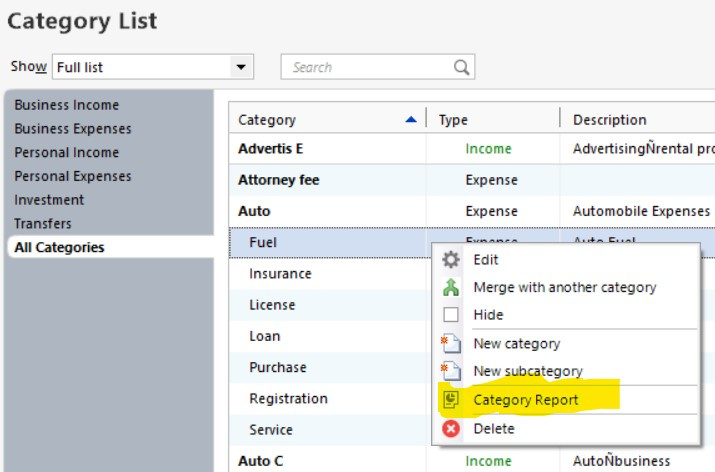
    I get a Category Report option by right-clicking on a category:

    q.jpg
  • Boatnmaniac
    Boatnmaniac Quicken Windows Subscription SuperUser ✭✭✭✭✭

    Yes, I should have mentioned that is another way to get to the Summary and Detailed reports that I posted about above. Thanks for pointing out this alternative way to get the reports.

    I have a lot of categories and subcategories that have 0 transactions (yeah, I should probably hide them). By first adding the Usage column it helps to identify which categories and subcategories I can get reports for….either by right clicking on the category/subcategory or simply clicking on the number of Usages.

    Quicken Classic Premier (US) Subscription: R65.17 on Windows 11 Home