E*Trade Direct Connect fails

aikoaiko3
aikoaiko3 Quicken Windows Subscription Member ✭✭

Multiple E*Trade accounts that had been using Direct Connect and "Complete investing" to track transactions. A decade+, no problems.

Today, I changed my E*Trade username and password. First, I went into the Quicken Classic Password Vault to make the change, but Quicken failed to connect (authentication.) So I deactivated Online Services on all of the E*Trade accounts, which set them all back to "Simple investing." I changed the accounts back to "Complete investing" and tried to re-enroll in Direct Connect. Now, every time I choose "Etrade," Advanced Settings, "Direct Connect," and enter credentials, it simply says "We encountered an error while connecting to your bank."

Direct Connect had been working right up until this morning when I changed my Etrade username and password. Curious if this is related to the recently-announced Morgan Stanley Wealth Management outage issue. Any help is appreciated. Thank you!

R65.17, Windows 11 25H2

Comments

  • aikoaiko3
    aikoaiko3 Quicken Windows Subscription Member ✭✭

    Update from connlog.txt:

    20251218 10:34:07: QFN: Beginning send to https://ofx.etrade.com/cgi-ofx/etradeofx
    20251218 10:34:08: ***QFN kQFFinished: returns 67305875
    20251218 10:34:08: The application has been denied access to the server. Try again now, or wait and try later.
    20251218 10:34:08: QFN: End send to https://ofx.etrade.com/cgi-ofx/etradeofx, netstatus 15

  • Quicken Kristina
    Quicken Kristina Quicken Windows Subscription Moderator mod

    Hello @aikoaiko3,

    Thank you for reaching out! To help troubleshoot, I recommend checking if E*Trade requires authorization for 3rd party apps (like Quicken) to be able to connect. If additional authorization is needed, you may need to do that through E*Trade's website prior to connecting the accounts.

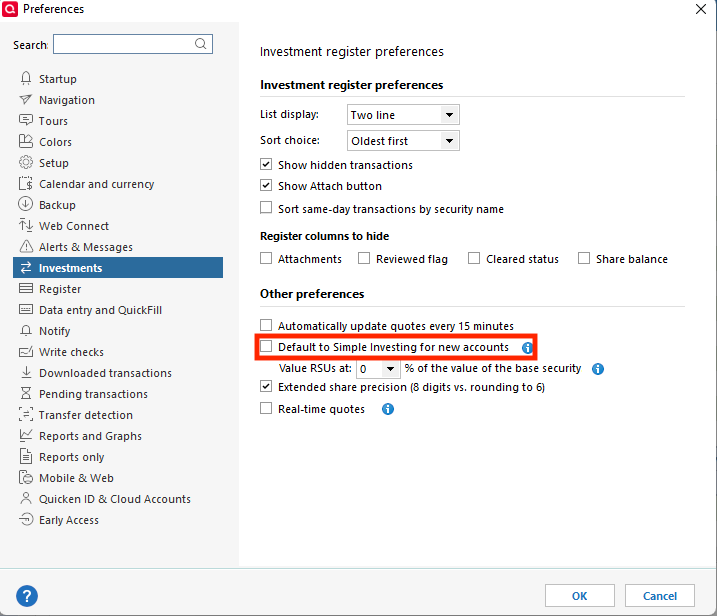
    You mentioned that it defaulted to Simple investment tracking when you reconnected your accounts. To make sure you don't have that set as your default option, please navigate to Edit>Preferences>Investments, and make sure Default to Simple Investing for new accounts is not selected.

    simple investing in preferences QWin.png

    I hope this helps!

    Quicken Kristina

    Make sure to sign up for the email digest to see a round up of your top posts.