Explore What ifs and tax link cause error messages about being unable to uninstall [Edited]

Lance C
Lance C Quicken Windows Subscription Member ✭✭

When I am in the planning window and I select "Explore What If's" I get a popup window trying to configure Quicken. It will fail and I will get another popup indicating "There are Quicken components currently open and can not be uninstalled. Please close Quicken, and try uninstalling again." . This also occurs when selecting a tax link from the Projected Tax for the Home>Main View screen.

I am on a Windows 10 Enterprise. Quicken Classic Premier version R65.17, Build 27.1.65.17. The quicken about window indicates my subscription expired at the end of November. However, I have been billed and paid my subscription and if I select Help>Check Subscription Status it indicates my subscription is up to date.

Ignore grammar issues, they are copied directly from the messages within Quicken.

Comments

  • Quicken Kristina
    Quicken Kristina Quicken Windows Subscription Moderator mod

    Hello @Lance C,

    Thank you for letting us know you're encountering these issues. To help troubleshoot, please provide more information. When did you first notice this issue? Did the issue coincide with any other recent changes, such as a program/computer update or unexpected program/computer shut down? Do you use an anti-virus and/or VPN?

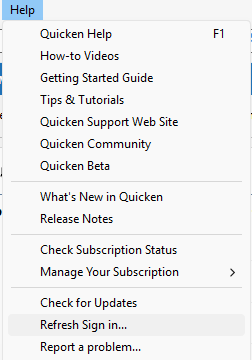
    Since you mentioned that the About Quicken screen sees an expired subscription, even though your subscription is up to date, please navigate to Help>Refresh Sign in…

    Screenshot 2025-12-20 at 5.07.36 PM.png

    If the issues are being caused by your file getting out of sync with Quicken's servers, refreshing your sign in should correct the problem.

    I look forward to your reply!

    Quicken Kristina

    Make sure to sign up for the email digest to see a round up of your top posts.