Reconciliation w/ Fidelity Managed Accounts Still Shows Zero Balances

cornguy.rln
cornguy.rln Quicken Windows Subscription Member ✭✭

Am using Quicken Classic v8.4.0 for macOS 15.6.1.

Reconciliation finally works for my Fidelity Cash Management Account and for a non-managed Fidelity account.

  • The CMA indicates the cash balances are currently held at QPIQQ Wells Fargo NA, QBNYQ The Bank of New York Mellon, and QUSBQ US Bank.
  • The non-managed account uses FIDELITY GOVERNMENT MONEY MARKET (SPAXX) for cash reserves.

However, the Reconciliation process for two of my Fidelity managed accounts still fails to show anything but a zero online balance.

  • Both use FIDELITY GOVERNMENT CASH RESERVES (FDRXX) for cash reserves

What is the status of the efforts to correct this issue?
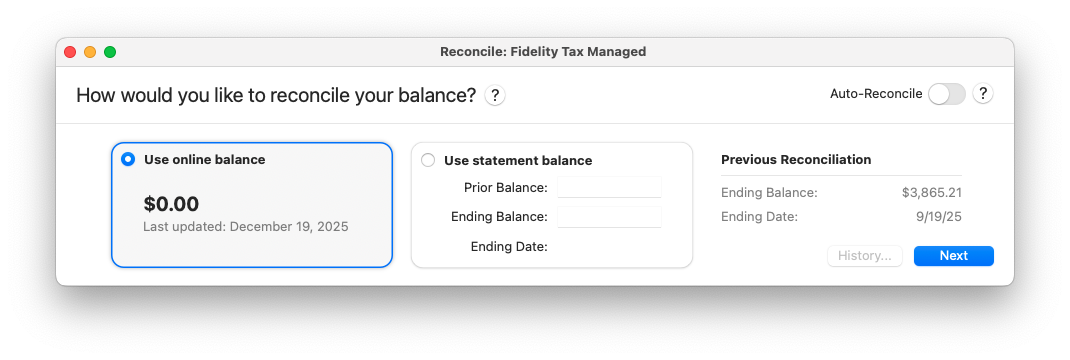
Zero Balance.png

Comments

  • Quicken Kristina
    Quicken Kristina Quicken Windows Subscription Moderator mod

    Hello @cornguy.rln,

    Thank you for letting us know you're still seeing this issue. Our teams are already working to resolve the issue. We do not have an ETA.

    Thank you!

    (CTP-15575)

    Quicken Kristina

    Make sure to sign up for the email digest to see a round up of your top posts.

  • cornguy.rln
    cornguy.rln Quicken Windows Subscription Member ✭✭

    Kristina,

    Want to emphasize that even though Quicken may categorize me as a Windows subscriber, this problem is occurring in Quicken Classic for Mac. I switched from the Windows version to the Mac version earlier this year.

    bob nielsen

  • Quicken Kristina
    Quicken Kristina Quicken Windows Subscription Moderator mod

    Thank you for the heads up!

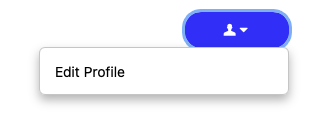
    It looks like you're currently using Quicken Classic for Mac (QMac) version 8.4.1. If you need to update your profile on the Community to reflect that you're using QMac, you can do so by clicking on your profile picture, then on your username to access your profile. Then, click the dropdown and select Edit Profile.

    Screenshot 2025-12-26 at 5.55.11 PM.png

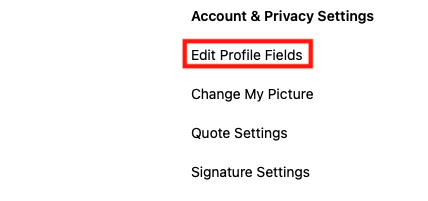
    In the Edit profile screen, click on Edit Profile Fields.

    Screenshot 2025-12-26 at 5.55.39 PM.png

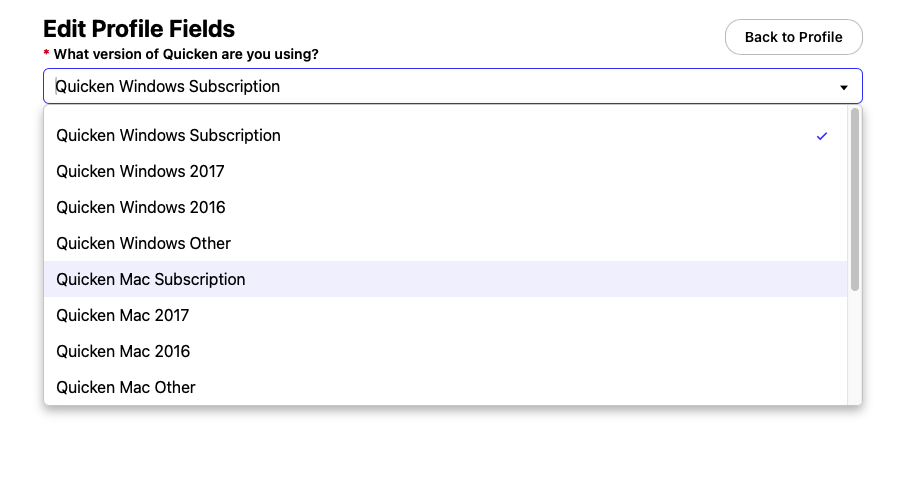
    Then, select the correct version from the dropdown and click Save.

    Screenshot 2025-12-26 at 5.55.53 PM.png

    I hope this helps!

    Quicken Kristina

    Make sure to sign up for the email digest to see a round up of your top posts.

  • Ramias
    Ramias Member ✭✭✭
    edited December 2025

    [Removed - Duplicate Post]