CC-502 Error with Jackson National Life when using One Step Update

Hemar
Hemar Quicken Windows Subscription Member

I can set up an account and connect with Jackson National Bank using One Step Update for an annuity I set up through my agent. However, the amount shown in the account is $0.00. When I called Jackson to inquire, they informed me that the data is not available to Quicken.

Why allow the connection if the data is not available?

Comments

  • Quicken Kristina
    Quicken Kristina Quicken Windows Subscription Moderator mod

    Hello @Hemar,

    Thank you for reaching out. To clarify, are you seeing a CC-502 error when attempting to add/update your account, or is it seeming to add/update correctly, but then shows a $0.00 balance (or both)?

    If you are seeing a CC-502 error, please try troubleshooting the issue by following these steps from our article on CC-502 errors:

    Refresh your account information

    1. Open the transaction register for the account with the error message.
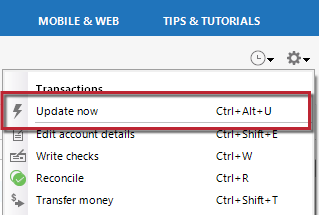
    2. Click the Gear Icon in the upper right of the register and select Update Now. image.png
    3. Follow the on-screen instructions to complete the update.
    4. Repeat these steps for each account with this error.

    If refreshing your accounts does not resolve the issue 

    Try waiting one business day. This error message is typically caused by maintenance on your bank's website. You can try updating again in a few hours or the next business day. If the issue still occurs after one business day, try the steps above again.

    If the issue persists

    Please Contact Us so we can help you fix this issue.

    I look forward to your reply!

    Quicken Kristina

    Make sure to sign up for the email digest to see a round up of your top posts.