Posting Date vs Transaction Date
Until the latest update, I was able to post transactions as they happen and, when I downloaded my bank info, they would take on the transaction date as entered OR download as a duplicate transaction. Now, all transaction dates are changing to the posted date and this is starting to take me a lot of time to correct. I need to know when purchases, etc, were made and NOT when they cleared the bank. I see this issue has been dealt with before but all threads have been closed so I had to start another one. The option of defaulting to the transaction date isn't in the preferences like was shown in some people's examples. So, how do I change it back to the transaction date without editing each transaction. It's taking more time than I care to take.
Comments
-
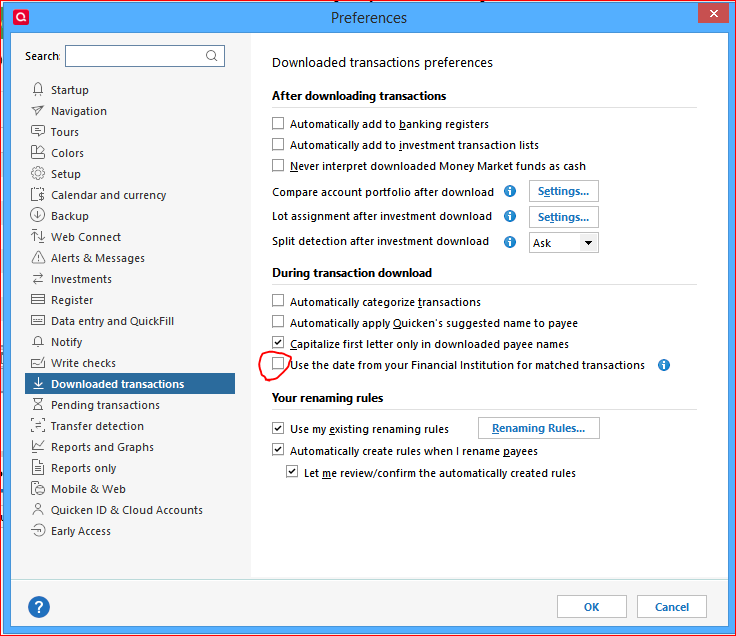
For newly downloaded transactions, please take a look at this setting in Edit / Preferences … is it on or off?
While you're on this view, also hover the mouse over the little (i) button for an additional explanation.
The only way to mass-change existing register transactions is Edit > Find/Replace. Use with care, to avoid making unintended, incorrect changes. And backup your data file before starting to make changes.
0
Categories
- All Categories
- 42 Product Ideas
- 36 Announcements
- 225 Alerts, Online Banking & Known Product Issues
- 21 Product Alerts
- 497 Welcome to the Community!
- 677 Before you Buy
- 1.3K Product Ideas
- 54.4K Quicken Classic for Windows
- 16.5K Quicken Classic for Mac
- 1K Quicken Mobile
- 814 Quicken on the Web
- 115 Quicken LifeHub