Memo/Notes (Q Mac)

I would love it if Quicken would allow the memo/notes column in the register to be independent and not copied for like charges.
For example, I took an uber and added Halifax in the notes section so that I would remember that it was different from all my other uber charges, but now every uber I take has a memo that says Halifax.
Memo/Notes should be for distinguishing charges from other similar charges.
I have no idea if this is the right place to suggest something like this but I really hope someone from Quicken sees this!
Thank you.
Comments
-
@treestar73 It sounds like you have a QuickFill rule for Uber, and that rule includes the Memo value. You can check this by going to Window > Payees & Rules > QuickFill Rules and search for Uber. You should find the rule which includes the "Halifax" memo. You can edit the rule to remove that memo but leave the rule for the category, or you can delete the rule.
More generally, Quicken already offers a lot of flexibility in creating and applying QuickFill rules. There is a "global" setting in Settings > Register to automatically create QuickFill Rules when you enter/edit a transaction. You can turn this off (uncheck the checkbox) if you prefer. Or you can leave it on (checked), and change the "When saving new QuickFill rules, save…" option to "Category Only" instead of "All Fields". With Category Only, a new QuickFill rule for a particular Payee will have only the Category you want applied, but not any of the other fields (Memo, Amount, Tags, etc.).
Whether you have that Setting on or off, Quicken allows you to override in when entering/editing any transaction. When you click in the Category field of a transaction, a little blue box pops up above the Category field to control whether you want Quicken to create/update a QuickFill rule for this transaction, and if checked, whether you want it to save All Fileds or Category Only.
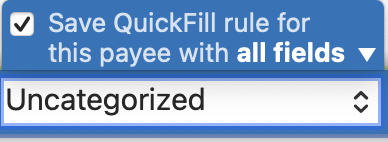
This combination of the global setting and the pre-transaction setting gives users ultimate control over whether QuickFill rules should be created and whether a QuickFill rule is category-only or all fields.
I like being able to save some of my QuickFill rules with the Memo field. Sometimes the Memo is typically the same each time I use a Payee. For many of my recurring bills, I have a memo which is sort of a template of what and how to record something. For instance, I have some memos which are "mmm-mmm" to remind me to enter the range of months covered by a bill. For my electric and water bills, I include more in the memo to prompt me to enter additional information: "mmm-mmm (xxx kWH)" or "xxx gallons". But there are other Payees, such as Home Depot or Amazon, where the purchase is different every time and I don't want a standard memo applied.
I think having the global setting as well as the transaction setting override allows me complete control over when and what QuickFill rule I save. And I thus think that what you are asking for in your post already exists; you just have to set your preferences (and probably edit or delete some existing QuickFill rules) to make it perform the way you want it to.
@treestar73 Please post back and let us know if what I describe above allows you to accomplish what you were asing for, or if there is some additional functionality that doesn't currently exist which you would like to see.
Quicken Mac Subscription • Quicken user since 19930

Categories
- All Categories
- 68 Product Ideas
- 35 Announcements
- 222 Alerts, Online Banking & Known Product Issues
- 21 Product Alerts
- 633 Welcome to the Community!
- 673 Before you Buy
- 1.2K Product Ideas
- 54.1K Quicken Classic for Windows
- 16.4K Quicken Classic for Mac
- 1K Quicken Mobile
- 813 Quicken on the Web
- 115 Quicken LifeHub