New Fidelity Connection Method problems

pauljasmine
pauljasmine Quicken Windows Subscription Member ✭✭

Ever since Quicken changed the Fidelity connection method, I get the Reathorization required popup (see attached). I have reauthorized about 100 times and still get this popup. I am able to download transactions, but how do I make this popup go away?

Screenshot 2025-12-30 at 5.26.03 PM.png

Also, since the new connection method, Quicken does not properly categorized shortsell option transactions, it categorizes them as SOLD. This used to categorize correctly. It used to not categorize covershort option transactions and now it does (usually, although sometimes categorizes them as BOUGHT)!

[Edit - Removed Personal Information]

Comments

  • Quicken Kristina
    Quicken Kristina Quicken Windows Subscription Moderator mod

    Hello @pauljasmine,

    Thank you for letting us know you're encountering this problem. Based on the information in your screenshot, Quicken is still seeing two accounts connected to the old (no longer valid) Fidelity connection, which is why you keep getting that popup.

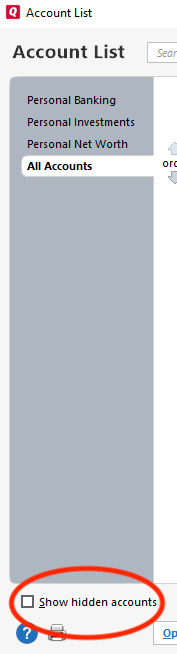
    To resolve the issue, backup your Quicken file, then navigate to Tools>Account List. In the account list window, if you see the option to show hidden accounts, make sure to select that checkbox (if you do not see the option, that means you don't have any hidden accounts).

    show hidden accounts win.png

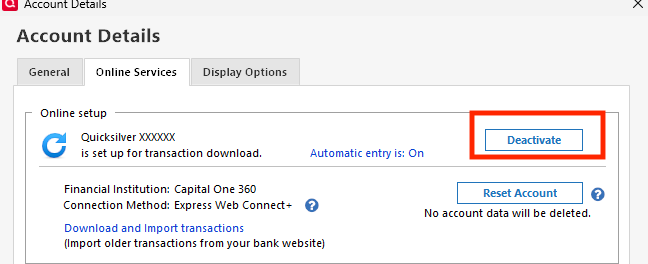
    Scroll through the account list to find the two accounts that Quicken specified on the reauthorization popup. Once you locate those accounts, for each of those accounts, click the Edit button next to the account, select the Online Services tab, and click the Deactivate button.

    deactivate.png

    Once those accounts are deactivated, you should no longer get the reauthorize prompts.

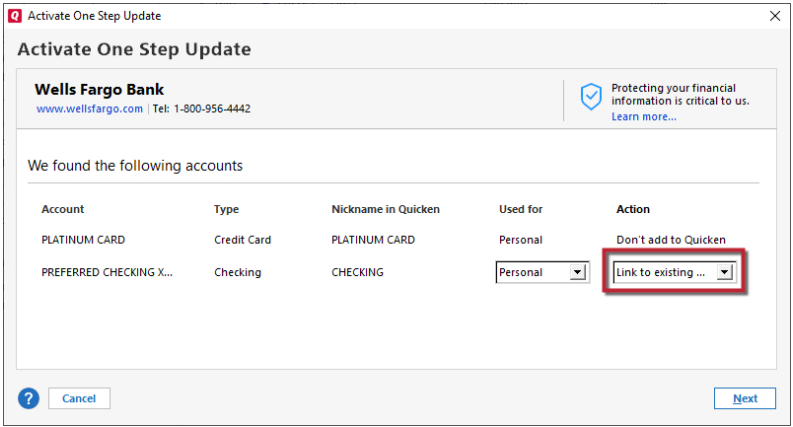
    If you don't already have those accounts connected via the new method, you would then need to navigate to Tools>Add Account and follow the prompts to reconnect the accounts using the new connection method. Make sure to carefully link the accounts to the correct nickname in Quicken.

    Link to Existing.png

    Please let me know how it goes!

    Quicken Kristina

    Make sure to sign up for the email digest to see a round up of your top posts.