Set up Rename Rules for transfer in Q; No account number in bank download

Eagle
Eagle Quicken Windows Subscription Member ✭✭✭

Q - Quicken

V R65.29; Build - 27.1.65.29; Windows 11; Downloading from US Bank

Hello all .. Soon to be Happy New Year!

I am trying set up my renaming rules for transfers done in Q. Category is used to point the where the transfer is coming or going, as I understand it. Not like a regular category such as Utilities:Water. If not set up, I don't know to which account the transfer was sent.

My problem is that I don't have the account number in the download from US Bank. It might have "/Internet Banking transfer deposit" or some similar description. Sometime there is an account but usually no.

I'd like to know how some folks set up the category pointing to the proper account based what might come down in the downloads. Or is there another way to do this?

My plan was to check for account number in the downloaded transaction, but I can't depend on the account number being there.

Any thoughts on this would be appreciated.

Thanks for listening …

Bob

Comments

  • UKR
    UKR Quicken Windows Subscription SuperUser ✭✭✭✭✭
    edited January 1

    If you have issues with transfer transactions not being created correctly by the transaction download process:
    For best results manually enter transfer transactions into your register BEFORE you download transactions from the bank which contain the transfer confirmations. For recurring transfers use scheduled reminders and enter them a day or two before the due date.
    Be sure to use distinct Payee Names for each transfer / credit card payment to avoid confusing Quicken - memorized payee entries.
    That takes the guesswork out of the download process. Because a correctly entered transfer transaction already exists in your account registers, the download process should just match the downloaded transfer transaction to the existing one in both accounts.

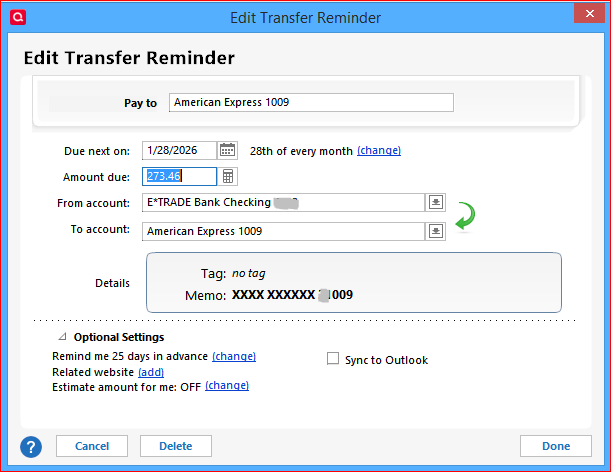
    Here's what a Scheduled Transfer Reminder looks like in my data file, to pay a credit card from my checking account.

    image.png

    Each of my reminders has a distinct "Pay to" payee name, making it easy for me to see at a glance where the money is going to.
    No matter what kind of cryptic data arrives in the bank download, I always have understandable transactions in my registers.

    No need for Renaming Rules doing it this way.

  • Eagle
    Eagle Quicken Windows Subscription Member ✭✭✭

    Hello and thanks for getting back with me.

    I understand your thoughts of putting the reminders out on the register ahead of time. That is what I do (when I remember!).

    My problem is this. Look at the first three entries on the download that is attached. Those are 3 transfers to two savings and a checking account ($20.01, .02, .03). They were done with online banking at US Bank. When Q reads them in, it has nothing to compare to to decide which account to put them. Or am I missing something? It is my understanding that the category field is used for transactions. Where the amount comes from and goes to. This is what I was attempting to do with rename rules and finding the account number in the downloaded transaction.

    I just feel I am missing something or looking at it wrong.

    Thanks for your input.

    Bob

  • Jim_Harman
    Jim_Harman Quicken Windows Subscription SuperUser ✭✭✭✭✭

    This is not a problem that can be solved with Renaming Rules.

    As @UKR explained above, if these transfers happen regularly, once a month for example, you should set up a transfer Reminder for each of these transfers. This will be easy to do in your case because each transfer is for a different amount. Set the Reminders so that they are automatically entered in the register a few days before the actual transfer will take place. Give each Reminder a descriptive Payee - "Transfer to Fred's account" for example.

    Then when the transactions download, Quicken will match them to the transactions that are already in the register based on the date and amount. It does not matter what the downloaded Payee is.

    QWin Premier subscription
  • Eagle
    Eagle Quicken Windows Subscription Member ✭✭✭

    OK, thanks again to Jim and UKR for your explanations.

    I will set that up.

    This post is closed

    Bob