2026 Budget based on 2025 Actuals

Don32@
Don32@ Member ✭✭✭

I seem to be having issue with creating a 2026 Budget based on 2025 Actuals. How do i do this?

Comments

  • Quicken Anja
    Quicken Anja Moderator mod

    Hello @Don32@,

    Thanks for reaching out!

    Please follow these steps below which can also be found in this Help Article:

    1. Go to the Planning tab and select Budgets.
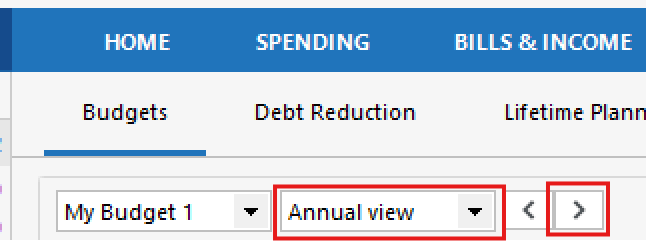
    2. In Annual View, click the > button next to the current year. image.png
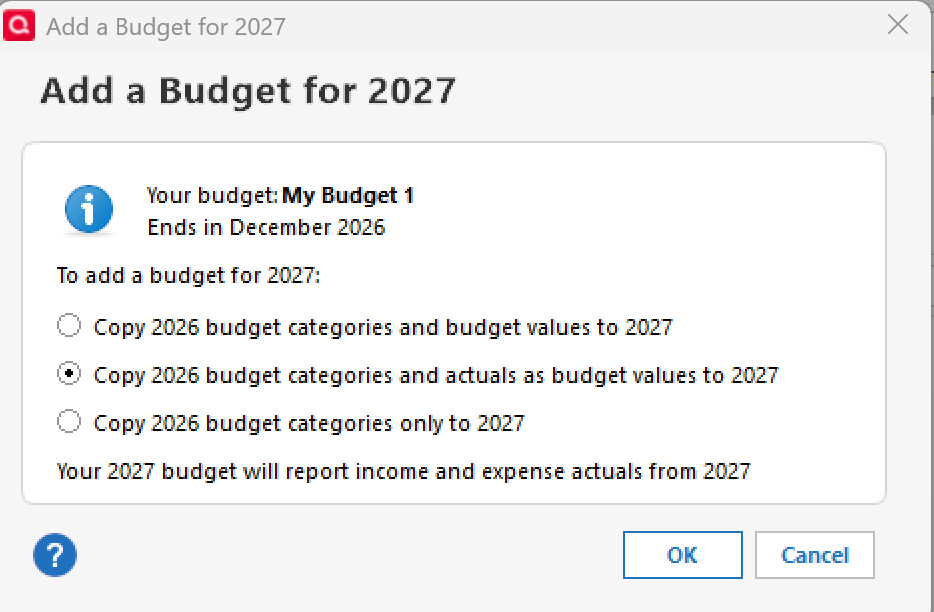
    3. In the Add a Budget for [next year] window, choose one of the following (note: my screenshot is showing 2027 as 2026 is already set up in my own Quicken):
      • Copy [year] budget categories and budget values to [next year]
      • Copy [year] budget categories and actuals as budget values to [next year]
        • You'll want to choose this option to use actuals. image.png
      • Copy [year] budget categories only to [next year]
    4. Select OK.

    Hope this helps!

    -Quicken Anja
    Make sure to sign up for the email digest to see a round up of your top posts.

  • Don32@
    Don32@ Member ✭✭✭

    Is there a way yo go back and use 2025 actuals or is it to late for that? Thanks

  • GeoffG
    GeoffG Quicken Windows Subscription SuperUser ✭✭✭✭✭

    Yes, you can restore from a backup dated prior to 1/1/2026. Preferably a 12/31/2025 backup will provide the least amount of rework.

  • mshiggins
    mshiggins Quicken Windows 2017 SuperUser ✭✭✭✭✭

    If the problem is Quicken is now specifying 2027 budget since we are now in 2026, I would temporarily set the date on your computer to 12/31/2025, create the 2026 budget, and reset the computer’s date to the current date.

    Quicken user since Q1999. Currently using QW2017.
    Questions? Check out the Quicken Windows FAQ list

  • Quicken Anja
    Quicken Anja Moderator mod

    @Don32@ Thanks for following up! The suggestions from @GeoffG and @mshiggins are really your best options here.

    Either approach will get you back on track with using last year’s actuals for your 2026 budget.

    Thank you!

    -Quicken Anja
    Make sure to sign up for the email digest to see a round up of your top posts.