This discussion was created from comments split from:
Fidelity EWC+ Brokerage Securities Sales Not Showing [Edited]
.
I have a similar problem. the R65.29 release notes claim they fixed some issues. Not only are the issues not fixed, they are worse as all transaction downloads have stopped. Additionally, there were zero instructions on "running the wizard" and I had to guess at the exact steps Quicken wanted done.
NOT FIXED Fixed issues in the wizard used to set cash treatment for money market funds in downloaded investment accounts. If you see a cash balance mismatch, re-run the wizard from Edit Account/Online Services.
Hello @evilknieval,
Thank you for letting us know you're seeing these problems. To start troubleshooting this issue, please follow these steps from our article on missing transactions/transactions not downloading: Be sure to follow these steps in order:
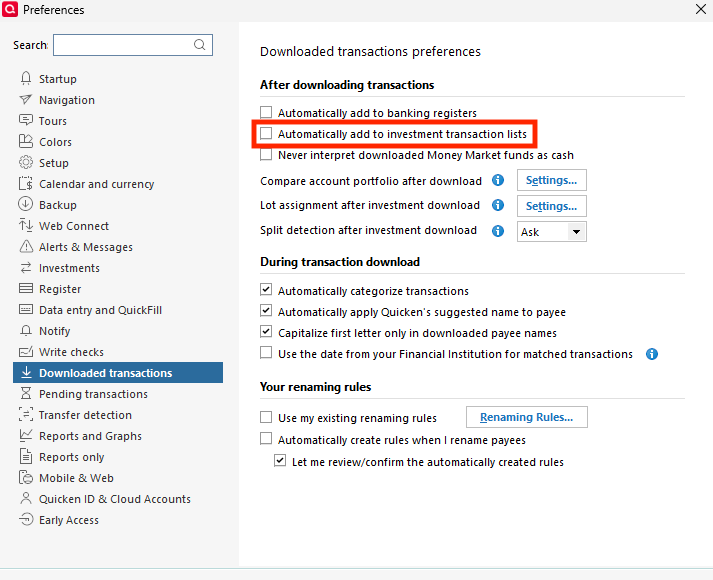
1. Go to Edit > Preferences > Downloaded Transactions. The option Automatically add to investment transaction lists needs to be unchecked.
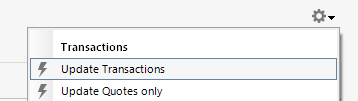
2. Refresh your online account information by clicking the Actions Gear Icon on the upper right of the register, and select Update Transactions. Follow the on-screen instructions to complete the update.
3. Confirm that the Sort Order in your account is by Date; just click the top of the Date column in your account register. It's possible the transactions are in your register, but not where you thought they'd be.
4. Try refreshing your login session: To do this, go to Help > Refresh Sign in. After completing the log-in process, trying running a One Step Update again.
5. Go to Tools > Account List and check Show Hidden Accounts at the bottom left. Confirm the missing transactions haven't been added to a hidden account by clicking on the name of any account that appears with a check mark in the Hidden column.
What specific issue(s) are you encountering with the ability to set cash treatment for money market funds?
I look forward to your response!
I haven't seen a response from you. Do you still require assistance?
Thank you!
Hello again,
Checking in once more before this thread is closed. Let us know if you still need assistance.
Due to the lack of response, I went ahead and closed this post.
If you still require assistance, please feel free to start a new post.