Deleting memorized payee issue

StanleyK
StanleyK Quicken Windows Subscription Member ✭✭

This is a recent issue for me, probably after one of the more current updates. When I delete a memorized payee (I have a long list), it deletes it, but instead of staying at the same place on the list like it usually did, it goes back to the first entry (A-Z). So, I must scroll down to where I left off. Very annoying. Anyone else experiencing this? A fix?

Answers

  • NotACPA
    NotACPA Quicken Windows Subscription SuperUser ✭✭✭✭✭

    You can prune the list automatically with EDIT, Preferences, "Data Entry & Quickfill" and set the "Remove memorized payees … " option to your liking.

    Mine is set to 4 months.

    Q user since February, 1990. DOS Version 4
    Now running Quicken Windows Subscription, Business & Personal
    Retired "Certified Information Systems Auditor" & Bank Audit VP

  • UKR
    UKR Quicken Windows Subscription SuperUser ✭✭✭✭✭

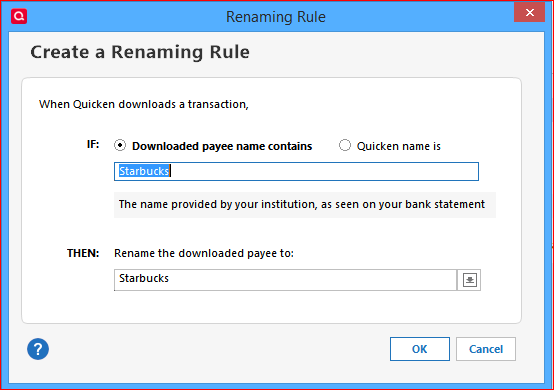
    In addition to the above pruning suggestion, you can, if you're not doing so already, set up and use Renaming Rules to avoid loading both your registers and your Memorized Payee List with meaningless payee names
    (e.g., to get a single payee name = "Starbucks" instead of "POS TRANS 070124 STARBUCKS", "POS TRANS 070224 STARBUCKS", "POS TRANS 070324 STARBUCKS", etc., for your daily cup of coffee).

    image.png

    These Renaming Rules apply to new downloaded transactions only.
    To clean up registers' existing transactions use Edit / Find/Replace.

  • StanleyK
    StanleyK Quicken Windows Subscription Member ✭✭

    Thanks for the responses. I am aware of the pruning feature, but I want to have more control over what specific payees get deleted. So, I do it manually. As to renaming, I already do that. Those two good suggestions would appear to be just workarounds of the issue I am having, i.e., when I delete a payee manually, instead of the list staying in the same spot, it jumps back to the beginning. And this just started recently. It didn't do it before. So something changed in the Quicken software. I presume inadvertently.