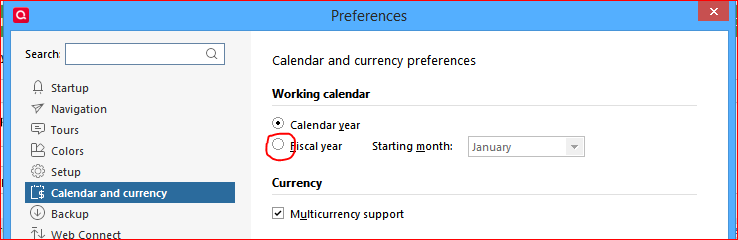
My fiscal year runs April to March - how do I customize the dates of my budget year?
Windows 11 Home 25H2
Answers
-
Assuming that you have a feature level of Quicken Classic for Windows which supports Fiscal Years, please take a look at Edit / Preferences / Calendar. Enable the radio button at Fiscal Year and set the starting month.
0 -
Hello @RedC1sc,
We haven't heard back from you in a while. Do you still need assistance?
Were you able to give @UKR's suggestion a try?Check back and let us know! Thank you.
-Quicken Anja
Make sure to sign up for the email digest to see a round up of your top posts.0 -
Hello again,
Checking in once more before this thread is closed.
Let us know if you still need assistance.Thank you!
-Quicken Anja
Make sure to sign up for the email digest to see a round up of your top posts.0 -
Hello again,
Due to the lack of response, I went ahead and closed this post.
If you still require assistance, please feel free to start a new post.
Thank you!
-Quicken Anja
Make sure to sign up for the email digest to see a round up of your top posts.0
Categories
- All Categories
- 46 Product Ideas
- 34 Announcements
- 245 Alerts, Online Banking & Known Product Issues
- 23 Product Alerts
- 513 Welcome to the Community!
- 679 Before you Buy
- 1.4K Product Ideas
- 55.4K Quicken Classic for Windows
- 16.8K Quicken Classic for Mac
- 1K Quicken Mobile
- 829 Quicken on the Web
- 123 Quicken LifeHub