I'd like to link to my Xcel Energy account and receive eBills.
Here is what I've done so far:
- I created a biller named named Xcel Energy.
- I clicked on "Link eBill", located Xcel Energy, and entered the account information on the form, making sure it matched the information on my most recent statement.
- I clicked "continue" and entered payment and schedule information.
- I submitted the request
I've done this twice. Each time, it will say "Enrollment pending" next to the biller until enrollment fails.
Then I'll click on the 3 dots and select "fix biller" and repeat entering account and schedule information.
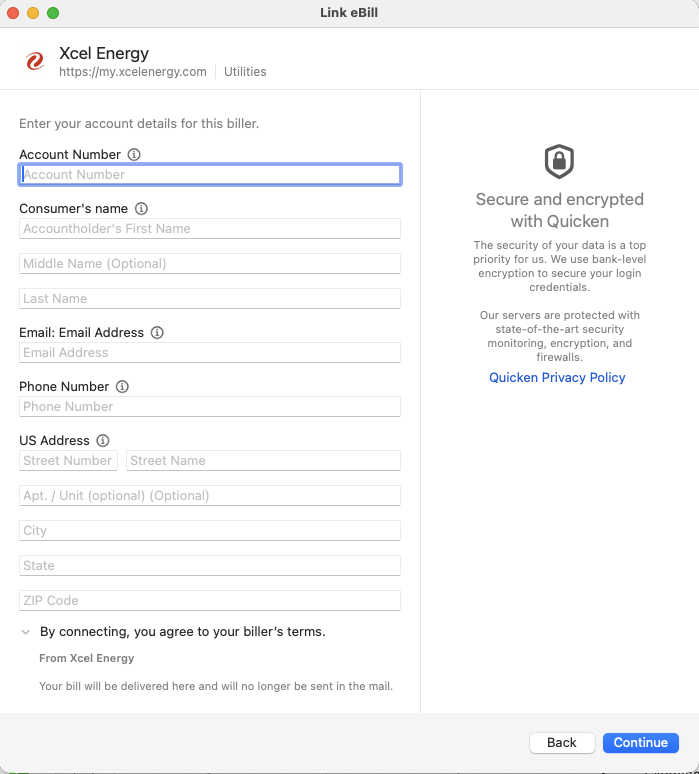
Enrollment information form screenshot ( no person information for privacy reasons )
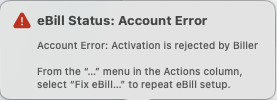
Error message screenshot
What I've noticed:
- It never asked me to log into my account.
How can it enroll me for eBills without authenticating me? That missing piece might be why enrollment is failing.
I'm on macOS 26.2 and Quicken Classic 8.4.1. I have 7 other eBill enrollments that are working, only Xcel Energy is failing to enroll.
Help!

