Transfer Issues

JohnGW9
JohnGW9 Quicken Windows Subscription Member ✭✭

I have a weekly transfer between banks. The withdrawal is completed on Thursday and the corresponding deposit arrives on Monday the following week. This is a scheduled transaction that Quicken fails to recognize and enters it as a new transaction in the receiving account. I delete the new transaction and clear the correct corresponding transaction but this deletes the next week's transfer in the scheduled transactions. The home screen will not accept a date change to the correct date for the next transfer. Help!

Comments

  • volvogirl
    volvogirl Quicken Windows Other SuperUser ✭✭✭✭✭

    Is it because the dates on the banks are different? You might want to have the withdrawal going to an intermediate holding account like called Funds in Transit. Then when it is deposited that transaction goes to the holding account to clear it.

    Sounds like a transfer I just did too. Made it on Thur 1/8 and it got deposited to my other bank today Monday 1/12. I manually enter my transactions so I just entered both the withdrawal and deposit dated 1/12 today. A transfer has to have the same date on both sides. I didn't bother setting up a holding account.

    I'm staying on Quicken 2013 Premier for Windows.

  • JohnGW9
    JohnGW9 Quicken Windows Subscription Member ✭✭

    I have been adjusting the date of receipt. Just being able to manually match the transaction would be ok without messing with the upcoming transfer schedule would work, too.

  • UKR
    UKR Quicken Windows Subscription SuperUser ✭✭✭✭✭

    If you have issues with transfer transactions not being generated correctly:

    For best results manually enter transfer transactions into your register BEFORE you download transactions from the bank which contain the transfer confirmations. For recurring transfers use scheduled reminders and enter them a day or two before the due date.

    Are you automatically accepting downloaded transactions into your registers?
    You should, at least for a while, turn off the "automatically accept downloaded transactions into registers" setting to gain better control over what is downloaded and what to do with it. This way you can manually match a downloaded transaction and avoid duplicate register transactions from being created.


    Remember: Transfer transactions in Quicken are generated as a pair of linked register transactions. Changing or deleting one of the transactions changes or deletes the other one, too, due to the linkage.


    Be sure to use distinct Payee Names for each transfer / credit card payment to avoid confusing Quicken - memorized payee entries.

    If possible, reschedule this weekly transfer to earlier in the week so that the deposit arrives on or before Friday. This way the deposit arrives faster and doesn't take a weekend vacation.

  • JohnGW9
    JohnGW9 Quicken Windows Subscription Member ✭✭

    Ultimately, I think the issue lies with the receiving bank. The transfer is withdrawn on Thursday and doesn't credit until Tuesday, so the connection between the two transactions is broken. Broken, or delayed until the deposit appears to close to the next week's scheduled transfer. I adjusted the withdrawal day to see if that helps.

  • Chris_QPW
    Chris_QPW Quicken Windows Subscription Member ✭✭✭✭

    Lagging like this is very common. The cleanest might be to use an intermediate account, but that tends to be a pain to maintain.

    Looking at the problems, you describe for the matching, I think I might be able to suggest a few things.

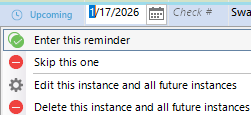
    The first is that if you set a scheduled reminder to automatically enter you can't change the date or even get it to enter at a different date. Change it to remind you and you will be able to change these things.

    You can then click on the reminder status (blue dot column) and get these options:

    image.png

    Second, for the matching, make sure the reminder is entered into the register before the downloaded transaction. The reminder should be on or before the download date for Thursday.

    This will show up in the other account "early" and can give a false sense of what is in each account, but the only ways to get around this is by using an intermediate account or not use a linked transfer.

    Signature:
    This is my website (ImportQIF is free to use):

    http://www.quicknperlwiz.com/