What do I have to do get credit card bills to download to my bill pay?

smm13
smm13 Quicken Windows Subscription Member

I removed all of my credit cards and added them back when Quicken did their upgrade. All of the transactions show up, but the bills never do. Instead of being able to click and pay the bill, I have to go online an to my credit card accounts to get the amount due and enter it manually. Thoughts?


Answers

  • Quicken Kristina
    Quicken Kristina Quicken Windows Subscription Moderator mod

    Hello @smm13,

    Thank you for reaching out. To help troubleshoot, please provide more information:

    1. Which billers is this happening with?
    2. What do you see in your Quicken for those billers (for example, does it perpetually show "Awaiting Next Bill")?
    3. Are you seeing any icons next to the billers indicating a connection issue? Online Biller error icon.png

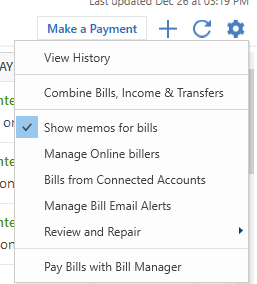
    You mentioned that you're no longer able to click to pay your bill in Quicken. I checked our internal tools, and it's not showing that you have a payment account set up for Quick Pay or Check Pay. To set up a payment account, in the Bills & Income tab, click the gear icon near the upper right, then select Pay Bills with Bill Manager.

    Screenshot 2026-01-13 at 4.30.46 PM.png

    I look forward to your response!

    Quicken Kristina

    Make sure to sign up for the email digest to see a round up of your top posts.