Downloaded Transactions Not Showing In Register
R65.17, Build 27.1.65.17
I have 6 different banking and financial accounts that have transactions (44 transactions in all) that have been downloaded to Quicken. The red flag for the new transactions is showing up next to each account and the transactions are showing up under Tools | Online Center, but the transactions will not load into the account registers.
I have gone through all the troubleshooting steps in this forum and the Quicken Support site, and also spoken to a Quicken Support person by telephone, but still cannot solve the problem of getting the downloaded transactions into the register. The Support person I spoke to seems to think the bank still has not processed the transactions, but this is 6 accounts spread across 5 different institutions from January 1 through January 12.
This is my second posting about this problem, as the first post was somehow deleted.
[Edited - Readability]
Comments
-
Hello @SteveSensei,
Thank you for letting us know you're encountering this issue. I tried to look up your interaction with Support, but wasn't able to find the ticket. Do you have the ticket number handy?
Which financial institution(s) is this happening with?
You mentioned that you've already done all the troubleshooting you could find on this Community and the Quicken Support site. Just to confirm, have you followed all of the troubleshooting steps in the article linked below?
If not, please start by following any troubleshooting steps in that article which you haven't already done.
If you have followed all those steps, please let me know what happened in the copy of your file and what the results of the Validate were.
I look forward to your reply!
Quicken Kristina
Make sure to sign up for the email digest to see a round up of your top posts.
0 -
No ticket number was given to me.
This is happening to me on accounts with Bank of America, Travis Credit Union, Chase Bank, Charles Schwab and Fidelity Investments.
I have gone through all the steps in the "Quicken Says There Are Transactions…." guidelines.
Several problems showed up in the validation routine, but once fixed, the problem is still happening.Tue Jan 13 22:12:08 2026]T
File: "C:\Finances\Quicken\Data\1991Data"
QDF:
Validating your data.
No errors.QEL:
The old file was corrupt and only some of the data has been recovered.QEL:
All internal consistency checks passed.[Tue Jan 13 22:17:48 2026]
Additional data conversion in QWMain started[Tue Jan 13 22:17:52 2026]
The following transaction(s) were linked to account(s) that are no longer in Quicken. Quicken has changed them to indicate that the account was deleted. Please check them and set the category or destination account correctly. Make sure that this does not duplicate transactions.
Account Savings-B of A: 4/30/2009 YUBA COMM COLLEG DES:SALARY 4,700.58
Split 7 [Unspecified Account] -1,000.00
Account Savings-B of A: 5/29/2009 YUBA COMM COLLEG DES:SALARY 4,695.73
Split 8 [Unspecified Account] -1,000.00
Account Savings-B of A: 6/30/2009 YUBA COMM COLLEG DES:SALARY 5,139.35
Split 6 [Unspecified Account] -1,000.00Maximum security reference: 384, number of securities: 384.
Analyzing securities.
All security references are within the normal range.Validation has completed.
0 -
I have tried restoring previous backups, but still have the same problem when I update transactions. The problem appears to lead to the R65.17 update on December 23, 2025.
0 -
Thank you for your reply,
QEL:
The old file was corrupt and only some of the data has been recovered.
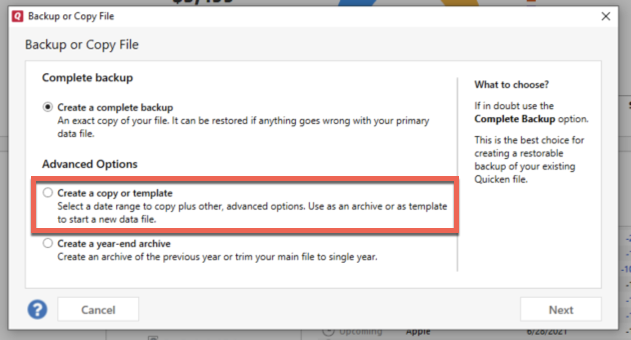
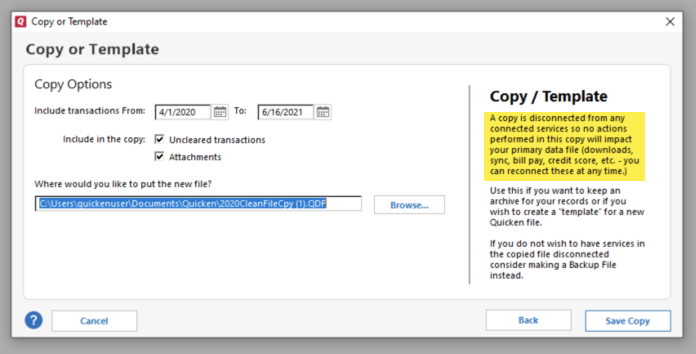
That part of the validation results indicates there were file issues that it could not fix. I suggest that you try creating a copy of your data file, which will rebuild all of the internal lists and database tables. If successful, you would then move forward with the copied file. To create a copy, please navigate to File > Copy or Backup File... > Create a copy or template (see examples below) which will also allow you to select a date range to move forward with.
If you wish to move forward with your entire data file, please check the full date range of your entire data file before copying so you can enter the correct date range if you do not wish to "shrink" your file by eliminating certain dates. Note: There is no need to "shrink" your file unless you believe that older data is the reason for the issue.
It's important to know that all online services will be disconnected in the copied file, and you will need to sign back in with your Quicken ID and reconnect all of your online accounts, online billers, Quicken Bill Manager services, etc if you plan to use that copied file going forward. The reason for this is that the new copy also creates a new and separate dataset ID.
Please initially reconnect only what is necessary to test if the issue is resolved. If the issue is resolved in the copied file, then reconnect everything and use the copied file as your main file going forward.
If the issue is not resolved in the copied file either, then feel free to switch back to your original file. For instructions on switching between Quicken files, please click here.
Thank you!
Quicken Kristina
Make sure to sign up for the email digest to see a round up of your top posts.
0 -
Instead of copying the old file, I have created a new blank file from scratch, added all my banking and investment accounts and tried downloading transactions again. Banking transactions now work when I set them to automatically load into the register.
Investment transactions, however, from Schwab and Fidelity, will download, display the red flag next to the company showing there are downloaded transactions, but will not transfer over to the register or show up under the Downloaded Transactions tab. None of the 32 transactions between these 5 accounts, after December 31, 2025, will transfer over to the registers.. I also have another separate data file for an account for my wife's non-profit, that has the same problem. Downloaded transactions will not transfer over to the register.
The only common link between these 2 data files is the program itself, under R65.17, build 27.1.65.17.
[Edited - Readability]
0 -
Thank you for your reply,
Since the issue is happening in a brand new file also, it is possible this issue is being caused by a program issue. To troubleshoot that, please start by manually installing the most current update. For instructions and the link to download the update patch, please use this article:
Please let me know how it goes!
Quicken Kristina
Make sure to sign up for the email digest to see a round up of your top posts.
0 -
Finally! That fixed the problems. Thanks.
0 -
Thank you for the follow-up,
I'm glad to hear the issue is now resolved!
If you need further assistance, please feel free to reach out!
Quicken Kristina
Make sure to sign up for the email digest to see a round up of your top posts.
0
Categories
- All Categories
- 49 Product Ideas
- 35 Announcements
- 225 Alerts, Online Banking & Known Product Issues
- 18 Product Alerts
- 504 Welcome to the Community!
- 673 Before you Buy
- 1.4K Product Ideas
- 54.9K Quicken Classic for Windows
- 16.6K Quicken Classic for Mac
- 1K Quicken Mobile
- 824 Quicken on the Web
- 120 Quicken LifeHub