Reconciliation; Reconcile Details Window; Please Fix Extremely Annoying Date Fields Bug
Hello Quicken Classic team. I am using the latest version of Quicken Classic ( Release R65.29 ).
The subject of interest here is the Reconcile Details window used to enter the parameters of a reconciliation to an account.
Let me express my desire to have you fix a bug that's lived in that window from the beginning of Quicken. That bug is extremely annoying and has to do with the two date fields underneath the Categorize your interest and bank charges, if any separator.
Below is an illustration of the Reconcile Details window.
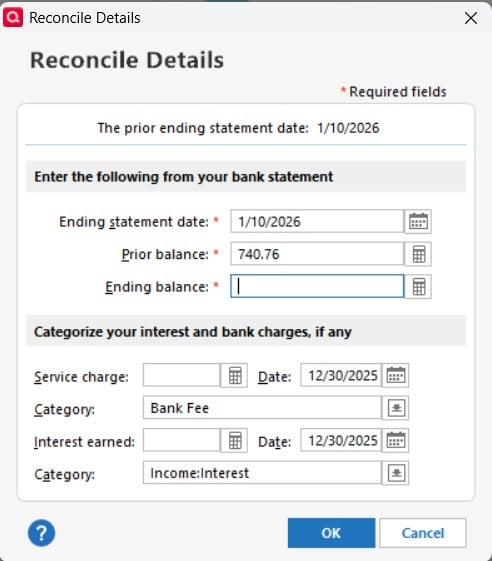
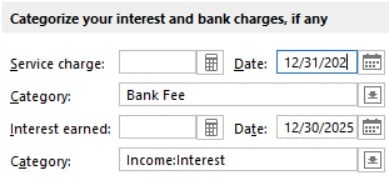
The Service charge: date field and the Interest earned date field are the two fields that will frustrate a person.
Note that the date of the December reconciliation has been filled in by Quicken as 12/30/2025. When a person attempts to do the obvious so as to correct this to 12/31/2025 the software rejects the data entry. The obvious thing is to position the data entry cursor on the number 12 and then type 12/31.
What happens instead is that the software accepts the '1' character (the 1st character of the number 12) and then refuses to accept another key. The resulting display then becomes stuck as follows:
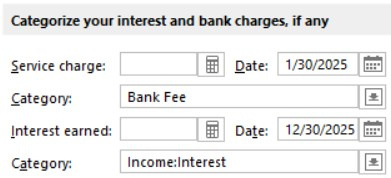
As you might imagine, this provokes a negative emotional response.
The only way to update the field properly is to select the entire date field and type in a terse version of the date as 12/31/25; the selection mechanism is illustrated below:
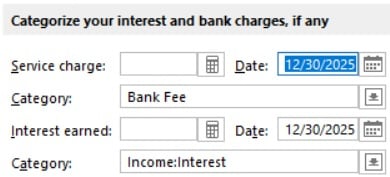
To make this bug even more annoying, when a person types 12/31/2025 the software again rejects the attempt. This deepens the negative emotional response.
To recover from the attempt at typing the date as 12/31/2025 a person must re-select the entire date field and then type the solution as 12/31/25.
You will be exalted for all time should you correct this behavior so that the date fields accept any properly formatted entry (e.g. 1/1/25, 01/01/2025, 12/31/25, 12/31/2025).
Note. The behavior described above does not happen with the Ending statement date: field. That field will accept any date that is properly formatted.
Comments
-
I hit this bug all the time yet never bothered to submit a report.
This should be treated as a BUG not an idea, but I voted for it anyway.
Quicken user since 1995.
Current Quicken for Windows subscription user. I usually upgrade to the latest version about 1 week after full release.0 -
Hello @Timothy Frank & @UserDavidC,
Thank you for taking the time to visit the Community to report this issue, though we apologize that you are experiencing this.
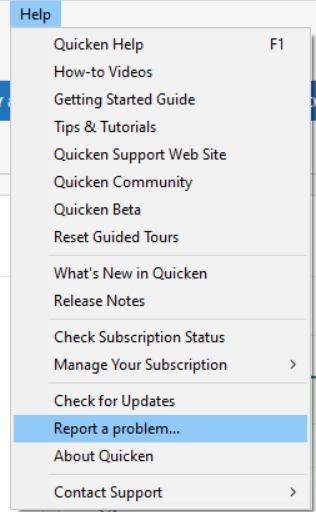
We have forwarded this issue to the proper channels to have this further investigated. In the meantime, if you haven't already done so, we request that you please navigate to Help > Report a problem and submit a problem report with log files attached and (if you are willing) a sanitized copy of your data file in order to contribute to the investigation.
While you will not receive a response through this submission, these reports will help our teams in further investigating the issue. The more problem reports we receive, the better.
We apologize for any inconvenience!
Thank you.
(CTP-16422)
Quicken Kristina
Make sure to sign up for the email digest to see a round up of your top posts.
0 -
Note that the date of the December reconciliation has been filled in by Quicken as 12/30/2025. When a person attempts to do the obvious so as to correct this to 12/31/2025 the software rejects the data entry.
Have you tried using Date Keyboard Shortcuts as an alternative method to entering a complete date?
In your example, the keyboard shortcut would be "r" to set the date to 12/31 of the displayed yearDate field keyboard shortcuts
Assuming today's date is May 7th, 2020 and it is shown in the date field and you are using standard US - style dates (this may not work with other date formats) ...
• Type + advances the date by 1 day, 5/8/2020
• Type - subtracts 1 day from the date, 5/6/2020
• Type t resets the date to Today's date, 5/7/2020
• Typing 0501 gives 5/1/2020 (always type it with leading zeros for month and day numbers 01…09, no slashes)
• Typing 123019 gives 12/30/2019 (no slashes)
• Typing 12011999 gives 12/01/1999 (again, no slashes)
• m gives the first day of the month, 5/1/2020
• h gives the last day of the month, 5/31/2020
• y gives the 1st of January of the year, 1/1/2020
• r gives the 31st of December of the year, 12/31/2020
• w goes back to this week's Sunday, 5/3/2020
• k goes forward to this week's Saturday, 5/9/2020
• typing the same letter again advances to the next / prior interval, e.g. "ww" = 4/26/2020 or "++" = 5/9/2020
• combine multiple keystrokes to get to the desired date, e.g., "m-" results in 4/30/2020 (date = 5/7, m = 5/1, - = 4/30)0
Categories
- All Categories
- 47 Product Ideas
- 34 Announcements
- 244 Alerts, Online Banking & Known Product Issues
- 22 Product Alerts
- 513 Welcome to the Community!
- 679 Before you Buy
- 1.4K Product Ideas
- 55.5K Quicken Classic for Windows
- 16.8K Quicken Classic for Mac
- 1K Quicken Mobile
- 829 Quicken on the Web
- 124 Quicken LifeHub