Auto-Match posting date (Q Mac)

Agordon8233
Agordon8233 Quicken Windows Subscription Member ✭✭

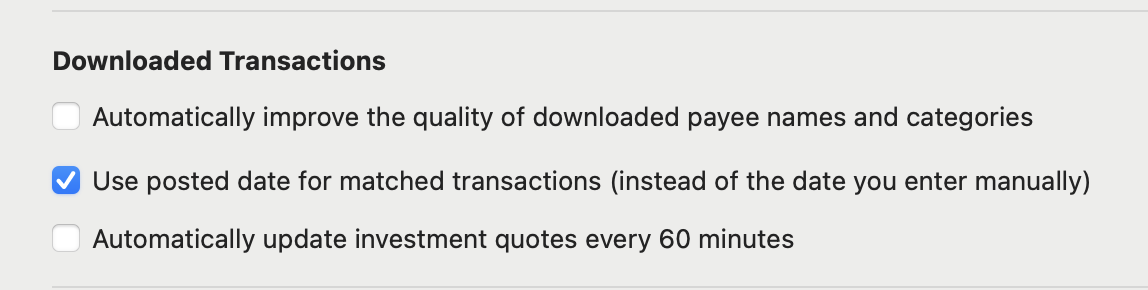
I am using version 8.4.2 and see that the date on my manually entered transaction change to the posting date when I download transactions and they are auto matched. How do I disable that function and keep the entered date?

Best Answer

  • jacobs
    jacobs Quicken Mac Subscription SuperUser, Mac Beta Beta
    Answer ✓

    Go to Settings > Connected Services and uncheck the box:

    Screenshot 2026-01-17 at 9.59.41 AM.png
    Quicken Mac Subscription • Quicken user since 1993

Answers

  • jacobs
    jacobs Quicken Mac Subscription SuperUser, Mac Beta Beta
    Answer ✓

    Go to Settings > Connected Services and uncheck the box:

    Screenshot 2026-01-17 at 9.59.41 AM.png
    Quicken Mac Subscription • Quicken user since 1993
  • Agordon8233
    Agordon8233 Quicken Windows Subscription Member ✭✭

    Thanks for the help.