Cannot re-connect to Ascensus RPLink - Windows 11
This began on Jan 6 after I had to restore a backup which disconnected several accounts in my Quicken (R65.29, Build 27.1.65.29) file. All connections were able to be restored immediately except for my Ascensus RPLink account.
When I attempt to reconnect to Ascensus RPLink, I am not taken to the bank's website for authorization like the other accounts, but am only requested to enter my login credentials on a Quicken "Activate One Step Update" dialog window. (My credentials are valid as I can log on to their website.) I am then randomly asked for one of four personal info pieces (first 3 digits of SSN, last 4 digits of SSN, zip code, date of birth). After attempting to connect to the bank, I am then kicked back to the Quicken login dialog box with a CC-502 error displayed (see attached) and asking me to wait a few hours for the situation to correct. This has now gone on for over a week.
A similar issue was reported back in October here: "https://community.quicken.com/discussion/comment/20519099"
The issue was apparently resolved as the discussion is now closed. Perhaps you could review the solution and apply it to my current situation.
Thank you.
Comments
-
Hello @dr_data,
Thank you for the detailed explanation and screenshots.
A CC-502 error is typically caused by maintenance or temporary issues on the bank’s servers that Quicken uses to connect, even if you can log into the bank’s website successfully. Because of that, we actually recommend not deactivating and reactivating accounts when troubleshooting this specific error, as it can sometimes introduce additional connection problems.
Please review this support article for more information. Here are the recommended guidance:
1. Refresh the account connection
- Open the affected account register.
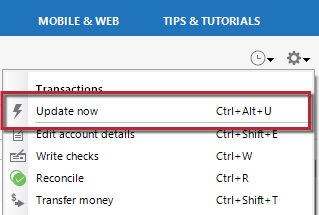
- Click the Gear icon in the upper-right corner.
- Select Update Now and follow the prompts.
Repeat this for any other accounts showing the error.
2. Wait and retry
If the error continues, wait one full business day and try updating again. CC-502 errors are often related to temporary server maintenance on the financial institution’s side.If the problem continues after following the guidance above and waiting a business day (which it sounds like you already have), then we recommend contacting Quicken Support so they can review your logs and connection attempts in more detail.
Thank you!
-Quicken Anja
Make sure to sign up for the email digest to see a round up of your top posts.0
Categories
- All Categories
- 50 Product Ideas
- 35 Announcements
- 229 Alerts, Online Banking & Known Product Issues
- 21 Product Alerts
- 500 Welcome to the Community!
- 678 Before you Buy
- 1.3K Product Ideas
- 54.5K Quicken Classic for Windows
- 16.6K Quicken Classic for Mac
- 1K Quicken Mobile
- 817 Quicken on the Web
- 116 Quicken LifeHub