Cannot add Mr. Cooper account
Answers
-
Hello @MACNLEAKEY ,
Thanks for reaching out. I checked your account on our side and can see that you are receiving an internal FDP-103 (CC-503) error when attempting to add your Mr. Cooper account.
A CC-503 error means that Mr. Cooper is reporting the login credentials as invalid. Below are the recommended steps to try (which you can also find in this support article):
Step One: Verify your bank login information- Type your password/PIN into a text application, such as Notepad, WordPad, or other text/word application.
- Note: This is a way of confirming you don't have typographical errors in this field.
- Highlight the "confirmed" password and then copy it (Ctrl + C) and paste it (Ctrl + V) into the appropriate fields in Quicken.
Step Two: Verify your bank login at the bank's website
- Go to your bank's website and confirm that you're able to log in with the expected username and password.
- Once you are logged in, review your account at the website for notifications (such as pending messages in a mailbox or message center) to confirm if further action is required to grant Quicken access.
- Some banks will require a separate login, password, or both to access accounts on third-party software. Also note, you may need to go to your settings at the website to access these prompts for new credentials.
New passwords: If you are required to make a new password, be aware that some special characters may cause errors in Quicken. These special characters are the ampersand (&), left carat (<), right carat (>), backslash (\), and forward slash (/). Additionally, while Quicken does not have a character limit, your bank may have one.
Step Three: Update your password(s) in Quicken
- Launch Quicken and go to Tools > Password Vault > Add/Edit Passwords.
- Click on the account in the Password Vault.
- Choose Delete Password for the account.
- Complete a One Step Update, you will be prompted to enter the password manually.
- Type in the password (the same one used on the bank's website) and check in the box marked Save next to the password field.
- Click Update Now.
If there is no option to delete and update the password, or if the login ID/username also needs to be changed:
- Choose Tools > Account List.
- Click the Edit button next to the account you want to change the login ID for.
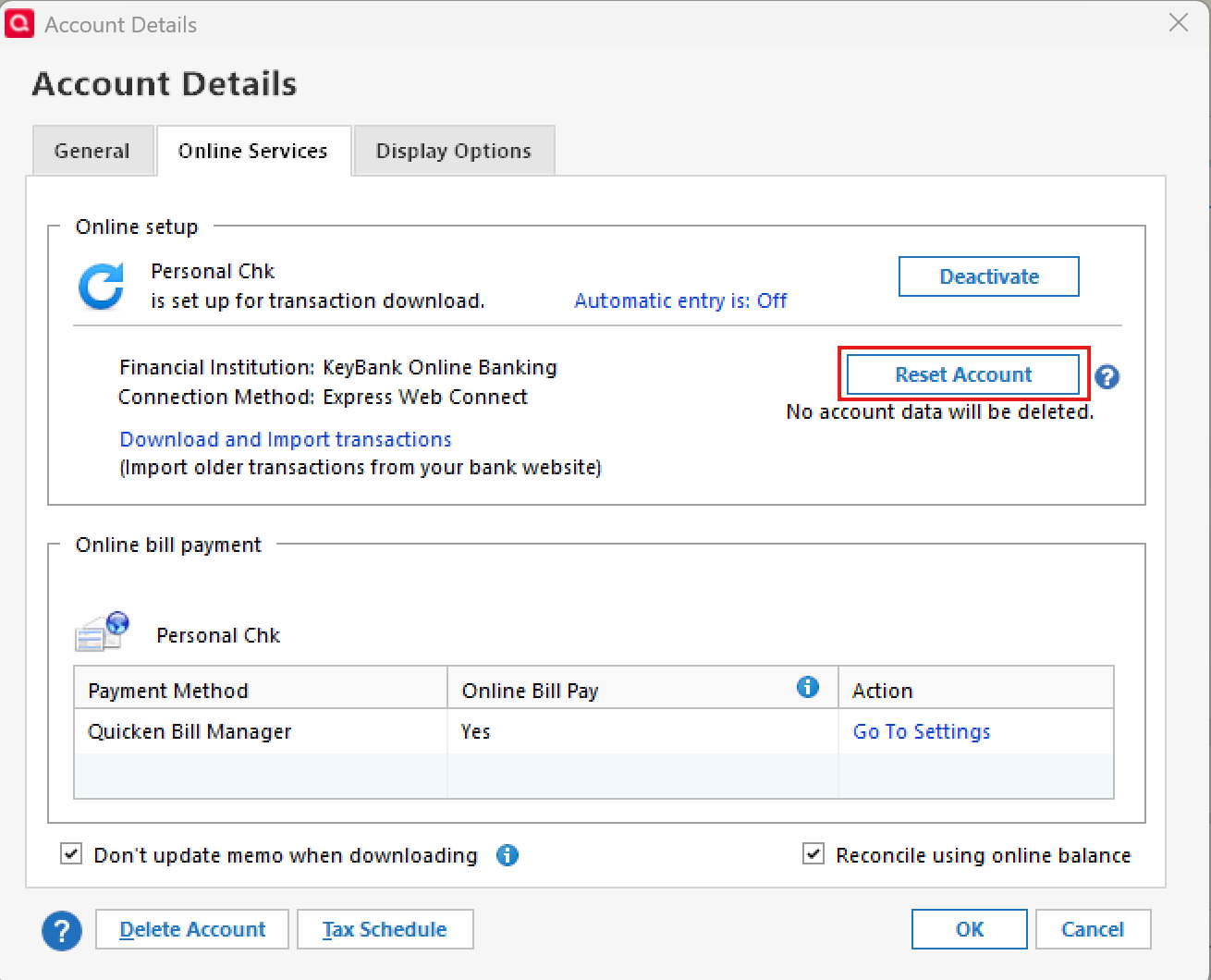
- In the Account Details window, click the Online Services tab.
- Click Reset Account.
- Enter the correct login ID and follow the on-screen prompts to complete the reset.
- If prompted, carefully LINK the accounts found to the existing accounts in Quicken.
After the reset process is complete, attempt your online session again.
If the issue persists
Try Deactivating and Reactivating the affected accounts:
- Choose Tools > Account List.
- Click the Edit button next to the account you want to change the login ID for.
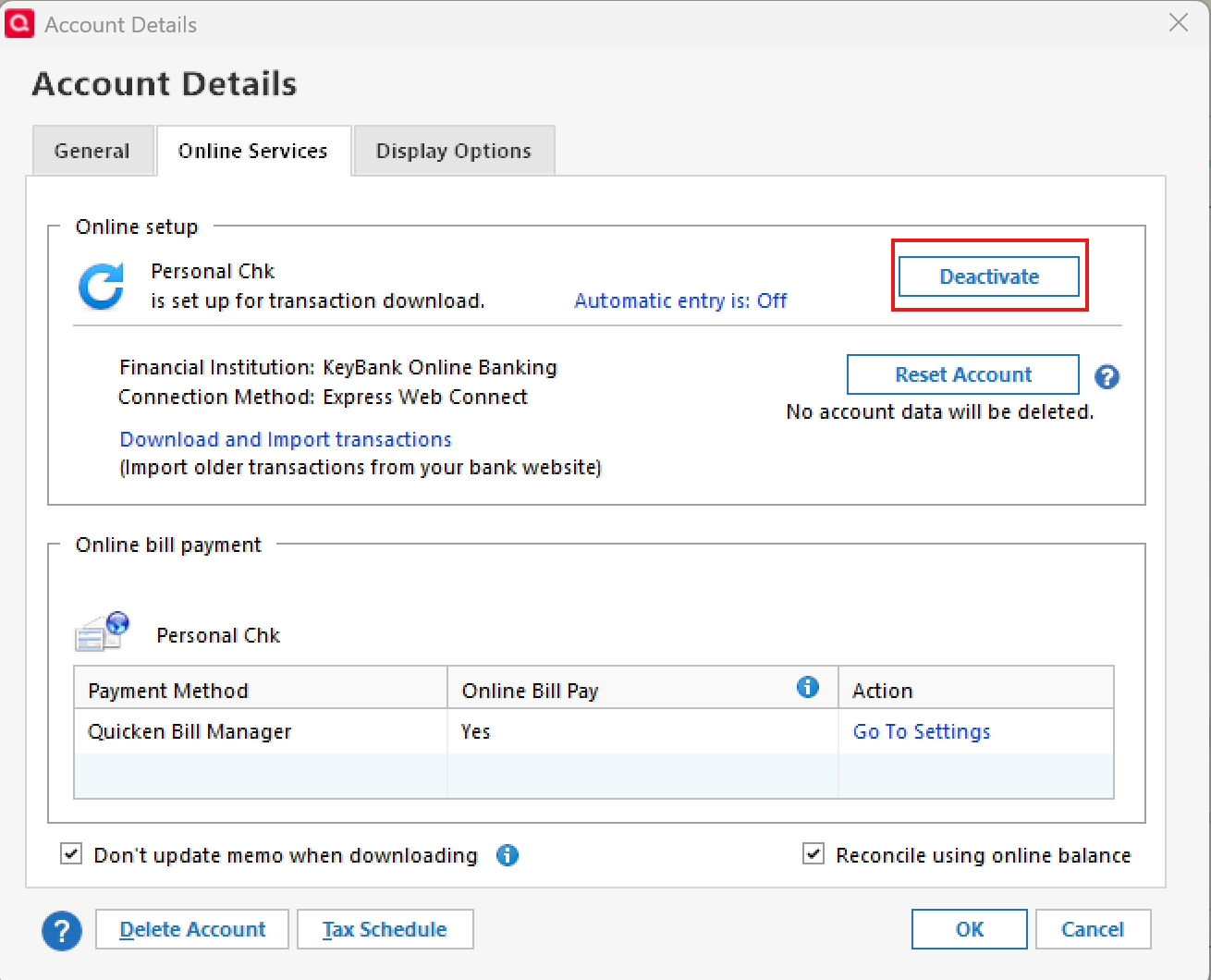
- In the Account Details window, click the Online Services tab.
- Click Deactivate, and then click Yes to deactivate online services.
- Click Yes again, if necessary, to confirm your choice.
- Repeat these steps to deactivate all accounts at this same bank.
- Return to the Online Services tab and click Set up Now for each account you've deactivated.
- Enter the correct login ID and follow the on-screen prompts to activate your account.
Please note:
Even after trying the steps above, you may still be unable to connect successfully because there is currently a known, ongoing issue with Mr. Cooper connections being tracked in this Community Alert.
While the error you are seeing is slightly different internally, it is likely related to the same broader connection problem. Because of this, successful connection may not be possible until the bank-side issue is fully resolved.
Please keep an eye on that Alert for any and all official updates, and let us know what happens after trying the steps above.
Thank you for your patience while this is being worked on.
-Quicken Anja
Make sure to sign up for the email digest to see a round up of your top posts.0 - Type your password/PIN into a text application, such as Notepad, WordPad, or other text/word application.
Categories
- All Categories
- 50 Product Ideas
- 35 Announcements
- 229 Alerts, Online Banking & Known Product Issues
- 21 Product Alerts
- 499 Welcome to the Community!
- 677 Before you Buy
- 1.3K Product Ideas
- 54.5K Quicken Classic for Windows
- 16.6K Quicken Classic for Mac
- 1K Quicken Mobile
- 817 Quicken on the Web
- 116 Quicken LifeHub