Missing downloaded transactions from reconciliation register
When I try to reconcile my credit card account download transactions are not showing so my balance is off. The two transactions that are showing have dates of 12/20/25 and 1/09/26. The missing transaction dates are from 12/28/25 - 12/31/25. What can I do to fix this problem?
Comments
-
Hello @oceanorange26,
Thank you for sharing your experience. I am happy to help!
I have some follow-up questions for you.
- Does this issue only happen in one account?
- If you delete one of the affected transactions and reenter it, does it then show up in the reconciliation?
- Where is your data file located?
- Is your file being synced/backed up by any third-party services like OneDrive, Dropbox, or Carbonite?
Thank you.
Quicken Alyssa
Make sure to sign up for the email digest to see a round up of your top posts.
0 -
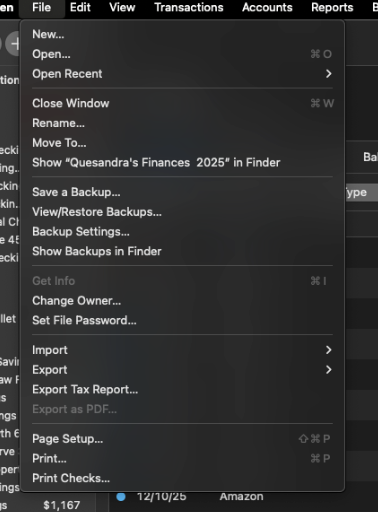
So I don’t see the "validate and repair file” option. Yes it is only happening to one account and this is the first time its done that. I tried doing a screen shot but it would not work.
0 -
I was able to take a screenshot of where I was looking for the “validate and repair” option
[Edited-Screenshot]
1 -
Thank you for following up!
I apologize for the confusion. I didn't realize you were on a Mac. I have moved this discussion to a Mac category.
Please disregard the validation steps, as those are specific to Windows. I have edited it out of my previous post. Please answer the remaining questions to help me determine the next best troubleshooting steps.
- If you delete one of the affected transactions and reenter it, does it then show up in the reconciliation?
- Where is your data file located?
- Is your file being synced/backed up by any third-party services like iCloud, Dropbox, or Carbonite?
Thank you.
Quicken Alyssa
Make sure to sign up for the email digest to see a round up of your top posts.
0 -
Hi, @oceanorange26
I don't suspect this to be a database issue-that is quite rare in the Mac version.
I question if you manually enter transactions (or is a scheduled transaction), and then download to match. And, (in the Settings), you also have the option selected to retain the date entered for matched transactions versus posted.
I would select one of the missing transactions, and chose command+shift+I (or, from the menu bar, choose View:Show Inspector) and see what the "Date Posted" date is. I suspect it is after the end of your reconcile period-and hence why it isn't showing.
Older cleared transactions will show up regardless of reconcile period start date (if entered), but newer ones posted ones won't if they fall after the reconcile ending date range. I suspect that is what is going on here.
1 -
Thanks for responding to my issue.
- All the transactions were downloaded not scheduled. They were not manually put in and then matched with the download. It was just transactions downloaded.
- All the missing transactions have 12/28/25 has the “Date Posted”. The two transactions that show have posted dates of 12/20/25 and 1/09/26.
- I deleted one of the missing transactions and reentered it, it showed up that time when I tried the reconciliation.
- When I do the reconciliation I’m using the online balance. In this case I did try the statement option but it didn’t work either
0 -
- If you delete one of the affected transactions and reenter it, does it then show up in the reconciliation? Yes
- Where is your data file located? On my hard drive
- Is your file being synced/backed up by any third-party services like iCloud, Dropbox, or Carbonite? No its not.
0 -
I don't know exactly what happened, but I would just enter the missing transacitons and move on. If the problem keeps recurring, then it's time for a call to Quicken Support.
Also, I'd try reconciling to the statement balance as of December 31, rather than to the online balance.
Quicken Mac Subscription • Quicken user since 19931 -
Thanks for your help
1
Categories
- All Categories
- 54 Product Ideas
- 35 Announcements
- 219 Alerts, Online Banking & Known Product Issues
- 18 Product Alerts
- 504 Welcome to the Community!
- 673 Before you Buy
- 1.4K Product Ideas
- 54.8K Quicken Classic for Windows
- 16.6K Quicken Classic for Mac
- 1K Quicken Mobile
- 824 Quicken on the Web
- 120 Quicken LifeHub