Why do I have to sign-in everyday?

tonywilk
tonywilk Quicken Windows 2017 Member

I've been using Quicken for 15+ years. Four days ago, I had to sign-in, plus restore my data file. This has been going on for the last three days. Luckily, I have been backing up my data every day. What is the problem and how do you fix it?

Thank you.

Answers

  • Quicken Anja
    Quicken Anja Moderator mod

    Hello @tonywilk,

    Thanks for reaching out!

    Just to make sure we’re on the same page—are you being repeatedly prompted to sign in with your Quicken ID and password each time you open Quicken? If so, this is usually related to an authentication block in the data file rather than your backups themselves.

    Here’s what we recommend based on the guidance found in this support article:

    1. Download the latest update here if you have not done so already.
    2. After completing the update, open Quicken.
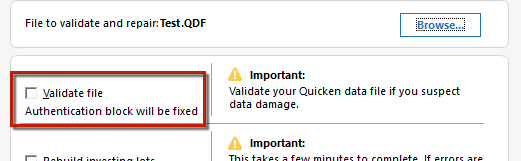
    3. Hold the Control key and select File menu > Validate and Repair File.
    4. Check the Validate file box and click OK. 
    SS3%20Validate.png

    If initiated correctly, the Validate file checkbox will also show the message "Authentication block will be fixed" as pictured above.

    If the issue persists

    1. If you don't see or can't get to the Edit menu on the upper left, close the sign in window.  You may have to close it several times before you can see the Edit option.
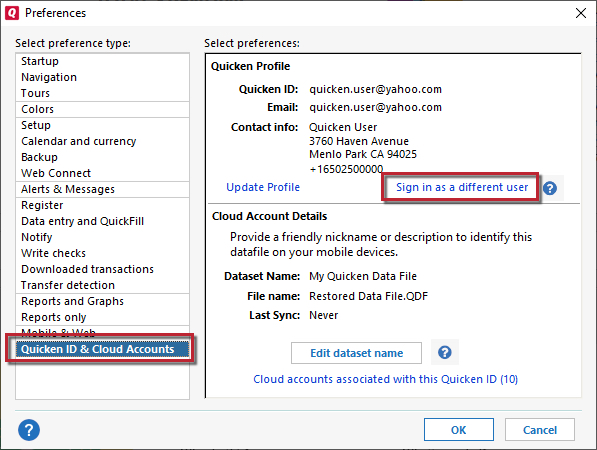
    2. Click on the Edit Menu, and select Preferences.
    3. In the left panel, select Quicken ID & Cloud Accounts.
    Sign%20in%20as%20different%20user%202022.jpg
    1. Click Sign in as a different user.
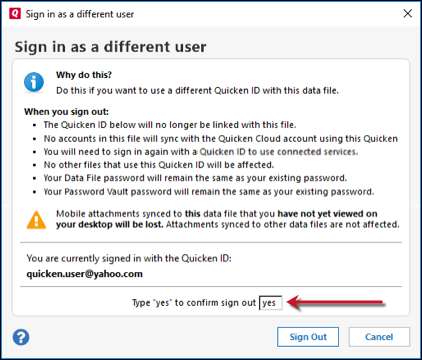
    2. Type "yes" as prompted, and click Sign Out.
    Type%20yes%20prompt.png
    1. Sign back in with your Quicken ID.


    Hope this helps!

    -Quicken Anja
    Make sure to sign up for the email digest to see a round up of your top posts.