This discussion was created from comments split from:
Fidelity Securities Mismatch FZFXX Treasury MMF
.
Why does Quicken continue to have so many problems? I am now experiencing the following error "OL-221-B AND OL-221-A" when I download updates from my Truist Account. I would not recommend Quicken software to anyone based on the number of problems I have experienced over the last year. Every Quicken update comes with new set problems. and frustration.
Hello @upset user,
Thank you for letting us know you're seeing an issue with OL-221 errors. To clarify, is this happening when importing a QFX/Web Connect file into Quicken, or are you seeing this error when running One Step Update (OSU)?
If you are encountering this error when running OSU, then please follow these steps from our article on OL-221 errors:
1. Open Tools > One Step Update Summary to find the bank where this OL error is presented. Also, verify the exact error code you are getting to confirm it is one of the errors covered here.
2. Open the register for this bank account.
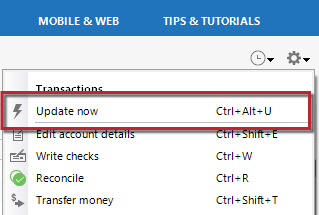
3. Click Account Actions (button or gear icon) at the top right of the register.
4. Select Update Now.
If completing the Update Now process doesn't clear up the issue, try updating your accounts the next business day. This error may be caused by a temporary financial institution server outage or maintenance that may be resolved the next day.
If the issue is not resolved after waiting, you will need to identify the connection type of the affected account(s) to determine what next steps need to be taken. To do this, go to Tools > Account List, find the affected account(s), and confirm the connection type in parentheses in the Transaction Download column.
If you are seeing this error when importing a QFX/Web Connect file, then please follow these steps from our article on Web Connect troubleshooting:
If you are seeing an OL-221 error
This error may be caused by your system date and time settings.
To adjust these settings in Windows:
If you are still receiving this error after adjusting the date and time settings, this could indicate an issue with the QFX file itself. You will need to contact your bank to resolve this issue.
I hope this helps!
I haven't seen a response from you. Do you still require assistance?
Thank you!
Hello again,
Checking in once more before this thread is closed. Let us know if you still need assistance.
Due to the lack of response, I went ahead and closed this post.
If you still require assistance, please feel free to start a new post.