On December 17th, my MidFirst account was reconnected to Quicken after 6 months of not being able to download transactions. Now, Quicken is showing downloaded payment checks as deposits (these are handwritten checks I have given out as payments).
For my initial download after reconnecting MidFirst and Quicken, I had already cleared/reconciled all the transactions manually, so I ignored the first download that showed a check as a deposit. This was a payment check transaction that cleared approximately two days before the reconnection of MidFirst and Quicken. I had already manually handled that transaction, so I just deleted the downloaded transaction that was incorrectly labelled a deposit.
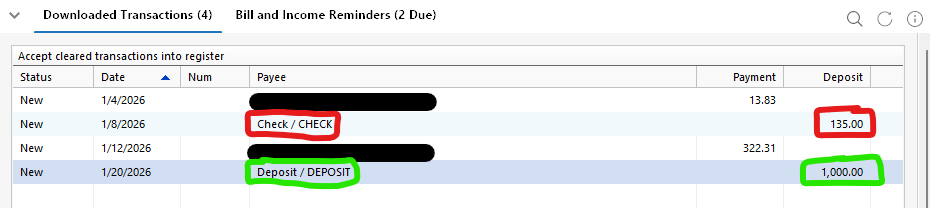
Now, I am seeing a new transaction I have downloaded that is also a handwritten payment check being listed as a deposit by Quicken.
I do not write a lot of checks, so I do have a lot of downloaded transactions that are handwritten checks.
The downloaded transactions are correctly labeled by Quicken under payee as a "Check / CHECK", whereas an actual deposit is labeled "Deposit/DEPOSIT". In the picture below, the payment check is marked in RED - it is a handwritten payment check that has been downloaded by Quicken and listed as a deposit. The transaction marked in GREEN is downloaded correctly as a deposit.
I have verified on MidFirst.com that the transaction appears as a check, not a deposit, and that I do not have any other transactions for that amount for over a month, so I am not confusing a different transaction.
I have not tried anything to replicate, as I do not write that many checks.
The issue started on December 17th, when my MidFirst account was finally reconnected after 6 months.
Quicken Classic PREMIER version R65.29 Build 27.1.65.29
Windows 11 25H2 Build 26200.7462
Bank is MidFirst Bank - no errors are reported during Quicken One Step Update.

