LendingClub transactions not downloading
Is anyone having issues with transactions from LendingClub not downloading? I have followed the suggested deactivate and reconnect instructions, and still no transactions since 1/22/2026. No error message is given, but also no transactions. Both checking and savings seem to be affected.
[Edited - Readability]
Answers
-
Hello @dave_bickers,
Thank you for letting us know you're seeing this issue. To start troubleshooting this issue, please follow these steps from our article on missing transactions/transactions not downloading:
Be sure to follow these steps in order:
1. Go to Edit > Preferences > Downloaded Transactions. The option Automatically add to banking registers needs to be unchecked.
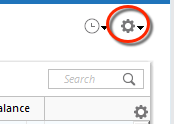
2. Refresh your online account information by clicking the Actions Gear Icon on the upper right of the register, and select Update Now. Follow the on-screen instructions to complete the update.
3. Confirm that the Sort Order in your account is by Date; just click the top of the Date column in your account register. It's possible the transactions are in your register, but not where you thought they'd be.
4. Click the Reset button at the top of the register. This will confirm that there's no filtering in your account register.
5. Try refreshing your login session: To do this, go to Help > Refresh Sign in. After completing the log-in process, trying running a One Step Update again.
6. Go to Actions (Gear Icon) > Register Columns > Check Downloaded Payee in the account register. This allows you to search by Payee to confirm the transactions haven't been renamed unexpectedly.
7. Go to Tools > Account List and check Show Hidden Accounts at the bottom left. Confirm the missing transactions haven't been added to a hidden account by clicking on the name of any account that appears with a check mark in the Hidden column.
Please let me know how it goes!
Quicken Kristina
Make sure to sign up for the email digest to see a round up of your top posts.
0 -
did all that plus reset and deactivated then reactivated the accounts.
0 -
Thank you for your reply,
Since the troubleshooting did not resolve the issue, I recommend that you contact Quicken Support directly for further assistance, as they have access to tools we can't access on the Community and they're able to escalate the issue as needed. The Quicken Support phone number can be found through this link here. Phone support is available from 5:00 am PT to 5:00 pm PT, Monday through Friday.
I apologize that I could not be of more assistance!
Quicken Kristina
Make sure to sign up for the email digest to see a round up of your top posts.
0 -
Hello All,
Posting a follow-up to my earlier response:
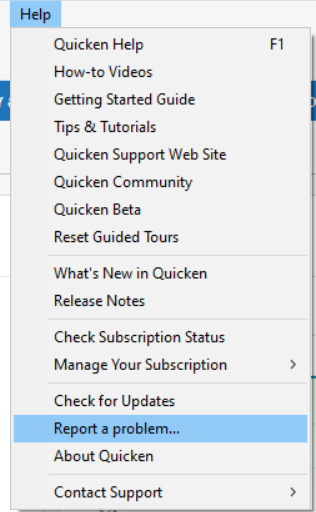
We have forwarded this issue to the proper channels to have this further investigated. In the meantime, we request that you please navigate to Help > Report a problem and submit a problem report with log files attached and (if you are willing) a sanitized copy of your data file in order to contribute to the investigation.
Please also include at least 3 sample transactions that are posted on the financial institution side, but are not in your Quicken at all, not even manually entered. If possible, please also include screenshots showing the transactions on the financial institution side and showing that they are not in Quicken. Since problem reports limit you to 10 attachments, if you need to include more attachments, you can unselect any log file with OLD in the filename, or you can send a second problem report with the additional attachments.
While you will not receive a response through this submission, these reports will help our teams in further investigating the issue. The more problem reports we receive, the better.
We apologize for any inconvenience! Thank you.
(CBT-1018)
Quicken Kristina
Make sure to sign up for the email digest to see a round up of your top posts.
0 -
Following up on my previous post,
We now have a Community Alert for this issue. Please bookmark the alert to be notified of any updates, once available, and to know when the issue is resolved.
Thank you!
(Ticket #12213512)
Quicken Kristina
Make sure to sign up for the email digest to see a round up of your top posts.
0
Categories
- All Categories
- 56 Product Ideas
- 34 Announcements
- 235 Alerts, Online Banking & Known Product Issues
- 19 Product Alerts
- 510 Welcome to the Community!
- 678 Before you Buy
- 1.4K Product Ideas
- 55.2K Quicken Classic for Windows
- 16.7K Quicken Classic for Mac
- 1K Quicken Mobile
- 828 Quicken on the Web
- 121 Quicken LifeHub