Fidelity download error when downloading into CMA account
I have a Cash Management Account at fidelity. This morning when I ran "Update transactions", I had 1 transaction: The month-end payment of a dividend for the money market, SPAXX. This is the only security in the account, and the account is set to default behavior: SPAXX is treated as cash.
I ran into 2 problems.
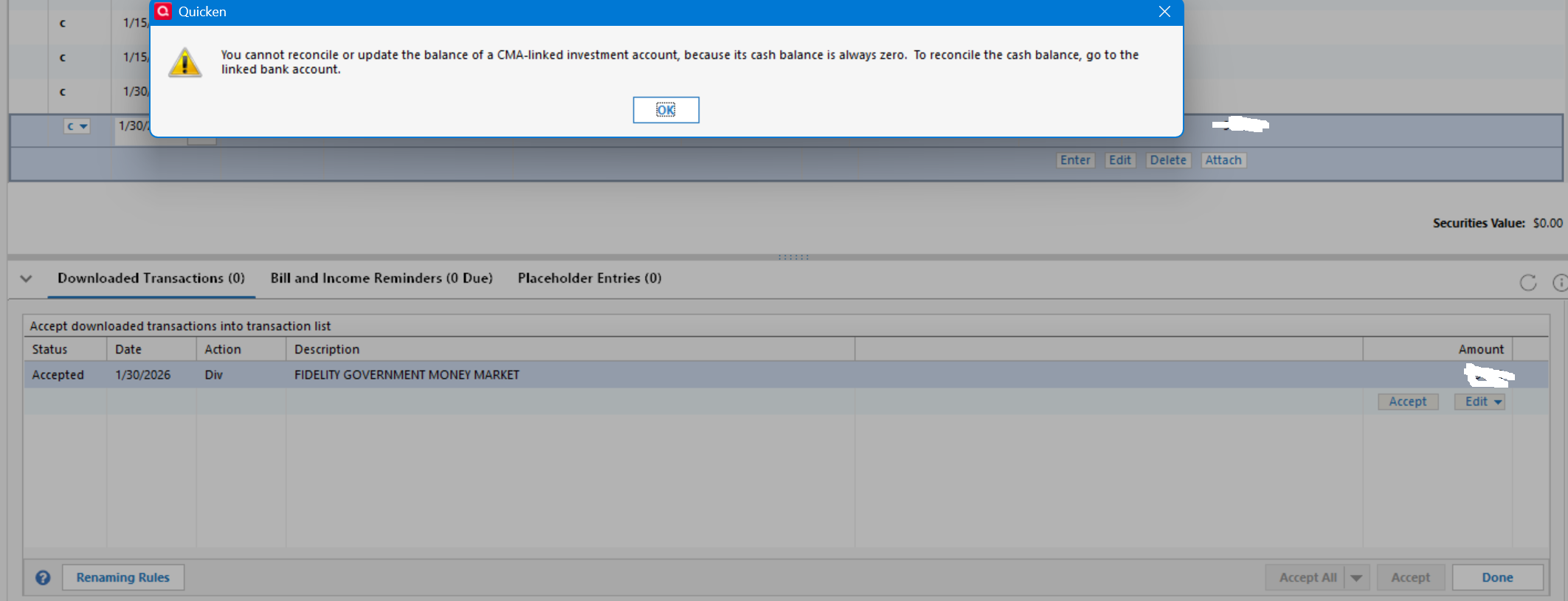
- When I hit "accept all" in the register, I got the error shown in the screenshot below.
- After hitting OK, a new TXN showed up in the investment account, but with an action of "div", so the cash balance in the paired checking account was not updated. When I manually changed "div" to "divx", the cash balance was updated normally.
@Quicken Kristina Is this one of the remaining "known" fidelity issues, or have I hit something new?
Any other input would be appreciated.
Marc
Comments
-
I can't help much, but I'll offer a data point. My CMA account downloaded the dividend as as DivX, which seems to be the correct transaction type. I did not hit "Accept All" but instead accepted each transaction, and everything worked as expected.
Speculation: I once read here that "Accept All" does some different things from "Accept," and perhaps that includes some reconciliation activity that is not working correctly.
0 -
I have the same problem with my two Fidelity CMA brokerage accounts. The dividends for SPAXX download as Div in the investment account and don't transfer to the paired checking account. Changing the Div to DivX makes the cash balance in the checking account correct.
I have two other Fidelity brokerage accounts which are not CMA accounts. The SPAXX dividends for these accounts download as DivX and are automatically transferred to the paired checking accounts.
All four brokerage accounts and paired checking accounts are set up the same.
This has happened each month since I updated to EWC+ in November.
2 -
@Quicken Kristina Is this one of the remaining "known" fidelity issues, or does this need to be reported to get it fixed?
0 -
Hello @marcaronson408,
Thank you for sharing your experience. The issue you described does not look like one of the known issues. Does that account have a linked checking account in Quicken? Do you see this behavior with any other investment accounts when you use the Accept All button?
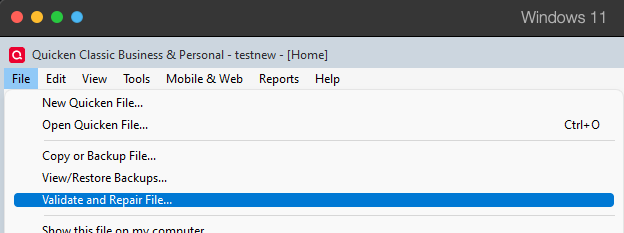
The behavior you describe may be file specific. To troubleshoot for that, I suggest that you try validating your data file. Please save a backup file prior to performing these steps.
Validate:
- File
- Validate and Repair File...
- Validate File
- Click OK
- Close the Data Log
- Close Quicken (leave it closed for at least 5 secs)
- Reopen Quicken and see if the issue persists.
Please let me know how it goes!
Hello @WSAQ,
The issue you describe sounds a bit different from the original post. Are you seeing that same error message about reconciling when using the Accept All button? If not, please start a new discussion so that your issue can get the attention it needs.
Thank you!
Quicken Kristina
Make sure to sign up for the email digest to see a round up of your top posts.
0 -
Hi @Quicken Kristina, it is a cash management account and has a linked checking account in Quicken.
I have already run a validation — no errors.
My other Fidelity account is not a cash management account, so the use of "div" is the correct behavior for that other account. The issue here is that a quicken account that has a linked checking account needs to use "divx", not a "div".
It is not unique to me — on the post a couple of entries up on this thread @WSAQ indicates that he is having the same problem.
Marc
0 -
I have not seen the error message.
0 -
Good point — I was no longer focused on the error message, as I was able to get around it.
@Quicken Kristina I am not concerned with the error message — let's see if it happens again.
My focus is on the transaction being download as a "div" instead of a "divx". This is the issue that is not uniquely mine.
Marc
0 -
I have experienced the same issue. The Month End dividend for the core position, SPAXX, of an investment account for Fidelity that has a linked cash account shows the action as Div instead of DivX. The results is that the linked cash balance is incorrect.
Strangely, the Div transaction in the investment part shows the correct transfer account to be the linked cash account, but doesn't post in the linked cash account unless the Div is changed to DivX.
It is an aggravation that did not exist prior to the Fidelity EWC+ cutover.
I have submitted a problem report.
Deluxe R65.29, Windows 11 Pro
0
Categories
- All Categories
- 49 Product Ideas
- 35 Announcements
- 225 Alerts, Online Banking & Known Product Issues
- 18 Product Alerts
- 505 Welcome to the Community!
- 673 Before you Buy
- 1.4K Product Ideas
- 54.9K Quicken Classic for Windows
- 16.6K Quicken Classic for Mac
- 1K Quicken Mobile
- 825 Quicken on the Web
- 120 Quicken LifeHub