Summation of "uncleared" items in checking account

Stuart789
Stuart789 Quicken Windows Subscription Member ✭✭

It would be convenient if, when filtering transactions in a checking account to have either uncleared items or unreconciled items have a summation of those items at the bottom of the page.

That summation would make it easy to adjust the online balance to the amount in Quicken.

Of course, one could use the reconcile feature. However, if one typically reconciles to monthly bank statements, it's not advised to also use the that function to reconcile to online balances. My understanding is that Quicken suggests one either reconciles to monthly statements or online, but not jump between the two.

I reconcile to monthly bank statements. It would be helpful if I could get a summation when filtering checking account transactions for uncleared or unreconciled items.


1
1 votes

Reviewed · Last Updated

Comments

  • UKR
    UKR Quicken Windows Subscription SuperUser ✭✭✭✭✭

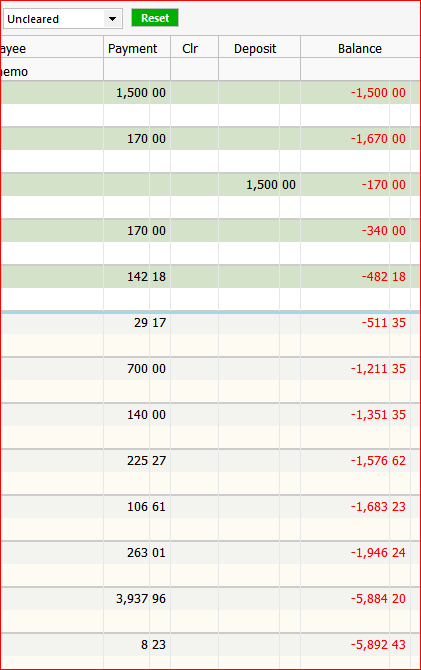
    In a filtered register view you can use the Balance column to show the sum of all transactions in this filtered view. The Balance amount shown in the bottom transaction can be used for that purpose.

    image.png

    In this example, the register is filtered to only show Uncleared transactions. The Balance is a Running Balance of all transactions shown in the view, with the tally beginning at 0.00

    If the register view is wide enough, there will also be an amount shown in the bottom line of the register, next to the transaction count.

    image.png

    You may have to widen the register view so that the amount can be displayed. In this case, I had to temporarily close the Account Sidebar by pressing the "F11" key as a toggle.
    Other means to widen the register view: Maximize the Quicken window to fullscreen. And/or close the Account Sidebar using the ▾icon in the sidebar's title.