Bank of Hawaii Update Problem
When trying to get the latest transactions for my account, get a message stating that Bank of Hawaii needs to send me an authentication code via text. The number they want to send the auth to is not my number. Because of this, can't get the latest account data. Bank of Hawaii says that it is a known Quicken problem and directed me to contact Quicken.
[Edited-Readability]
Comments
-
Hello @SubicSquid,
Thank you for sharing your experience. I have moved your post into a Windows category, as it appears you are a windows user.
While this is not currently a known issue, I did check your connections internally and can see you are getting a CC-585 error.
This usually means your financial institution has added a new security feature that requires your attention before your account can be updated. Follow the steps below; these are also in the article linked above.
Refresh your online account information
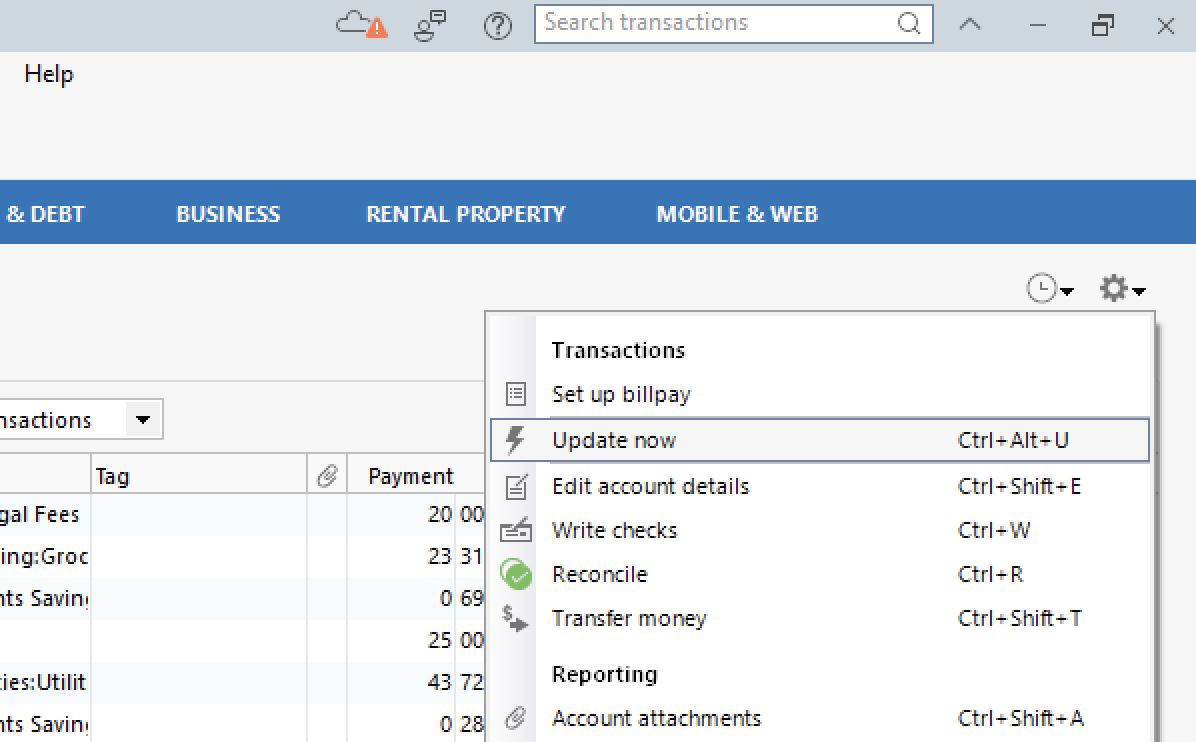
- From your account register, select the Actions gear icon at the very top of your register (Ctrl + Shift + N).
- Select Update Now.
- Follow the on-screen instructions to complete the update.
- Repeat these steps for each financial institution experiencing this error.
Visit your financial institution's website
- Sign in to your financial institution's website.
- Navigate to the page where you view your account information.
- When you encounter the new web page that requires your response, fill out the requested information and dismiss the screen. If you have the option to not display the page or ask you again, select that option. If you do not, the error may continue to occur.
Note: Some financial institution websites may have this new security requirement located in your inbox or message center.
If these steps do not resolve the issue, please reach out to Quicken Support directly for assistance. They can investigate further and process an escalation if needed.
Thank you!
Quicken Alyssa
Make sure to sign up for the email digest to see a round up of your top posts.
0 -
I am also having this same issue. I am not receiving any error code, I am able to log in to the Bank of Hawaii website without issue and without a requirement for any additional security. I did try both to reset the account and to deactivate the service and set up again. In both cases, I am getting a verification request from the BofH website for additional information to phone numbers which are not mine.
0 -
At the BofH website, are there any Profile Settings where you can set up, verify or change phone numbers and security settings?
IMHO, that would be the first thing I'd look for.0 -
Of course there is, profile is correct….
0
Categories
- All Categories
- 49 Product Ideas
- 35 Announcements
- 225 Alerts, Online Banking & Known Product Issues
- 18 Product Alerts
- 505 Welcome to the Community!
- 673 Before you Buy
- 1.4K Product Ideas
- 54.9K Quicken Classic for Windows
- 16.6K Quicken Classic for Mac
- 1K Quicken Mobile
- 825 Quicken on the Web
- 120 Quicken LifeHub