Correcting Price History Errors After Recording a Stock Split
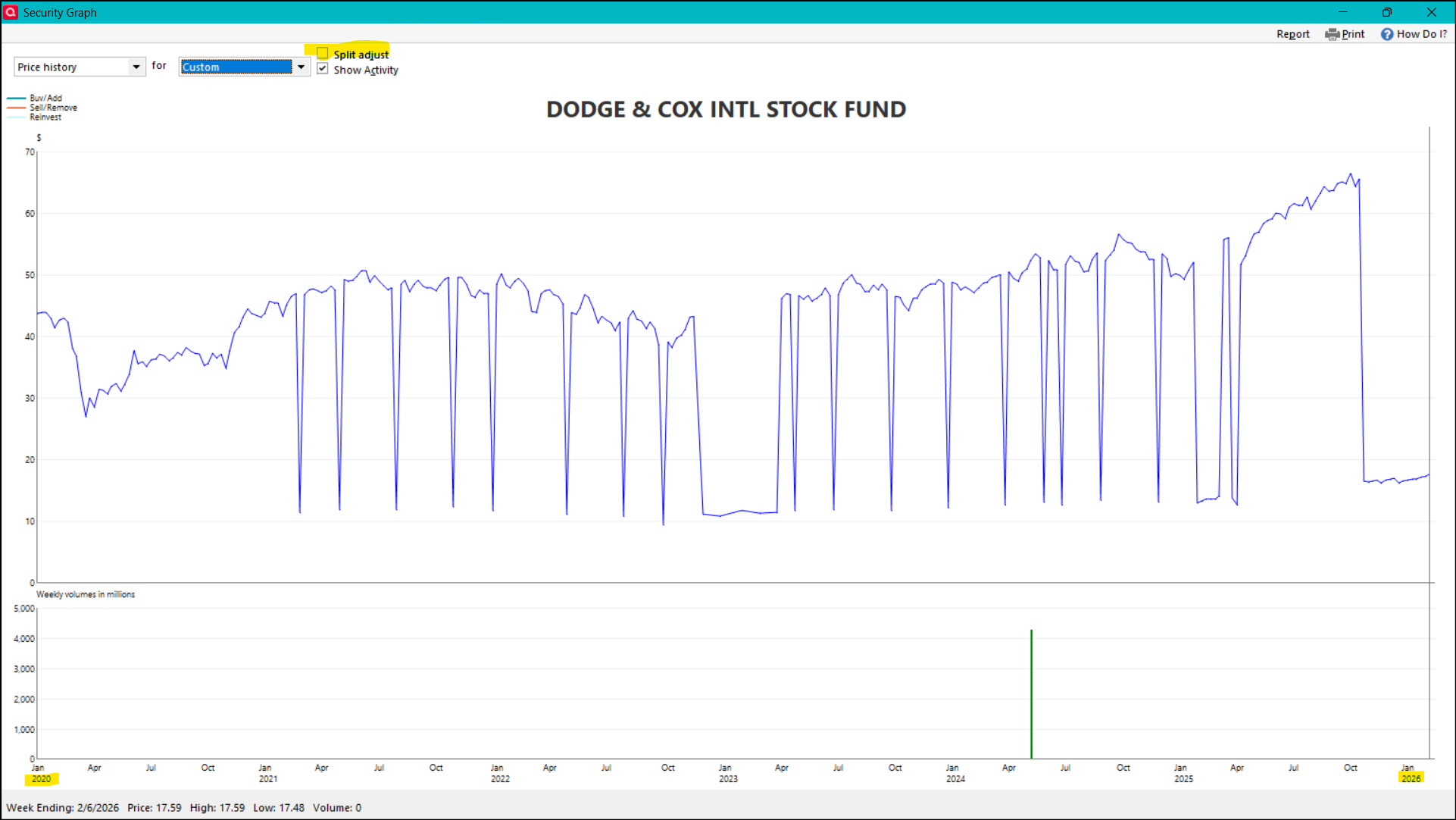
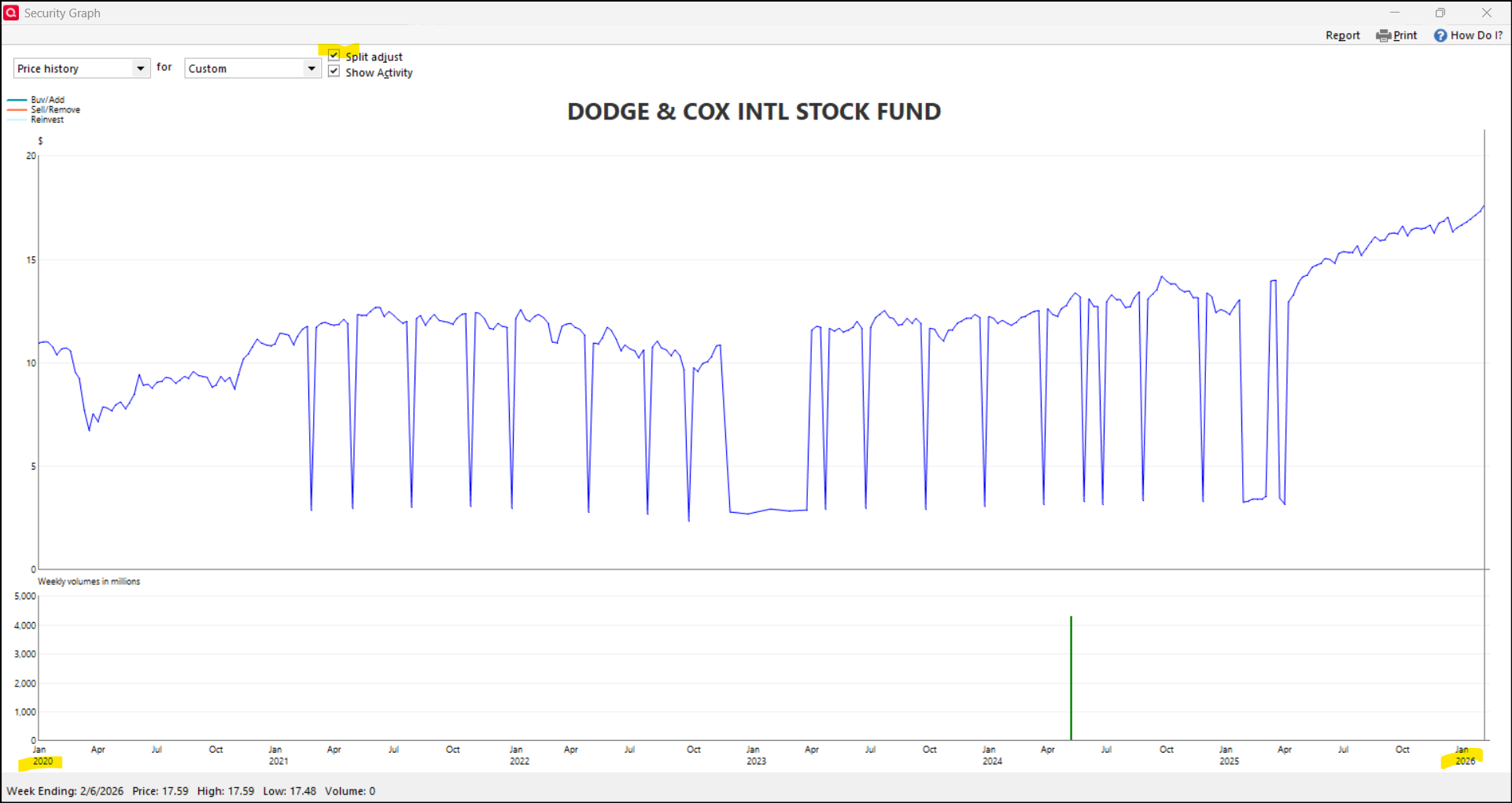
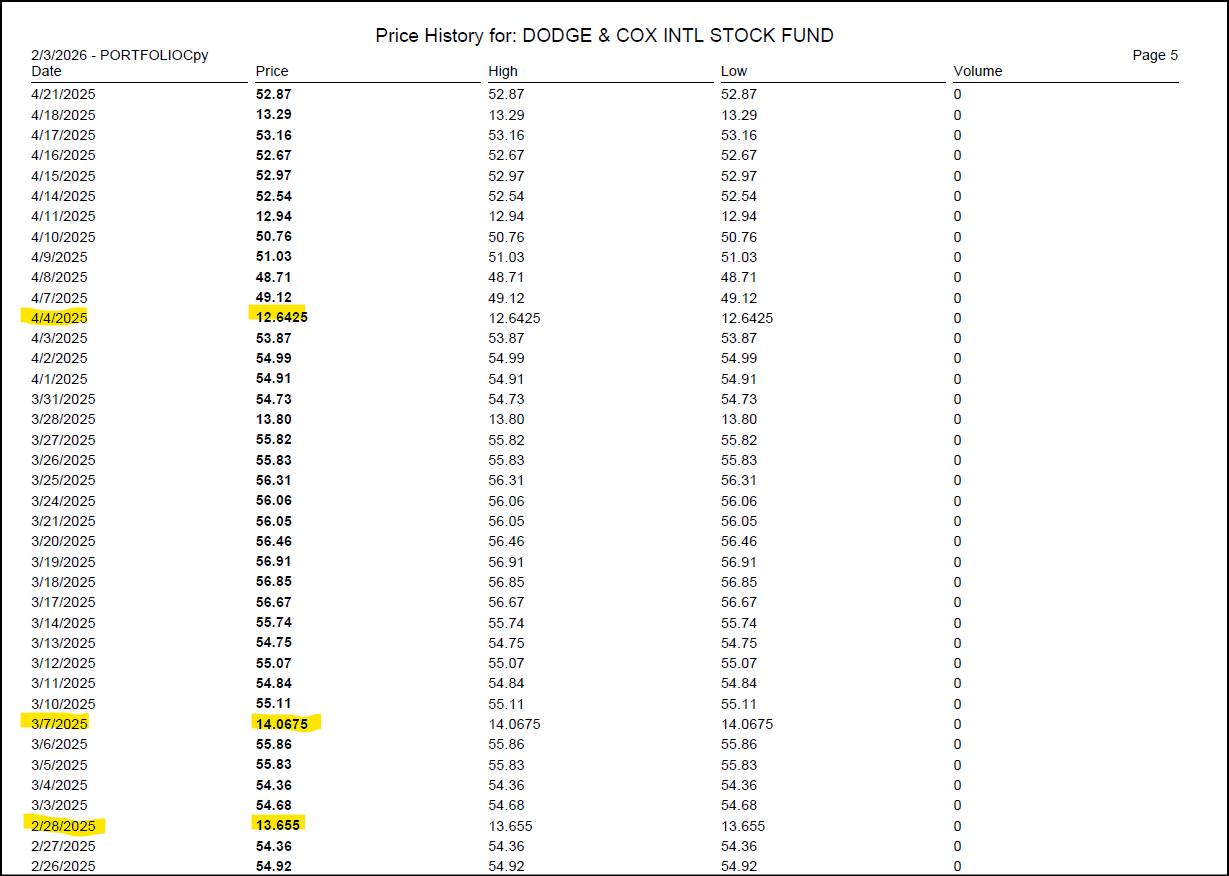
After recording stock splits for DODFX (4:1) and DODGX (16:1) for our accounts at Schwab on 10/24/2025, I noticed several errors in the price history between Feb 2021 and July Oct 2025. There are more than 60 dates where the price is exactly 1/4 (DODFX) or 1/16 (DODGX) of the true historical price. And all the dates are either end-of-week (Friday) or end-of-month.
My specific questions and some screen shots are below the following three paragraphs of my tedious customer support saga…
I phoned Quicken support on 2/2/2026 and spoke with Brian (ticket # 12207850). He said that, except for price history that I have added or edited, all the price history in Quicken comes from what they download from Schwab (via Morningstar); and therefore the error is Schwab's fault. He said I could edit the price history to make corrections, but that whenever I download transactions going forward, those manually added/edited prices will be overwritten. He also said I should just wait, and that Schwab will eventually correct the price history data that Quicken is downloading. While on the phone with him, I tried the validate and repair tool to no avail; we also tried creating a new Quicken file and downloaded transactions and price history for DODFX — this worked fine until I recorded the stock split on 10/24/2025, at which point I had the same erroneous price history shown below. Also, that new file would neglect the decades worth of price and transaction history I have in my existing Quicken file.
I phoned Schwab on 2/3/2026, and they said they don't have any direct control over what prices show up in Quicken, and that they use a 3rd party vendor to manage the data that goes to Quicken. They said I should phone Quicken and ask Quicken to submit a help ticket with Schwab, and then I could follow up with Schwab if Quicken gives me a case ID and user number, etc.
Then I phoned Quicken on 2/3/2026, and spoke with John (ticket # 12210378). For the most part, he repeated the claims I'd heard from Brian on my previous Quicken call. Except that John said if I edit or add to the price history myself, it "usually" doesn't get overwritten when downloading transactions and prices. John said that Quicken couldn't submit a help ticket directly with Schwab, so I didn't get any case or user ID info to share with Schwab. He escalated this issue and walked me through reporting the error through the Help menu within Quicken, and he recorded some screen shots. I'm not sure whether I'm supposed to ever hear anything back from Quicken regarding this ticket, but I'm not optimistic.
Specific questions for the Quicken Community…
- Besides any price history I add or edit myself, where exactly does the price history come from? Why does that price history generate errors after I record these stock splits? This hasn't happened with previous stock splits recorded in Quicken. It sure does seem like Quicken is making some calculations (dividing by 4 and 16, respectively) for various dates in the last 5 years, after I've recorded this split.
- If I correct the price history for these 60+ dates, will that correction work be overwritten by a future transaction/price quote download?
- If I should correct the price history, can I import just the last 5 years of history (we've held shares of these securities for more than 20 years)? Will that (partial history) leave intact the preceding history (2004-2020ish)? I found I can download price history for free from NASDAQ, so hopefully that data is good enough (I do not have a paid subscription to Yahoo Finance).
Thank you for your help!
-Robert (Quicken Classic Premier for Windows, R65.29)
DODFX price history 2020-2026 without split adjust
DODFX price history with split adjust
DODFX price history report from Quicken
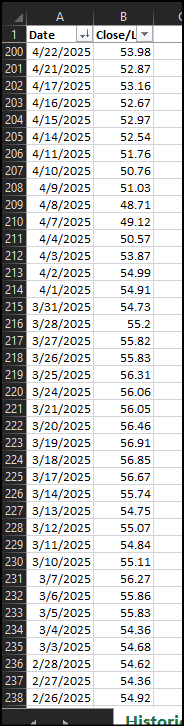
NASDAQ price history for DODFX for same time period
Comments
-
It is VERY unfortunate that the Quicken folks answered so wrongly. @Quicken Kristina a follow-up with the support folks would be helpful, if possible.
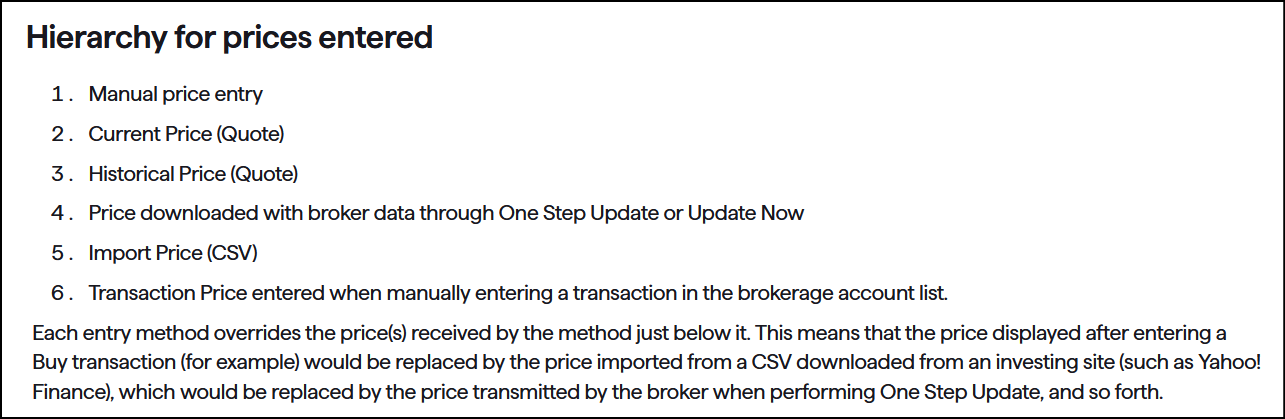
Prices get downloaded principally from two sources - 1) Quicken's third party data suppliers (Download Quotes and Download Historical prices, and 2) your financial institution (as part of downloading transactions and holdings). Your FI will (typically) only provide prices one day at a time. The third party data supplier seems to provide a minimum of 5 days of prices and with a historical request can go back up to 5 years. But those longer stretches are end-of week or end of month values, not daily. Other price sources are User manual entry, user initiated csv file import, and prices associated with transactions (buys and sells, etc.). The hierarchy on how these various prices take precedence is presented here.
At one time an outfit called Mark-It was one of the third party data suppliers. Maybe they still are, maybe not. No one who really knows is saying.
The major issue that leads to the types of data spikes you are seeing is that after a stock split or similar event the data suppliers adjust the historical prices for that current split. That makes their graphs appear right, but is is wrong for Quicken data. Our Quicken records identify the change in share quantity, so the price history should not be adjusted.
If you go after historical prices (from the data supplier) and end-of-week or end-of-month values are missing or from a lesser source, the split adjusted can get inserted when they should not be.
The additional misinformation you received - If you manually enter a corrected price for those bad spikes, your manual entries are supposed to be of highest precedence and not later overridden by a subsequent historical download. They should hold, and have in my experience.
While I am comfortable promoting the indicated hierarchy as the true intent, I hold some skepticism that more recent programming changes may have created some cases that ignore that hierarchy. It is nothing I can prove or document, but the blips you are showing appear to occur more frequently than they used to.
2 -
Thank you very much, @q_lurker !
First, just to confirm: are you saying Quicken support misinformed me about both (a) where the downloaded price history comes from, and (b) whether manual price history additions/edits take priority over future One Step downloads? Were they also wrong to say that the price history errors might be corrected by a future One Step or price history update with corrected price history from Schwab or the 3rd party data supplier?
Next, from your comment: "If you go after historical prices (from the data supplier) and end-of-week or end-of-month values are missing or from a lesser source, the split adjusted can get inserted when they should not be." I reviewed a restored backup prior to the 10/24/25 split, and it has (correct) prices for all the dates that show incorrect prices post-split. Those prices would have to be from One Step Updates because I've never done extensive price history editing for any of our holdings. So how and why would these dates' prices be overwritten? Maybe a relevant data point: the same account had a more recent split (XLU, 2:1) in December 2025d, and that didn't generate any price history errors.
Last, if I understand the hierarchy shown below, then I should not import a corrected price history CSV (since imports are lower down than both price quotes and One Step Updates). That means I'll need to manually key in each of the 60 corrections (actually 120, since I'll need to do this for DODGX too). I just want to confirm that's the best path before spending more time on it. [Furthermore, if CSV imports fall beneath price quotes and One Step updates, what use are they? Won't the data be overwritten at the next One Step update? I must be mistaken.]
Thanks again,
Robert
0 -
Your opening paragraph questions — a) Yes, they misinformed you; b) Yes, they misinformed you; third: Yes, I would not expect the prices to be corrected in the future, unless you manually do so.
Second paragraph: Your evidence is what I was suggesting with my skepticism in my final paragraph where I am not sure the professed hierarchy is being followed or maintained. Your DODFX plot is suggestive that month-end prices were coming from the historical price downloads going back for a period of 5 years. Those prices (#3 in the hierarchy) should not have overridden regular quote downloads (#2). Even if those prior prices were from a prior historical price download, I don't think the new data should replace pre-existing same-source level data. The only scenario I can conceptualize a new value popping in would be if the month end price somehow appeared for a weekend (Sat or Sun) and the existing data only included Fri and Mon. Just to be a little clearer, the historical price data is supposed to be: Daily values for the 30 days (or Month?) previous to the query, then end of week values to go back a full year, and finally end-of-month values for the remaining 4 years to cover a total 5-year length of time.
Third paragraph: Certainly by intent, the csv prices might get overwritten. I have not proven that to happen or not happen. They are good for time periods older than 5 years, or for securities with prices not being downloaded.
The other unspoken part here is why might historical prices been brought in anyway. I rarely invoke that selection and if I do, I do so only for a specific security I am working on. Again, my skepticism wonders if historical prices aren't being called in by some (or all) one-step update actions. My thinking at one time was the programming saw the most recent x-days of prices missing for a given security and only solicited for data back that far. I am not sure that is currently correct if it ever was.
0 -
@q_lurker — thanks again. This is helping a lot.
- To be crystal clear, you do recommend I go ahead with the manual price history edits for the past 5 years for both securities?
- I don't quite understand this: "The other unspoken part here is why might historical prices been brought in anyway. I rarely invoke that selection and if I do, I do so only for a specific security I am working on."
- Besides reviewing price history after any future stock splits, is there anything you would suggest going forward? Any idea why these stock splits and not others generated errors? In other words, is there anything one can do differently to avoid this hassle?
Thanks!
Robert
0 -
- 1. Yes, I would go ahead with the manual updates. Depending on your patience level, you could try building the csv file for a few dates, importing it, requesting a historical price update, and seeing what survived. a) you might find the csv import did nothing since it is lower on the hierarchy. b) if you deleted existing bad data, imported the csv data getting good values accepted, you still might find it overridden by the subsequent historical data download. So even then for your own piece of mind, I'd suggest manual entry of a few prices, then historical quotes to make sure the manual entries hold on.
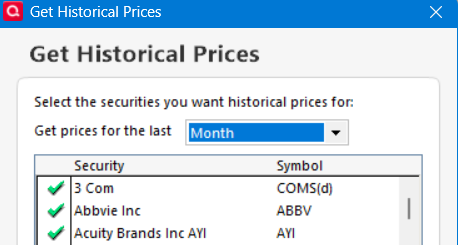
2. I don't habitually go to the below pop-up for historical prices. When I do, I am very selective to a specific security rather than the default 'all' securities. But I do sometimes find historical prices filled in that I didn't expect. Why? When did that happen? I don't know. If it is from a OSU, for just those securities already being updated by the OSU, maybe that is ok. If there is something else initiating a historical quotes access, I'd want to be in control of that.
3. My policy more and more is to keep up to date with regular (current) price updates. That seems to keep the #2 hierarchy data in play and avoid the hassles you are seeing here. Associated with splits, I try to watch and examine the price data for the few days before the split. It seems the supplier providing the 'current' quotes is likely to adjust the prices based on the 'date of record' as opposed to the effective date of the split. No idea why sometimes this shows up and not other times. May associates back to my point 2 comments that I don't know why historical prices sometimes fill in.
1 -
Hello @bebob,
Thank you for sharing your feedback about your interactions with support. They have been forwarded to the proper channels for review.
The issue with DODFX price history not showing correctly has already been reported to our teams for further investigation and resolution. Thank you for sending the problem report with log files attached. I added you to the ticket.
Thank you!
(CTP-15585)
Quicken Kristina
Make sure to sign up for the email digest to see a round up of your top posts.
0 -
@Quicken Kristina thank you for your attention to this problem. I have had the same problem with both DODFX and DODGX.
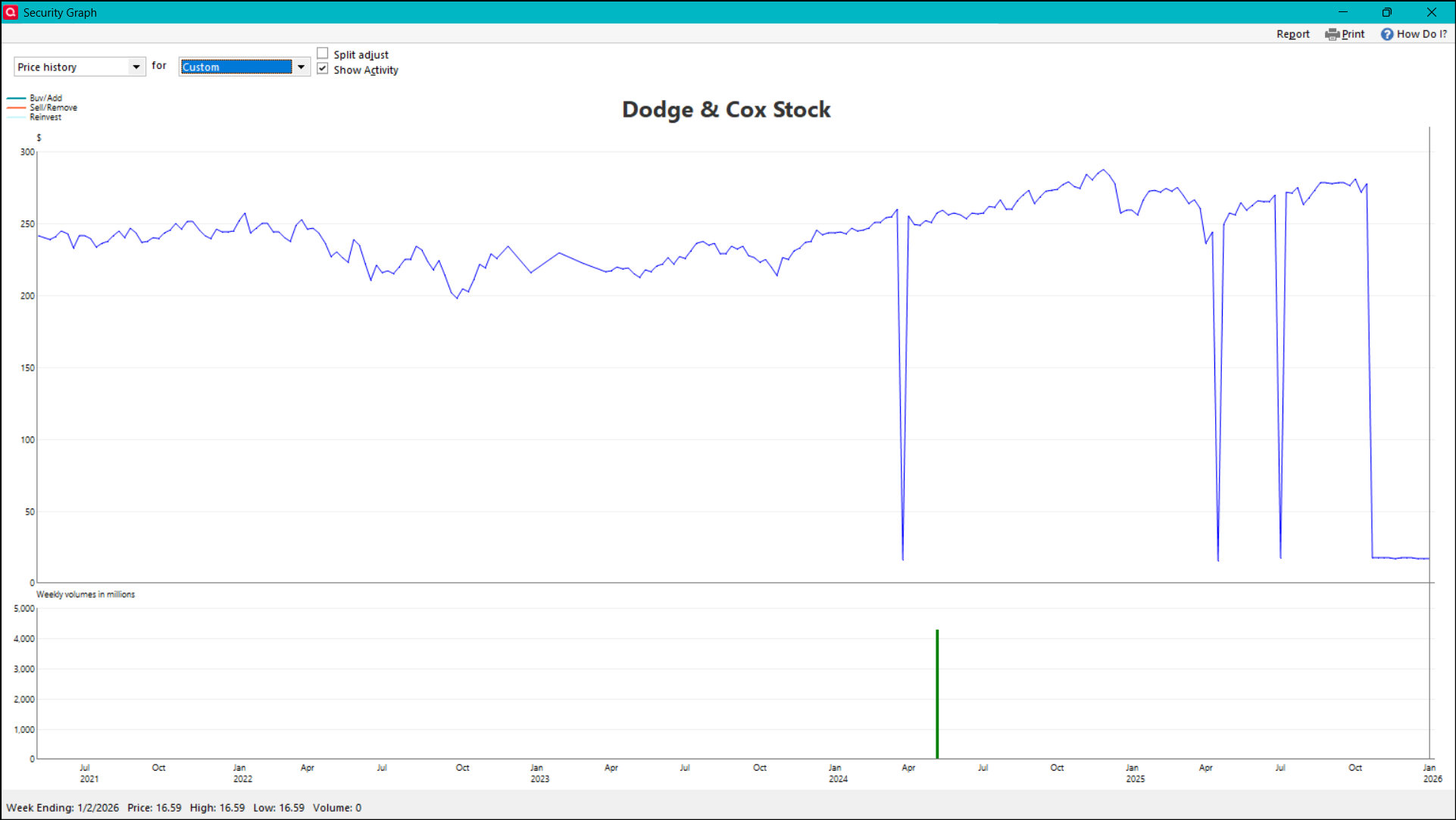
@q_lurker thank you again for your help. After manually correcting each price for DODFX and DODGX, whenever I update transactions at Schwab I continue to get price errors for both securities on the following dates:
- 7/4/2025 (4th of july)
- 4/18/2025 (good friday)
- 3/29/2024 (good friday)
- 5/31/2021 (memorial day)
The market was closed those dates, so I had deleted the price data (rather than editing), but after each transaction download, bad (split-adjusted) prices are downloaded. [And this oddity in graphing: the low price on 5/31/2021 only shows up if I set custom dates for a briefer period.]
Any tips on how to permanently fix these price errors? Should I just duplicate the price on the day(s) preceding these errors (even though there should be no price history for a market closed date)?
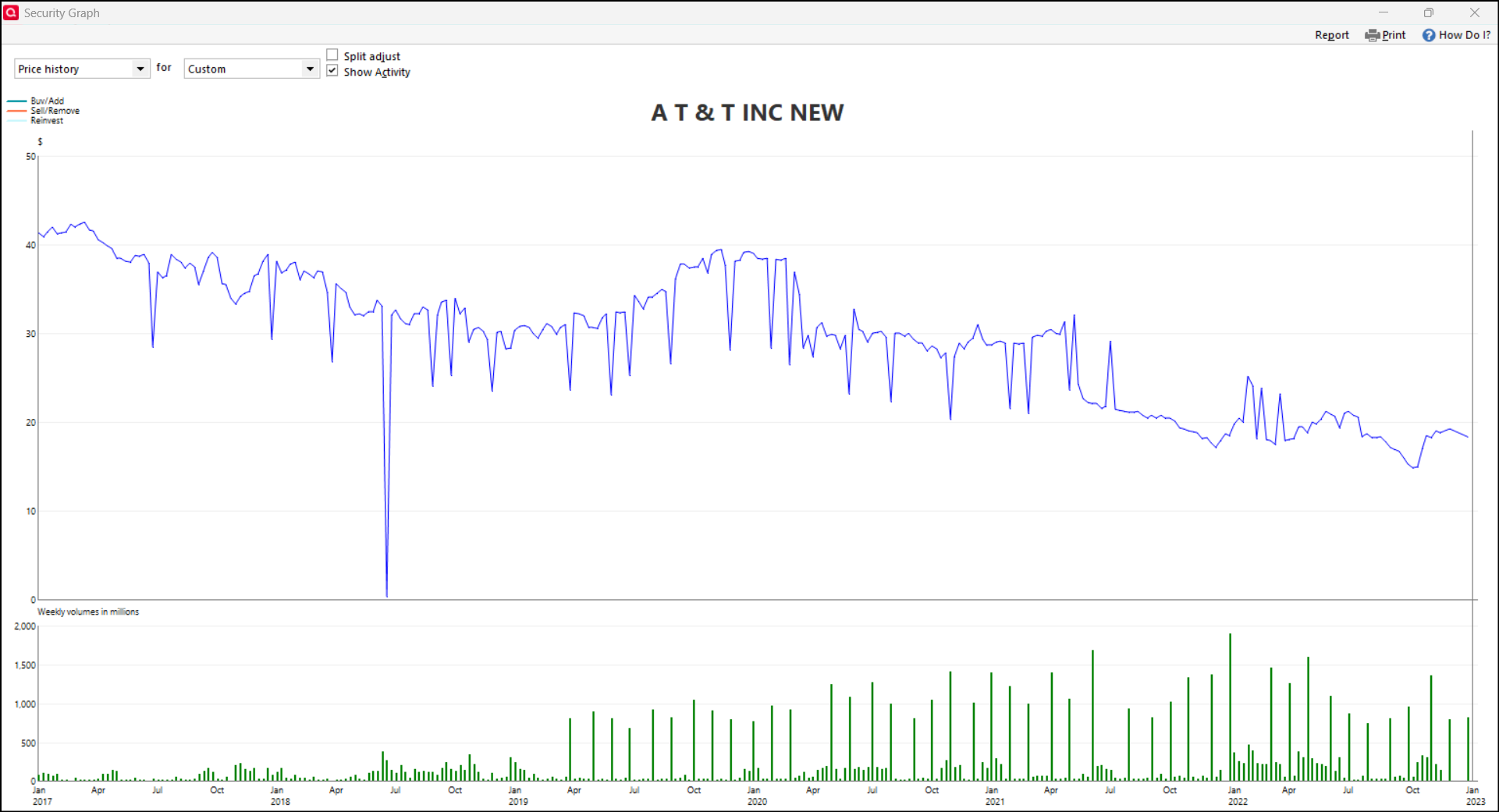
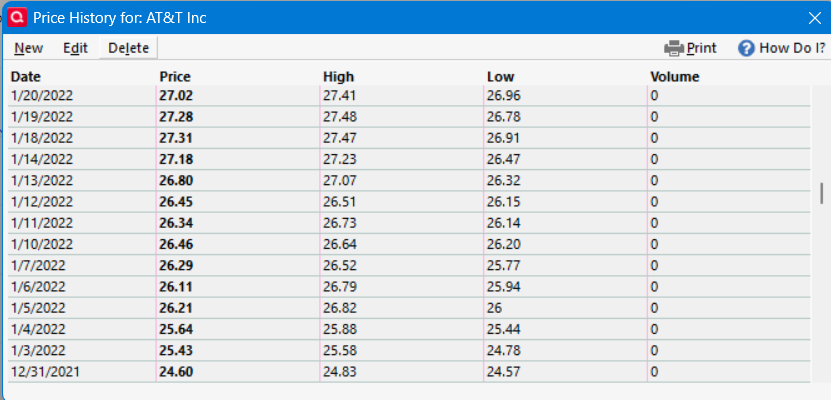
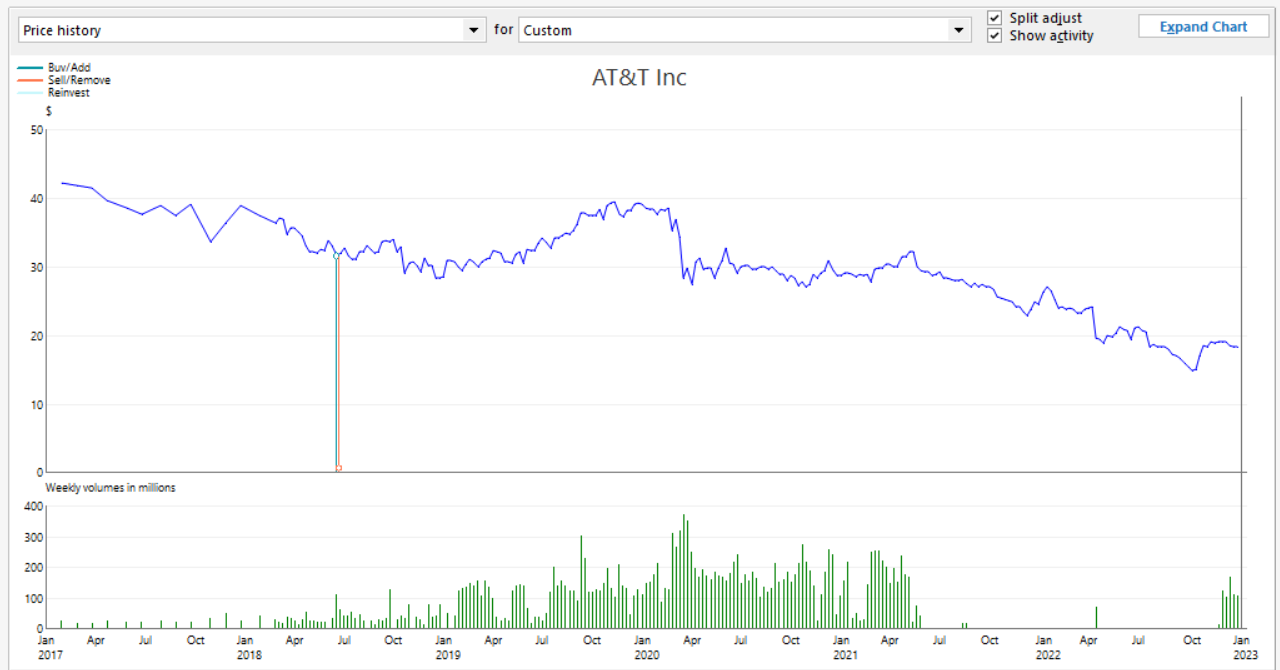
Meanwhile, I've noticed another price history problem and wonder if it's related or how you recommend I correct it. AT&T spun off shares of WBD in April 2022. Unfortunately I don't know whether the price history between 2017 and 2022 was wrong before I recorded the spinoff, but it's certainly messed up now. I haven't checked whether all of the wrong prices are on Fridays, but a lot of them are, including the $0 price in June 2018.
The price history looks correct outside of that window, and given that window is about 5 years I figured this might relate to the post-stock split price history errors discussed on this thread. Any advice? Apologies for sneaking another possibly unrelated issue into this thread. Thank you,
Robert
0 -
Yes, those holiday prices for DODFX and DODGX are coming from Quicken's data supplier. I wish they wouldn't. I don't have a clue why they do it.
Any tips on how to permanently fix these price errors? Should I just duplicate the price on the day(s) preceding these errors (even though there should be no price history for a market closed date)?
I think the only way around would be as you suggest - manually enter the prior closing values for those holidays.
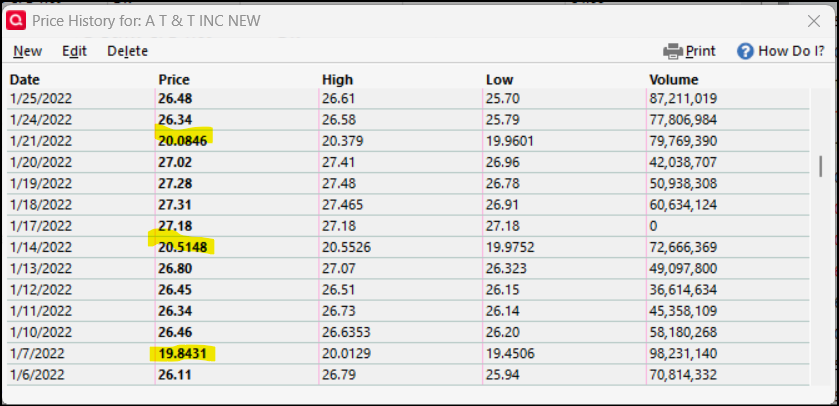
From a secondary file I was maintaining in your AT&T time frame, I had this data:
and this graph:
On the whole, I believe this supports that the spikes you are seeing are related to the same phenomenon. Off the top, I don't recall why my volumes are 0 for late 21 through most of 22. That account did include the WBD spinoff in April 22.
Quickly comparing data, I see agreement on 1/6/22 (both at 26.11), and disagreement on Friday 1/7/22 (26.29 vs 19.8431). That suggests to me the prices downloaded after the WBD spinoff were reduced to about 75.5% of their true closing (19.8431/26.29).
In my main file, I did not own AT&T in early 2022, but I do find Friday prices that match the Friday prices in your snip. 1/7, 1/14, and 1/21. Again that seems to reinforce that those prices are 'real closing prices' adjusted downward due to the WBD spinoff.
So perhaps you can manually correct those spikes by dividing the price history values by the 0.755 factor (though I'd choose to be more precise. The calculation should actually lead to a price to a full penny (19.8431 / 0.754777 = 26.29000).
Hope this helps
0 -
@q_lurker thanks again. Re the AT&T price errors, what's the difference between your main and secondary files? The former has the same errors I have, while the latter has correct prices. Maybe unrelated, but could my AT&T price history errors have anything to do with the way I recorded the WBD spinoff?
As far as how to correct the AT&T prices, your dividing by 0.754777 leads to prices that match your secondary file. But I haven't been able to find an online resource that matches either the "raw" prices pre-spinoff or "real closing prices" Quicken evidently pull from when it downloaded prices post-spinoff. I've only checked on Yahoo and NASDAQ though.
@Quicken Kristina should I submit problem reports and log files for the related issues with DODGX post-split price history, and now the AT&T pre-WBD-spinoff price history? Thank you.
0 -
@bebob My secondary file owned AT&T continuously through that 2022 time period. As such, the prices were getting downloaded from Quicken's third party data supplier regularly (the #2 in the hierarchy of sources). My main file did not own AT&T through that time period. I believe (or suspect) that the prices after October 2020 were filled in from the Historical price source in late 2022 when I bought back in. So those January 2022 prices were the Friday closing prices adjusted downward by the 75% factor due to the April 2022 WBD spinoff with the data from the #3 source in the hierarchy.
These reduced price data are from the third party data suppliers and unrelated to how the spinoff event is actually recorded in Quicken.
I primarily use Yahoo finance for historical data. Therein, they tabulate a 'Close' price and a 'Adj Close' price. Their 'i' explanation indicates that the 'Close' column is "Close price adjusted for splits" and the 'Adj Close' column is "Adjusted close price adjusted for splits and dividend and/or capital gain distributions". Further to that they show on April 11, 2022 a "1324:1000 stock split" (1.324 is the inverse of the 75% factor I calculated above). That would indicate their 4/12/22 close of 19.56 is real, but their 4/08/22 close of 18.23 was really 1.324 * 18.23 = 24.14 (rounded). Or going back to 1/7/22, the 19.86 they show was really 26.29 (rounded).
From my data in my secondary file, I'd reverse that and say the known close on 1/7/22 of 26.29 was reduced by Yahoo to 26.29 / 1.324 = 19.8565 rounded to19.86.
Bear in mind neither the 1.324 nor the 75.477% I showed are absolutes. They derive from what someone determines to the the fair market values of the two companies 'immediately' after the spinoff, but the IRS does not dictate how those FMVs are to be determined. So Yahoo Finance, NASDAQ, your brokerage, AT&T, and everyone else can make their own determination. In reality, all those types of sources should be close.
I don't know of any source that maintains the true historical closing prices.
0
Categories
- All Categories
- 59 Product Ideas
- 34 Announcements
- 239 Alerts, Online Banking & Known Product Issues
- 19 Product Alerts
- 511 Welcome to the Community!
- 679 Before you Buy
- 1.4K Product Ideas
- 55.3K Quicken Classic for Windows
- 16.7K Quicken Classic for Mac
- 1K Quicken Mobile
- 828 Quicken on the Web
- 123 Quicken LifeHub