Investment Cash Account does not match statement, Split ContribX entries

DonBoy
DonBoy Quicken Windows Subscription Member ✭✭
edited February 7 in Investing (Windows)

Greetings! I’m trying to follow my investment accounts, which are managed by an advisor. I have Quicken setup to download transactions from the LPL account site. The account balances/values, according to Quicken, are often whole percentages off from what the account statements are showing, and at year end 2025 are way off.

Compared with the account statements, the Quicken portfolio value report:

--with the exception of (most frequently negative) “-Cash-”, identical ending share and value numbers for all securities.

--the investment bank account values accurately reflect the cash/bank amount in the statements. So, ignoring the Cash amount, the Quicken report would produce the same account values as the statements.

There are no placeholder entries, and validate and super validate have been run. In Quicken, the portfolio bank accounts are set up as Type=Other and Asset Class=cash. This seemed to be the most accurate of the available options. But, maybe it’s wrong.

I understand that I can manually enter transactions that adjust the Quicken cash value to match the statements, but this seems like it should not be necessary for significant amounts.

Windows QuickenClassic Premier. Ver R65.29, No placeholders are in the accounts.

Something I discovered while working on this, which may be unrelated--The investment transaction reports show missing values in the cash column for some transfers from my checking account. See 7/14 vs. 8/14.

Q1.jpg

Oddly, the Total behaves as if they were there.

In the Investing Activity report, the entries for the transaction values that don’t show (above) have “–Split--” as the category. See 7/14 vs. 8/14 below. This usually means a split transaction, but I don’t see any difference between the entries. I see no splits in the register entries and split does not look like an option for these transactions.

Q2.jpg

This may not be related to the Cash balance issue, but maybe. I appreciate you reading this and any assistance offered.

—Don

[Edited - Readability]

Comments

  • Quicken Kristina
    Quicken Kristina Quicken Windows Subscription Moderator mod

    Hello @DonBoy,

    Thank you for reaching out! It is possible that the issues are related. Are the contributions with the -Split- category contributions from a paycheck reminder? If not, then where do they come from?

    Is the number of holdings in your account correct? It's possible that the cash balance could be off if part of it is being incorrectly identified as a security.

    I look forward to your response!

    Quicken Kristina

    Make sure to sign up for the email digest to see a round up of your top posts.

  • DonBoy
    DonBoy Quicken Windows Subscription Member ✭✭

    Quicken Kristina,

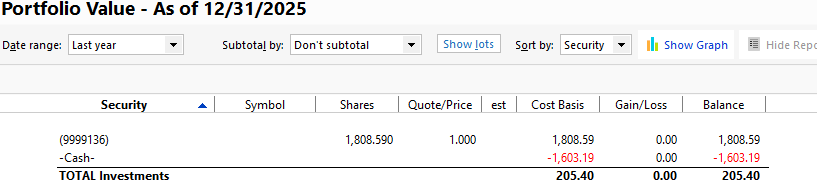
    Thank you for getting back to me. I have no paycheck reminders set up, or any reminders for transactions related to investments. All of the holdings (items with trading symbols) per Quicken are identical in identity, quantity and price with the statements, and always have been. The problem is with these two lines from a Portfolio Value report for the above referenced account account, as an example. The holdings (again, all accurate) have been filtered out:

    image.png

    The numeric security (a bank account within the investment account) matches the cash amounts shown on the statements. And, if the -Cash- amount (here negative) was not showing up in the report, all would be well. The Quicken -Cash- amount varies from month to month, so I don't think it's a single entry problem.

    Looking at the details of the -Split- transactions show no splits on either the investment (receiving) end:

    Q5.jpg

    Or the checking account (sending) end:

    Q4.jpg

    I did find that changing the investment transaction from type "Cash Transferred into Account" (ContribX) to type "Deposit" eliminates the -Split-. Changing it back again, reinserts the -Split-. However, these actions do not appear to have any influence initial problem with the -Cash- balance.

    In order to have accurate performance assessment, my understanding is that our periodic transfers of money between our checking and investment accounts should be shown as ContribX and WithdrwX actions, rather than Deposit and Withdraw, in order to have accurate performance assessment. Do you know if this is true?

    Peace. Don

  • Quicken Kristina
    Quicken Kristina Quicken Windows Subscription Moderator mod

    Thank you for your reply,

    You would want to use the correct transaction type when possible, since that helps keep reporting more accurate. It also sounds like changing the transaction type didn't correct the issue.

    Is the incorrect cash balance happening only in the report, or do you also see it in your investment account (in Quicken) and the portfolio view (in Quicken)? Is the report a saved report, or is this also happening when you run a new portfolio value report?

    Thank you!

    Quicken Kristina

    Make sure to sign up for the email digest to see a round up of your top posts.

  • DonBoy
    DonBoy Quicken Windows Subscription Member ✭✭
    edited February 11

    The incorrect -Cash- balance is also showing the same amount in the account and portfolio views. Regarding the reports, I'm using standard Quicken reports.

    I did a community search for "Investment Negative Cash Balance" and found discussions related to this. I hadn't seen these before, probably by not using these words. This is most likely nearly identical to my issue:

    Looking more deeply at the individual account transactions, this problem really arrived when my advisor switched brokerages from Cetera to LPL. Since the accounts and holdings were supposed to be transferred to LPL, and I wanted to continue to monitor performance across the brokerage transfer, I relinked the Quicken accounts to LPL, not create new LPL accounts. At that point, the downloaded cash transactions went up 8 fold with new transactions between -Cash- and the account's bank account, and the split transactions in -Cash- began to show up. So, I think this is related to Quicken's interpretation of these LPL transaction downloads. Does this sound like I'm on a reasonable thought process?

    Peace,

    Don

  • JQuick1
    JQuick1 Quicken Windows Subscription Member ✭✭

    @DonBoy I too am using R65.29, on Windows 11. I am unsure if this is the same or a related issue, but I stumbled on this problem in reviewing the standard "Investment Performance" report today, and it sounds potentially similar to your problem regarding split transactions. I don't view this report often, so don't know how long this issue has existed, but for sure the source of the problem relates to transactions in two of my manually maintained (no online downloads) Retirement accounts. Specifically, Quicken is inflating the "Investments" and "Returns" values in this report. Can you confirm you do or don't see inflated values in this same report for the account(s) you described in your problem above?

    By narrowing down report dates and looking at data, I traced this back to any/all "Split" transactions in these specific inflated accounts(in this report) being counted a second time when included in these "Investments" and "Returns" columns in the "Investment Performance" report. Do you see similar? To come to this conclusion, below is the combo of reports I generated, looking at balances of each at various times:

    (1) Investment Performance reports over various periods of time. I had two obviously very high inflated accounts, so I tried to see if I could find a pattern to identify a semi root cause.

    (2) Transaction Report that reports on ONLY split transactions over a relatively small period of time and ONLY for one given account identified in (1) above. I noted the total sum amount over this same period of time as reported in (1) above.

    (3) Register balance for specific account on the same/similar start & end dates as the 2 reports above.

    (4) Comparing the data from (1)-(3) above, do you see that the over-inflated values in report (1) above match when you ADD the value of the split sums seen in report (2) above, thus overall the (1) report is doubling the sum of all split transactions in the given account? My observation is that this is done for the ENTIRE life of the account, so the longer you have had the account open and been doing split transactions(and even more so if larger $ values in these split transactions), the larger the difference reporting error is in report (1) vs. reality(and also easier to identify which account(s) have the problem). I have no idea if any of this behavior carries over for other Quicken reports/functions/etc… or if this is only applicable to this one report.

  • DonBoy
    DonBoy Quicken Windows Subscription Member ✭✭

    @JQuick1

    I'm also confused by the outputs of some of these reports and I can appreciate the detective work you've done. I'm using Complete tracking and downloaded info, and it looks like you are using Simple tracking, which I have no experience with. That said, in my case, the split transactions appeared for a few months in mid 2025. And, I now believe that the split transactions are confusing but might not be a problem here. The big thing I've found is to assign the transactions appropriate 1) Category and whether or not a category impacts investment performance and 2) Action, like WithdrwX (cash transferred out of an account) vs Withdraw. But, again, I don't know if and how this works in your case. If you have thoroughly search the community, I suggest you create another discussion.

  • DonBoy
    DonBoy Quicken Windows Subscription Member ✭✭

    @Quicken Kristina

    The -Split- transactions were a diversion (red herring) in my case.

    The cash balance problem was related to cash entries at the time the brokerage for the accounts was switched. (Again, I wanted to maintain continuity of the accounts across the brokerages.). Entering Update Cash Balance entries for each account to match the first statement for the new brokerage corrected the problem. The lesson learned is to mind the statements. 🤔

    Also, by checking the "Affects investment performance" box on the transaction category for adviser fee transactions, the Investment Performance report Average Annual Return % closely matches that of the statements.

    So, I think I have it now. Hope all is well.

  • Quicken Kristina
    Quicken Kristina Quicken Windows Subscription Moderator mod

    Thank you for the follow-up,

    I'm glad to hear you found the cause of the problem and corrected it! Thank you also for sharing the solution. Hopefully, it'll help others encountering the same issue.

    Thank you!

    Quicken Kristina

    Make sure to sign up for the email digest to see a round up of your top posts.