As I try to continue reconciling Q Classic Cda to Excel

Tealeaf3
Tealeaf3 Quicken Canada Other Member ✭✭✭

Is there a way to see the breakdown by Account and Items of increases or losses overall per day.

My separate calculation shows a difference and even using Portfolio Value reports for the day does not show a figure that is produced by the program but matches my Excel??? calculations


Answers

  • Quicken Kristina
    Quicken Kristina Quicken Windows Subscription Moderator mod

    Hello @Tealeaf3,

    Thank you for reaching out! If you're wanting to see the day gain/loss per account, you can do that in your Quicken in the Investing tab, Portfolio tab.

    Select Accounts from the dropdown.

    Screenshot 2026-02-09 at 4.58.00 PM.png

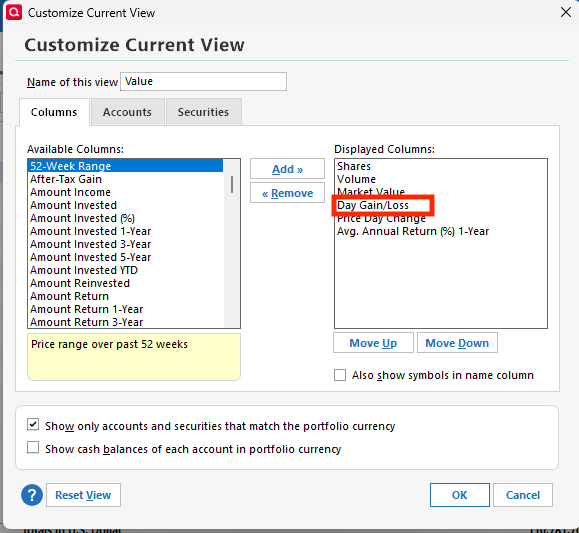
    If Day Gain/Loss isn't already visible, click the Customize button and add that column.

    Screenshot 2026-02-09 at 4.56.18 PM.png

    You can use the Export option to export to your clipboard or Excel, if needed.

    I hope this helps!

    Quicken Kristina

    Make sure to sign up for the email digest to see a round up of your top posts.

  • Tealeaf3
    Tealeaf3 Quicken Canada Other Member ✭✭✭

    Well it helps but does not lead to any reconciliation.

    The total of the separate accounts does not match the overall total by some, in this case, 386.55.

    I had one transaction closing that day which bears no resemblance.

    What kind of check can I run? Validation shows nothing.

    I reinstated an old back up and then ran an update but it seems to only download quotes from the last week???!! so I have lost data for over 2 months. The prior file that I closed to get that old one disappeared unless you can tell me how to recover it. It shows in Quicken as recently used, but I cannot see the location on my PC, Yikes!! Using Q Cda 27.1.65.20 on Windows 11

  • Tealeaf3
    Tealeaf3 Quicken Canada Other Member ✭✭✭

    Interesting or not, I found or should say I was able to download the latest file but it does not appear on my PC at C:\Users\"myName" as indicated by Quicken but at C:\Users\Downloads folder, so Quicken was not helpful that way.

    Now back to solving my original problem