Planning Budgets carryover year to year

Robert Sheran
Robert Sheran Member ✭✭✭✭

The rollover balance amount on any category at the end of the year, if adjusted, doesn't update the rollover balance in next year's category, and I need to adjust each category's rollover balance to match prior yr changes. 🤔

Win11, Quicken Deluxe, Ver: R66.12, Build: 27.1.66.12,

[Edited - Readability]

Tagged:

Comments

  • Quicken Kristina
    Quicken Kristina Quicken Windows Subscription Moderator mod

    Hello @Robert Sheran,

    Thank you for letting us know you're seeing this issue. To clarify, are you saying that after you move forward to 2026, you go back to 2025, adjust the budget in a way that affects how much will roll over, but that change does not reflect in the 2026 budget? If that is what is happening, are you seeing this with overages (spent more than budgeted), surplus (spent less than budget), or both?

    If that is not the case, please provide more details.

    I look forward to your reply!

    Quicken Kristina

    Make sure to sign up for the email digest to see a round up of your top posts.

  • Robert Sheran
    Robert Sheran Member ✭✭✭✭
    edited March 8

    No, I don't adjust the category's budget amounts in the prior year in order to correct the roll-over balance at the end of the year because the year-to-year gets out of line. It seems that the end-of-year balance is not the same as the carryover in the 1st month of the current year when a new budget is created.

    Makes no difference whether the prior year's category Roll Over Bal is in the negative or positive at the end of the year, any edit to the end of the year Roll Over Bal using the roll over edit feature in the prior year does not update the same category's 1st month current year's Roll Over Bal.

    Hope that helps.

    [Edited - Readability]

  • Quicken Kristina
    Quicken Kristina Quicken Windows Subscription Moderator mod

    Thank you for your reply,

    I'm not able to replicate the issue in my own Quicken file. What did you mean in your original post when you said: The rollover balance amount on any category at the end of the year, if adjusted, doesn't update the rollover balance in next year's category…

    What are you adjusting?

    Thank you!

    Quicken Kristina

    Make sure to sign up for the email digest to see a round up of your top posts.

  • Robert Sheran
    Robert Sheran Member ✭✭✭✭

    I admit I am not an expert on budget workflow, and my observation (issue) may just be my workflow and not programing. I have 7 years of consecutive budgets. I always create new year budgets based on prior years budget. For any category items that have unpredictable monthly actual expenses I set the item to "Roll Over Balances at the end of each month", At EOY I review the Roll Over Balance. If the "Monthly Budget" amounts for the Prior and Current year are appropriate (based on Avg monthly expenses), but the accumulative "Roll Over Balance" from year-to-year is excessive (+/-), my corrective action is to open prior year and edit the December Roll over Balance to an expected value. When I open the current year budget Category item, I find the Roll over balance on 1st month does reflect what I edited in the prior year.

  • Quicken Kristina
    Quicken Kristina Quicken Windows Subscription Moderator mod

    Thank you for your reply,

    I'm not able to replicate the issue in my Quicken. When did you first notice this issue?

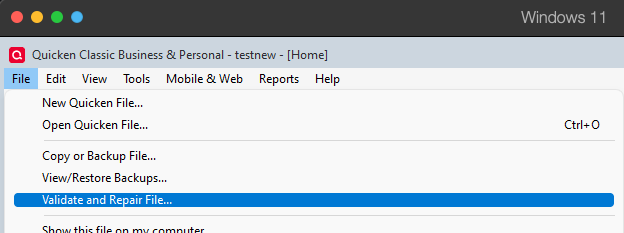
    It is likely to be a file-specific problem. To start troubleshooting, I suggest that you try validating your data file.  Please save a backup file prior to performing these steps. 

    Validate: 

    1. File
    2. Validate and Repair File... Validate and repair.png
    3. Validate File
    4. Click OK
    5. Close the Data Log
    6. Close Quicken (leave it closed for at least 5 secs)
    7. Reopen Quicken and see if the issue persists.

    Please let me know how it goes!

    Quicken Kristina

    Make sure to sign up for the email digest to see a round up of your top posts.

  • Robert Sheran
    Robert Sheran Member ✭✭✭✭

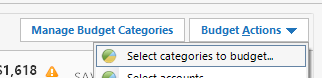
    No change after following suggested process, except now my budget window no longer displays Income categories. I only see expense categories. I checked the managed budget categories selection menu, and the income categories I need are selected for display, but they don't display in Budget window. This mess is getting out of hand. Don't care about roll over balances anymore. Now I need to get my Income categories to display in my Budget window. Any help?