Quicken fails to access accounts from Northwestern Mutual Inv Svs-NFIS

I have been using Quicken since the early 1990s. I have never been so frustrated and disappointed until the last 6 months or so. It seems that about every month I have to reestablish the Direct Connect to my brokerage accounts and it never works on the first, second, third, or more attempts. Usually, I have to work on it for hours without any success and later come back and do it again and again. I wish they would at least post something with the steps needed to get this access cleared and reset. At this point it would be faster to just go back the way it worked back in the 1990-2000-2010s and just make all transaction manually. Or maybe it is time to dump Quicken and get an application that actually works.

Aside from complaining about this crapping interface that offers no real help when it fails, I do have a question. Specifically for Northwestern Mutual Brokerage accounts, I am pretty sure that in order to get to the proper web page for Northwestern Mutual access, I need to have a web link to some URL other than NorthwesternMutual.com to sign in. But that is the address it gives when you try to add a new Northwestern account. Can anyone tell me what the web address is to get the correct page to login to Northwestern Mutual Investment Services for the access for Quicken accounts?

Thirty years down the tubes because Quicken added this account access process.

Answers

  • NotACPA
    NotACPA Quicken Windows Subscription SuperUser ✭✭✭✭✭

    The complete URL as actually used is longer than what's displayed. Per FIDIR.TXT, where Q stores the actual URL's to use for Participating Financial Institutions is:

    Northwestern Mutual Inv Svs-NMIS https://www.northwesternmutual.com/northwestern-mutual-investment-services-llc/ 1-866-950-4644 https://www.northwesternmutual.com/northwestern-mutual-investment-services-llc/ ACTIVE INVESTMENT,ACCOUNTINFO&DIRECT

    IF that's not correct, only the financial institution can tell Intuit (Q's agent for connectivity) what to change it to.

    Also, in what way does it not work? Are you getting any error codes or messages?

    Q user since February, 1990. DOS Version 4
    Now running Quicken Windows Subscription, Business & Personal
    Retired "Certified Information Systems Auditor" & Bank Audit VP

  • NotACPA
    NotACPA Quicken Windows Subscription SuperUser ✭✭✭✭✭

    Also, see this thread. It's in a Mac forum, but might be applicable.

    https://community.quicken.com/discussion/7971254/quicken-connection-to-northwestern-mutual-investment-services-down#latest

    Q user since February, 1990. DOS Version 4
    Now running Quicken Windows Subscription, Business & Personal
    Retired "Certified Information Systems Auditor" & Bank Audit VP

  • styerr
    styerr Quicken Windows Other Member

    The URL above finally got the Northwestern connection authorized at least for a day. Now my Fidelity connections are all broken again. And then all the sudden all of my online connections are requiring re-authorization. THIS PRODUCT IS UNUSEABLE!!!! Going through this reauthorization everytime I try to update my transactions is horrible. Can we get a version of Quicken from about 6-9 months ago before all this started to happen. How do I see and change the actual URL it is using? How to you clear the cache or buffer or whatever, when it gives a vague error and says try again later and it never works? The search function isn't helpful when you have no idea what it is actually trying to use. What a shame that after 30 years I have to switch to a product that actually works without the constant errors and hours of retrying.

  • styerr
    styerr Quicken Windows Other Member

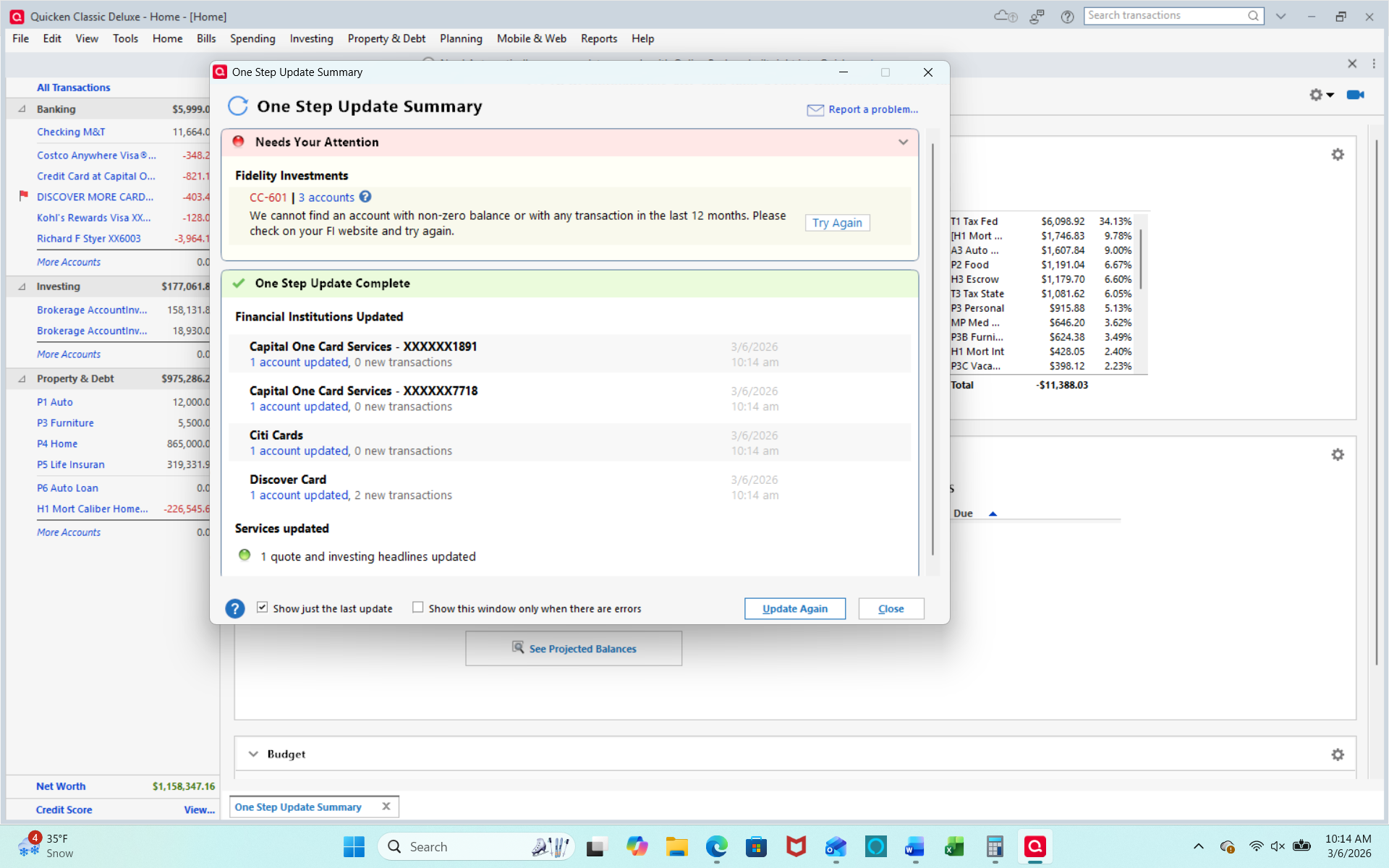
    I guess I have finally moved on to the next nightmare of this crappy product. I have been trying to get my Fidelity.com accounts authorized for access again. Now it allows to go all the way through the authorization by signing in on Fidelity.com, acknowledging the "Terms" page, and then selecting my FIdelity accounts, and doing the authorize. I then return to Quicken Classic and it does some processing after which it show my Fidelity account with options to "Add", "Link", or "Do Not add". I choose to link my accounts and it does more processing after which it gives me this error

    image.png

    I have five accounts with non-zero balances in Fidelity and I have recent transaction which have not been downloaded. How do I clear this cache or whatever it is that thinks my accounts do not need updates?