Classic delux for windows R66.12 How to remove acount re-authorize pop up
After successful reauthorization of my AmEx, the reminder to reauthorize keeps popping up when I do one-step updates. This adds an extra click to every update. How can I remove this pop-up?
Answers
-
When that comes up, are you clicking "Reauthorize" or "Remind me …"? What happens when you do such?
Have you clicked "Learn more" to see what's happening?
Q user since February, 1990. DOS Version 4
Now running Quicken Windows Subscription, Business & Personal
Retired "Certified Information Systems Auditor" & Bank Audit VP0 -
Hi @waltsgt3,
Thank you for reaching out and for providing the details. I’ll be happy to help you work through this.
Check for hidden American Express accounts
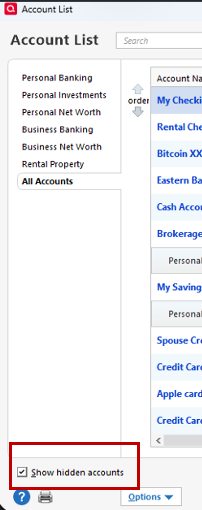
- First, let’s see if there are any old or hidden accounts connected to American Express (especially an account labeled “AM-EX, Corporate Card”):
- Go to "Tools."
- Open the "Account list."
- Click on "Show hidden accounts" at the bottom right (if you don’t see this option, there are no hidden accounts).
- Locate the account you’d like to review and click Edit.
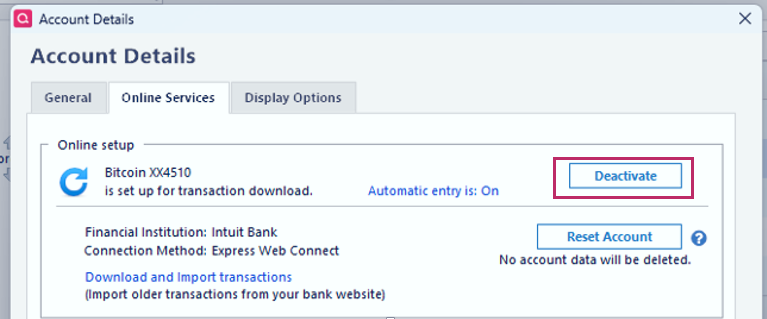
- In the Account Details window, click the Online Services tab.
- If the account is still connected and no longer needed, click Deactivate.
- Confirm by clicking Yes when prompted.
- Update your accounts. If the message is no longer displayed, this indicates that the problematic account is no longer connected or was connected correctly.
If there are no old or hidden accounts connected, please deactivate all currently connected American Express accounts:
Deactivate all Amex accounts
- Go to Tools > Account List.
- Select an Amex account and click Edit.
- Go to the Online Services tab.
- Click Deactivate, then confirm by selecting Yes.
- Repeat for each Amex account.
Reactivate accounts
Reactivate only the active accounts.- Go to Tools > Add Account.
- Search for and select your financial institution.
- If prompted, choose the appropriate connection method.
- Follow the on-screen instructions.
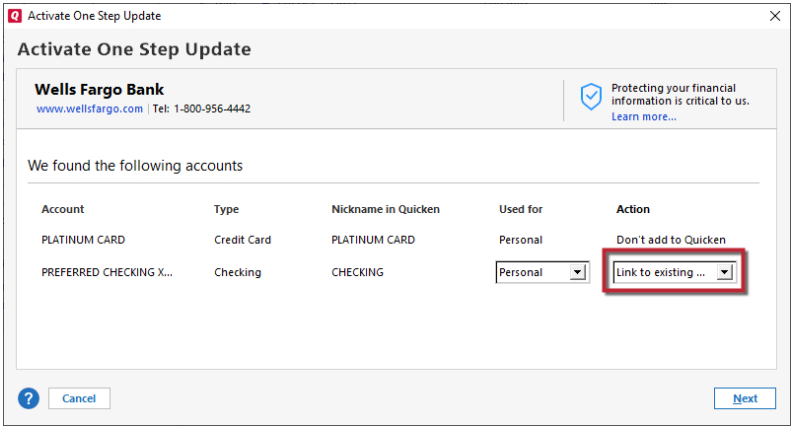
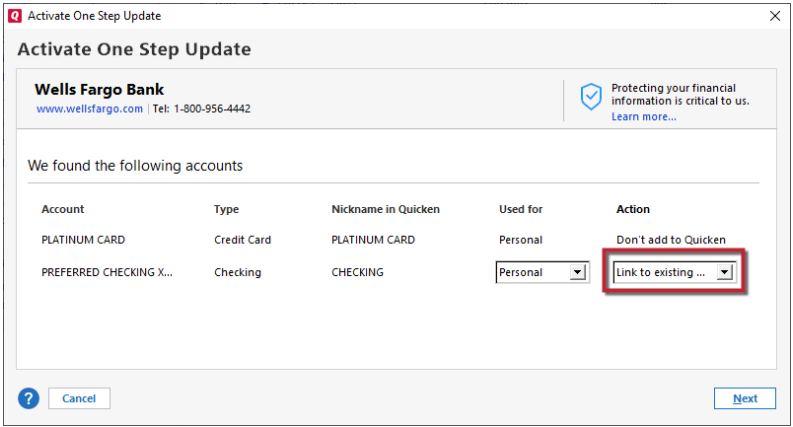
- When the list of found accounts appears, be sure to select Link to connect them to your existing accounts (do not add duplicates).
- Click Finish.
- After completing these steps, please run an update and let me know the results. I’ll be glad to assist further if needed.
Quicken Laura
Make sure to sign up for the email digest to see a round up of your top posts.
0 - First, let’s see if there are any old or hidden accounts connected to American Express (especially an account labeled “AM-EX, Corporate Card”):
-
This seems to have worked. Thanks!. However, I faild to select to "link to existing acount" and now I have duplicates. Is there a remedy for this?
0 -
You can move all of the transactions from the former account to the new … and then delete the former. Just watch out for duplicated transactions if any downloaded into both accounts.
OR, you can restore a very recent backup and repeat Laura's procedure. Just be aware that restoring from a backup will require that you re-connect EVERY account into which you download.
Q user since February, 1990. DOS Version 4
Now running Quicken Windows Subscription, Business & Personal
Retired "Certified Information Systems Auditor" & Bank Audit VP0 -
Hi @waltsgt3,
Thank you for coming back. I'm glad to hear that it worked!
You can definitely delete the duplicate account with the steps below (be sure to create a backup first):
- Open the duplicate account (the one you would like to remove).
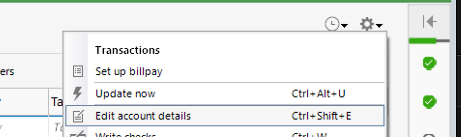
- Click the Gear icon in the upper-right corner.
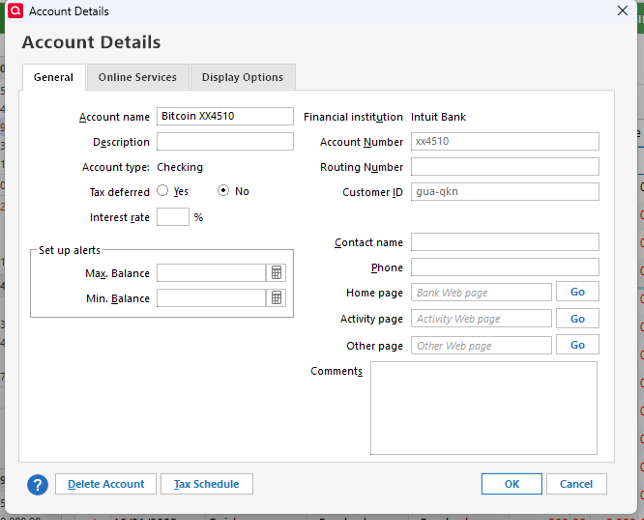
- Select Edit Account Details.
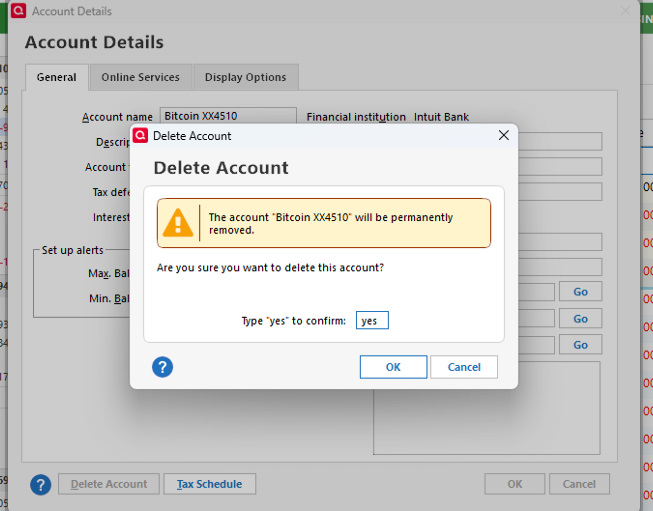
- Click Delete Account in the lower-left corner.
- Type Yes to confirm the deletion.
- Click OK.
After removing the duplicate, please reconnect the correct account:
- Go to Tools > Add Account
- Search for and select your financial institution.
- If prompted, choose the appropriate connection method.
- Follow the on-screen instructions.
- When the list of found accounts appears, be sure to select Link to connect them to your existing account (please avoid selecting Add, as this would create another duplicate).
6. Then click Next > Finish.
I hope this helps!
Quicken Laura
Make sure to sign up for the email digest to see a round up of your top posts.
0
Categories
- All Categories
- 58 Product Ideas
- 34 Announcements
- 238 Alerts, Online Banking & Known Product Issues
- 19 Product Alerts
- 511 Welcome to the Community!
- 678 Before you Buy
- 1.4K Product Ideas
- 55.2K Quicken Classic for Windows
- 16.7K Quicken Classic for Mac
- 1K Quicken Mobile
- 828 Quicken on the Web
- 123 Quicken LifeHub