Weird stuff with Register Entries Disappearing

Sborke
Sborke Quicken Windows Subscription Member

I use Quicken Classic Deluxe subscription on a PC. I enter all transactions and reconcile my accounts manually. I never update by downloading from my bank or other accounts.

Last month, my reconciliation was off, and I couldn't find out why. This month, at least two transactions that I entered manually aren't showing on the register. However, when I search for them, they show up in the search.

I've never had this problem before, and I've used Quicken since the 1980s.

Comments

  • Chris_QPW
    Chris_QPW Quicken Windows Subscription Member ✭✭✭✭

    Check to see if your register is sorted by date (click on the date column to sort one way and then again to reverse that sort if needed).

    Signature:
    This is my website (ImportQIF is free to use):

    http://www.quicknperlwiz.com/

  • volvogirl
    volvogirl Quicken Windows Other SuperUser ✭✭✭✭✭

    If you can't find the transactions in your register they may have gotten sorted in another place. LIke at the beginng of the year it's easy to enter a transaction with the wrong year on it so a Jan 12, 2026 transaction might be entered as Jan 12, 2025 or a Dec 2025 entry might get entered as Dec 2026 .

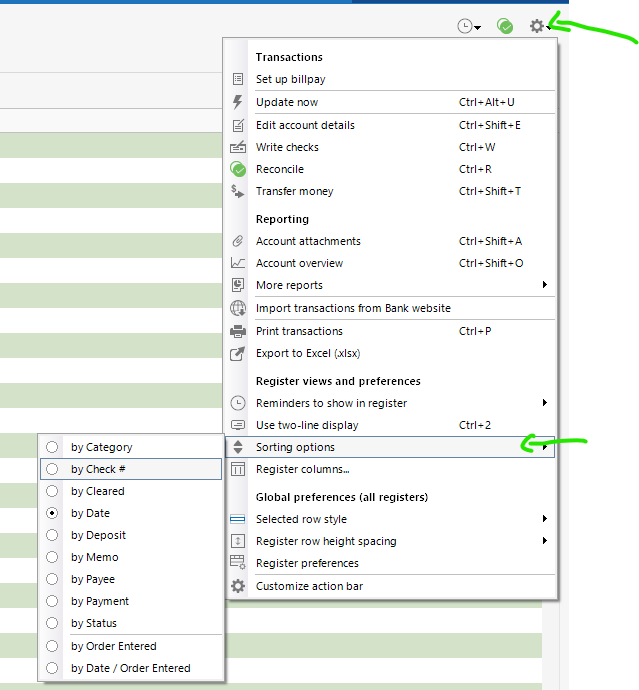
    You can sort by Order Entered, which is handy when doing a lot of entries. While in a register, click on "Account Actions", select "Sorting Options", select "by order entered". Or for earlier versions click Options at the top of the register on the right side. If you sort by anything other than the Date column you might not get a true running balance. So after you sort and look around be sure to sort it back by the Date.

    I'm staying on Quicken 2013 Premier for Windows.

  • Chris_QPW
    Chris_QPW Quicken Windows Subscription Member ✭✭✭✭

    Also make sure you don't have any filters on (Click the triangle in front of Filters so that it is pointing down and make sure the three fields are "All Dates", "Any Type", and "All Transactions").

    And here is where you can select sorting as a different way than selecting the column header.

    image.png

    Signature:
    This is my website (ImportQIF is free to use):

    http://www.quicknperlwiz.com/