Sync Issue

Rick Milton
Rick Milton Quicken Windows Subscription Member ✭✭✭
edited February 25 in Using the Mobile App

I have had this issue before and it's reappearing:

I'm having problems with Quicken and syncing. I've changed some scheduled transactions and when I sync, the old schedule comes back after I sync. It appears that the scheduled transactions are coming back from the cloud sync, instead of updating the cloud with the new scheduled transactions.

Hopefully I'm making sense with this.

I've changed the splits in both Quicken AND online and saved them. I've reset the cloud data, and it is still there!

I don't know if I'm not accessing the data correctly — I've gone into my calendar and clicked on the transaction and then into the splits that I wanted to change. I've also gone into the memorized transaction to make sure that THIS is also saved correctly, but it SEEMS to pull from the calendar data, not the memorized transaction. This is a weekly scheduled transaction and just is plainly screwed up and keeps coming back after I sync!

HELP!

Rick

[Edited-Readability]

Comments

  • Quicken Alyssa
    Quicken Alyssa Quicken Windows Subscription Moderator mod

    Hello @Rick Milton,

    Thank you for sharing your experience and reporting the issue you are running into with the cloud sync.

    Let's try resetting your Quicken cloud to resolve this issue.

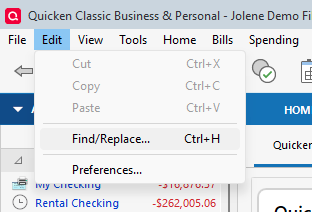
    1. Go to Edit.
    2. Select Preferences. Screenshot 2026-02-25 at 12.41.52 PM.png
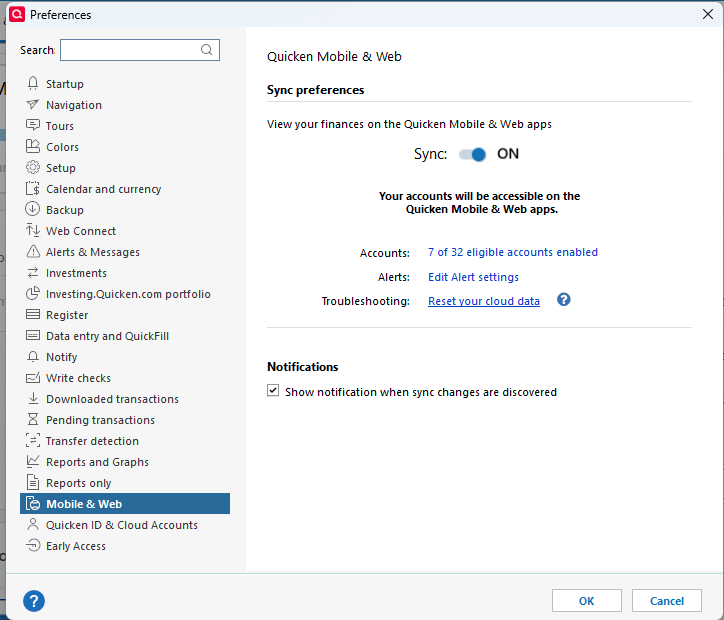
    3. In the left pane, select Mobile & Web.
    4. In the right pane, under Quicken Mobile & Web, click Reset your cloud data. Screenshot 2026-02-25 at 12.42.36 PM.png
    5. In the Reset Your Cloud Data dialog, type yes, and then click Reset to confirm the reset.

    Let us know if the issue persists after doing this.

    Thanks again!

    Quicken Alyssa

    Make sure to sign up for the email digest to see a round up of your top posts.

  • Rick Milton
    Rick Milton Quicken Windows Subscription Member ✭✭✭

    I can't see where my reply was posted, so I apologize if it posts twice.

    I must not have made myself clear, but I have already done the above reset. When I go in and look at the scheduled transaction online (cloud) it's not correct, so I change it as well as change it in my Windows version of Quicken. I'm not sure how it gets screwed up, but when I go back in and sync again, both the places (cloud and Windows version) both have the same mistakes again — it's has to do with the memo line - I've changed some of the memos on the schedule transaction, but it keeps replacing the what I want with what was there before.

    I've also noticed that it screws up the categories the bottom line of the deposit is correct, but the category amounts do not correspond correctly — it's my paycheck, so I do the same deposit each week, but one week the fed withholding is one figure and the next week it's another figure — and the figure that SHOULD be for fed withholding is now recorded for state withholding! Each of the categories is correct each week, it's the figures and the memos are changing by the sync, but the bottom line of the deposit is correct each week! It's madding as I have to go back and check each week and change the figures in my Windows version of Quicken!

    It ONLY happens if I sync, which I need to do because I can't have Quicken on two computers like I'd like (home and office).

  • Rick Milton
    Rick Milton Quicken Windows Subscription Member ✭✭✭

    I also see that THIS reply didn't post!

    I went ahead and made sure that everything was correct in Windows Quicken and then did another rest of the cloud data (not doing a sync before uploading) and when it was done, I checked the cloud. All the amounts and categories were correct, but the memos were incorrect! If I did a reset, everything should have been what I had in my Windows Quicken, exactly, but the memos were all screwed up!

  • Rick Milton
    Rick Milton Quicken Windows Subscription Member ✭✭✭

    UPDATE

    I deleted the scheduled transaction and reentered it. SO FAR it seems to have taken care of the problem…….stay tuned!

    Rick